Sakura Rental Server Review [2025 Latest]: Is It Scary or Slow? Pricing, Pros, and Cons for Personal and Business Use
さくらのレンタルサーバ
 is a long-established rental hosting service with more than 560,000 users.It is operated by Sakura Internet, the first domestic company to join the Japanese government cloud.

The reasons I recommend さくらのレンタルサーバ
to people looking for an affordable server, as well as companies and sole proprietors are:
- the reassurance of being run by the first domestic company to join the government cloud
- a large number of corporate users
- high-function, large-capacity email services
These are the reasons. There is a strong chance you will be satisfied. You can try it free for 14 days.
A competing service is LOLIPOP
 . With a long-term contract, it can be used at a lower price than さくらのレンタルサーバ
. It is worth considering alongside Sakura.
. With a long-term contract, it can be used at a lower price than さくらのレンタルサーバ
. It is worth considering alongside Sakura.
★ Lolipop! Review [2025 Latest]: What the Speed Tests Revealed, Plus the Pros and Cons
| Server type | Shared hosting |
| Display speed (TTFB) | 440ms |
| Recommended plan and term | Standard 12 months |
| Trial / refund guarantee | 14-day free trial |
| Monthly price (12-month contract) | 550 yen |
| Initial setup fee | Free |
| Free domain | None |
| Support | Business hours: 10:00-18:00 Phone callback reservations, chat, and email (reply the same day or by the next business day) |
| Uptime | 99.99% |
| Server storage | 300GB |
| Number of databases | Unlimited |
| Security measures | Website tampering alerts (paid), WAF, overseas IP address filtering, anti-relay abuse measures, and encryption |
| SSL | Free shared SSL, custom SSL |
| Backup / restore | 8 backup generations included free, free restoration |
| Number of email accounts | Unlimited |
| Email security measures | POP3, IMAP4, virus scanning, basic spam filtering, high-accuracy spam filtering |
| WordPress preinstall | None |
| Server / website migration service | None |
| CDN | 100GB/month free |

There are rumors that "Sakura Rental Server is scary," but there is no need to worry about that now.I have used it myself and have never once felt it was scary, and customer feedback about support is generally positive.
It is a high-quality server with a solid operational foundation that you can use with confidence.
How Sakura Rental Server compares with competitors
- Overallrating ★★★★☆
- Server speed ★★☆☆☆
- Pricing ★★★★☆
- Stability ★★★★★
- Ease of starting WordPress* ★★★★☆
- Domain management and SSL setup* ★★★★☆
* These scores reflect my hands-on experience using the service.

- Market-research data as of November 4, 2025, sorted by speed
- Monthly prices are the first-year cost of the cheapest plan that supports WordPress
- Speed is the Time to First Byte measured on demo sites under the same conditions
| Hosting service (plan) | Speed | Monthly price | WordPress preinstalled | Uptime | Support (hours) |
|---|---|---|---|---|---|
| Average and recommended | 222.2ms | 1,109 yen | Yes | 99.99% or higher | 24/7 or better |
| Kinsta
| 30ms | $30 (4,525 yen) | Yes | 99.9% | Chat (Japanese support, 24/7) and email |
【Hostinger】
 (Premium) (Premium) | 31ms | 439 yen | No | 99.9% | Chat (24/7) |
XServerビジネス
 (Shared) (Shared) | 40ms | 2,926 yen | Yes | 99.99% | Phone and email (weekdays 10:00-18:00) |
wpX Speed
 (W1) (W1) | 40ms | 1,320 yen | No | Undisclosed | Phone and email (10:00-18:00) |
| LOLIPOP
(Light) | 80ms | 495 yen | Yes | 99.99% | Email and chat (weekdays 10:00-18:00) |
スターレンタルサーバー
 (Free) (Free) | 90ms | 418 yen | No | Undisclosed | No |
| Rakko Server(RK1) | 120ms | 440 yen | Yes | Undisclosed | Email (weekdays 10:00-19:00) |
エックスサーバー
 (Standard) (Standard) | 130ms | 770 yen | Yes | 99.99% | Phone, email, and chat (weekdays 10:00-18:00) |
mixhost
 (Light) (Light) | 150ms | 594 yen | Yes | 99.99% | Email (weekdays 10:00-18:00) |
ConoHa WING
 (Basic) (Basic) | 160ms | 941 yen | Yes | 99.99% | Phone, email, and chat (weekdays 10:00-18:00) |
ColorfulBox
 (BOX1) (BOX1) | 190ms | 383 yen | Yes | Undisclosed | Phone (accepted 24/7), chat, LINE, and email (weekdays 09:30-12:00, 13:00-17:30) |
シンレンタルサーバー
 (Basic) (Basic) | 200ms | 985 yen | Yes | Undisclosed | Phone and email (10:00-18:00) |
リトルサーバー
 (Mini) (Mini) | 200ms | 165 yen | No | Undisclosed | Email (business hours undisclosed) |
Core Server
 (MINI) (MINI) | 210ms | 264 yen | Yes | Undisclosed | Email and chat (10:00-12:00, 13:00-17:00) |
| DreamHost(WordPress Starter) | 400ms | $2.99 (461 yen) | No | 100% | Chat (24/7), email, and phone callback |
| Bluehost(Basic) | 420ms | $4.99 (769 yen) | No | 100% | Chat (24/7) |
| さくらのレンタルサーバ
(Standard) | 440ms | 550 yen | No | 99.99% | Chat, email, phone, and callback reservations (10:00-18:00) |
| Namecheap(EasyWP Supersonic) | 440ms | $9.88 (1,523 yen) | No | 99.9% | Chat (24/7) |
| Shin Free Server | N/A | Free | No | Undisclosed | No |
XREA
 (Free) (Free) | N/A | Free | No | Undisclosed | No |
Value Server
 (Eco) (Eco) | N/A | 220 yen | No | Undisclosed | Email and chat (weekdays 10:00-17:00) |
| KAGOYA JAPAN(Grade 1) | N/A | 440 yen | Yes | 99.999% | Phone and email (weekdays 10:00-17:00) |
| SiteGround(StartUp) | N/A | $3.99 (615 yen) | No | 99.99% | Chat (24/7), email, and phone |
| Hostgator(Baby) | N/A | $4.45 (686 yen) | No | 99.9% | Phone and chat (24/7) |
| IONOS(Start) | N/A | $1.00 (154 yen) | No | 99.98% | Phone, email, and chat (24/7) |
onamae.com Rental Server
 | N/A | 2,398 yen | No | 99.99% | Phone, email, and chat (weekdays 10:00-18:00) |
ABLENET RentalServer
 (Light) (Light) | N/A | 830 yen | No | 99.99% | Email (business hours undisclosed) |
| Godaddy(Basic) | N/A | 899 yen | Yes | 99.9% | Chat (24/7) and phone (weekdays 10:00-17:00) |
iCLUSTA+ byGMO
 (Mini) (Mini) | N/A | 1,027 yen | No | 100% | Phone (weekdays 10:00-18:00) Email support is available 24/7/365 |
ムームーサーバー
 | N/A | 1,430 yen | No | 99.99% | Email and chat (9:30-13:00, 14:00-17:30) |
WADAX
 (WP Standard) (WP Standard) | N/A | 2,200 yen | No | 99.9% | Weekdays 09:00-22:00, weekends 09:00-18:00 |
| WebARENA SuiteX | N/A | 1,997 yen | No | 100% | Email and chat (weekdays 09:30-17:00) |
heteml
 | N/A | 2,035 yen | No | 99.99% | Phone and email (weekdays 10:00-18:00) |
CPI
 (Shared) (Shared) | N/A | 4,840 yen | No | 100% | Phone and email (weekdays 10:00-18:00) |
"さくらのレンタルサーバ
"is a long-established hosting service with more than 480,000 accounts in use. It was once said to be slow, but its platform has now been renewed and sped up. Even so, the affordable pricing has remained unchanged, and the value for money is excellent.
- Six key strengths of Sakura Rental Server
- A downside is that you cannot move down to a lower plan
- There is no need to worry anymore about claims that Sakura Rental Server is scary
- Comparing Sakura Rental Server with two competing services
- Five steps to start a WordPress website on Sakura Rental Server right now
- How to cancel Sakura Rental Server
- Questions related to Sakura Rental Server
- Summary
Six Key Strengths of Sakura Rental Server

The Response Time Is Slow, but the PageSpeed Insights Results Are Good
Our own testing on this site showed that Sakura Rental Server delivered good PageSpeed Insights results. However, the server response time itself was not very good.
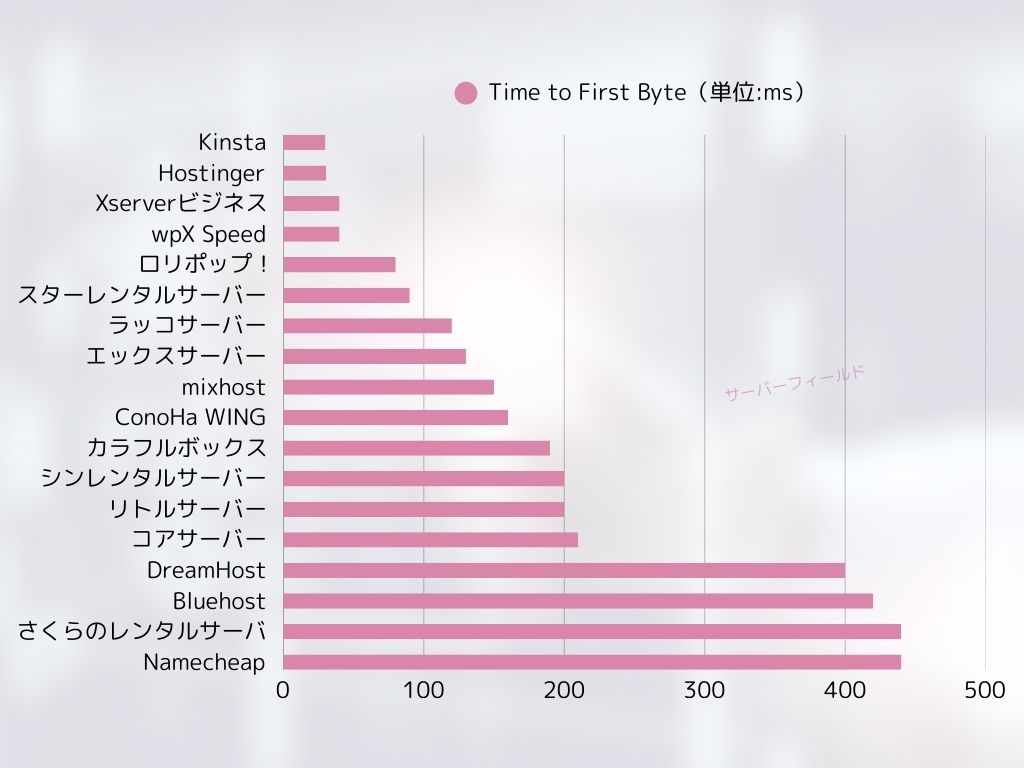
It is true that its TTFB is slower than that of many competitors, but the PageSpeed Insights results are not poor.Although the initial server response is not strong, the later-stage processing appears to be fast, which likely helped its PageSpeed Insights results.
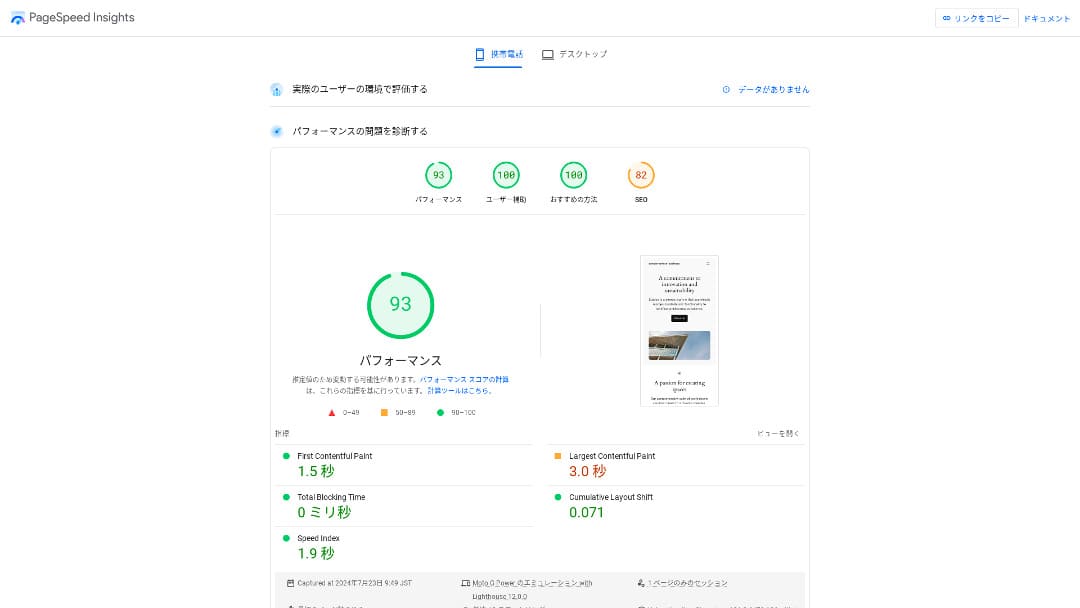
So there is no need to worry that it will be extremely slow in actual use.
★ Speed-tested: A comparison of 15 hosting services ranked by speed
The Pricing Is Affordable
さくらのレンタルサーバ
offersmonthly pricing that is affordable even compared with other providers, making it easy to start a website.The comparison below uses the following conditions.
- Initial setup fee
- 12-month server contract
- One year of domain costs
- The lowest-priced plan that supports WordPress
| Hosting provider | Total cost for one year |
|---|---|
| Sakura Rental Server | 6,600 yen |
| ConoHa WING | 11,292 yen |
| Xserver | 10,560 yen |
| Lolipop! | 5,940 yen |
| heteml | 24,420 yen |
Lolipop! is cheaper, but the features and specs of Sakura's Standard plan are stronger than Lolipop!'s.
Also, because Sakura Domain is a little expensive, you can reduce costs by using a cheaper domain service from another provider.
Stable 99.99% Uptime
さくらのレンタルサーバ
offers very stable service with 99.99% uptime.Its servers are operated in-house and monitored 24 hours a day, 365 days a year.
★ A beginner's guide to hosting uptime and SLAs
During the 2018 Hokkaido Eastern Iburi earthquake, the Ishikari data center lost external power, but Sakura kept operating on emergency power for 60 hours.It even made it through a large-scale disaster that caused a blackout across all of Hokkaido, which speaks volumes about its stability. That gives you real peace of mind about how stable it is.
The company's communication at that time was also excellent. In addition to delivering the latest information, it continued posting updates every six hours even when there was no major change. It feels like a company you can trust with important data.
A Free CDN That Helps Websites Load Quickly
さくらのレンタルサーバ
offers a CDN for free. This is a feature that helps your website load faster.
★ What is a CDN? Improve speed and performance with distributed servers
Using a CDN helps your website appear more quickly, and even when traffic surges it makes it easier to avoid situations where a 503 error prevents the site from being viewed. Because fast page delivery also affects website traffic, having a free CDN available is genuinely valuable.
★ What is a 503 error? Web congestion, prevention measures, and emergency responses
The free CDN allowance is also generous at 100 GB per month on the Standard plan, so it is unlikely to be insufficient for individual use. After you exceed the free allowance, it costs 5 yen per GB.
Strong Backup Features
さくらのレンタルサーバ
has excellent backup features.You can use a feature called "Snapshots" to create backups and restore data.You can keep up to eight backups, which is generous.
It is also easy to use.
- From the control panel, go to "Website/Data" and then "Backup"
- Click "Start using Backup & Staging".
- Click "Create backup" and wait for the status to change
When the status changes to "Completed successfully," the backup is finished.
From the same screen, you can also create backup schedules and restore data. It is very easy to use.
Use Leftover Capacity Effectively with Sakura Pocket
When people rent hosting, they often choose more capacity than they immediately need.さくらのレンタルサーバ
offers a way to use leftover storage effectively instead of wasting itthrough a feature called Sakura Pocket. You can use it much like Google Drive or Dropbox.
Whether for businesses or individuals, using cloud storage has become the norm. It helps save space on PCs and smartphones. That said, the amount of storage available in the free plans of Google Drive and Dropbox is not especially large.
But Sakura Rental Server users can make use of their unused capacity through Sakura Pocket, which helps reduce the cost of paying for another cloud storage service.
A Drawback: You Cannot Move Down to a Lower Plan

さくらのレンタルサーバ
does not let you change to a lower plan.If you end up with more capacity than you need, that is wasteful.
That is why it is best to sign up for a lower plan first and scale up only if necessary.
If you want to create a website, choose the Standard plan. The Light plan does not support WordPress. It offers enough capacity not only for individuals but also for many business users.
However, keep in mind that you cannot migrate from shared hosting plans such as Light or Standard to the managed server (dedicated server) plans.
★ What is hosting? The server you need to publish a website
The Business Plan Offers Good Value for SMEs and Corporate Users
「さくらのレンタルサーバ
」is the shared hosting service from Sakura Internet Co., Ltd., which also offers managed servers. It balances performance, service quality, and price well, making it a strong option for many businesses. The included free CDN quota varies by plan and helps deliver smooth communication.
| Server type | Shared hosting / managed server |
| Monthly price (12-month contract) | 2,420 yen* |
| Initial setup fee | Free |
| .jp domain | Registration 3,982 yen / Renewal 3,982 yen |
| Support | Weekdays 10:00-18:00 Callback reservations available |
| Uptime | 99.99% guaranteed |
| Server storage | 600GB* |
| Security measures | WAF / Website tampering detection / Overseas IP filtering |
| SSL | Free SSL / shared SSL / Gehirn MCA OV / domain-validated wildcard / domain-validated / RapidSSL |
| Backup / restore | 8 backup generations / free restoration |
| Number of email accounts | Unlimited |
| Email security measures | basic spam filter / high-accuracy spam filter / SPF/DKIM/DMARC support |
| Server / website migration service | No migration agency service No migration tool |
| Easy WordPress install | Yes |
| CDN | 300GB/month free* |
さくらのレンタルサーバ
also offers business-focused plans under for Biz.Compared with other business-oriented hosting services, its pricing sits in the middle range and offers strong value for money.
The Business plan starts at 2,420 yen per month on a 12-month contract and includes the specifications companies need for day-to-day operations.
- Free CDN acceleration (up to 300 GB per month)
- Management by multiple users
- A dedicated IP address that is not affected by other companies' traffic (Business Pro and above)
If you are looking for hosting for an SME or a corporation, it is highly recommended.
There Is No Longer Any Need to Worry That "Sakura Rental Server Is Scary"
The idea that "Sakura Rental Server is scary" began when someone who had been using the older dedicated server service more than ten years ago claimed on an information site that they had received an insincere response. It did not originally come from the current Sakura Rental Server service.
Sakura Rental Server published this statement in 2019 and has tried to respond sincerely. Because the complaint concerned the old dedicated server service, not Sakura Rental Server, 「About a post on a technical information sharing site regarding our server services」the current Sakura Rental Server can be used with confidence.There is no need to worry anymore.
Comparing Sakura Rental Server with Two Competing Services
Here we compare Sakura Rental Server with two competing hosting services. As with Sakura, we will compare providers that offer lower-priced plans.
Lolipop!
LOLIPOP
can be used at a lower price than Sakura Rental Server. However, Lolipop!'s Light plan is inferior to Sakura Rental Server's Standard plan in both features and support.
- No backup feature (requires a paid option)
- No phone support
- Email support can take up to 48 hours, which is somewhat slow
Compare these three points together with the price, and you can decide whether Lolipop! or Sakura Rental Server fits you better.
| Comparison item | さくらのレンタルサーバ
| LOLIPOP
|
|---|---|---|
| Main feature | Effective use of server capacity | Good value for money |
| Trial / refund guarantee | 14-day free trial | 10-day free trial |
| Uptime | 99.99% | 99.99% |
| Storage | 300GB | 350GB |
| First-year hosting cost | 6,600 yen | 5,940 yen |

Star Rental Server
スターレンタルサーバー
is also a hosting service popular for its lower price range. However, Star Rental Server's Light plan is inferior to Sakura Rental Server's Standard plan in both features and support.
- No backup feature (must be handled with WordPress plugins)
- No phone support
- You can create only one WordPress website
- You cannot use an advanced WAF security feature
Compare these four points with the pricing before choosing between them.
| Comparison item | さくらのレンタルサーバ
| スターレンタルサーバー
|
|---|---|---|
| Main feature | Effective use of server capacity | Low pricing |
| Trial / refund guarantee | 14-day free trial | 14-day free trial |
| Uptime | 99.99% | Undisclosed |
| Storage | 300GB | 160GB |
| First-year hosting cost | 6,600 yen | 4,686 yen |

Five Steps to Start a WordPress Website on Sakura Rental Server Right Now
- STEP.1Go to the official site
Click "Try it free for 14 days."
- STEP.2Sign up for the server
Choose a plan. The Standard plan is recommended because it supports WordPress.
You can leave the initial domain as it is. This domain will not be used as your public website address. It can be used, but it is better to get your own domain.
★ What Is a Domain? Its Role as an Address on the Internet and How to Get One
If you select "Also acquire a custom domain," it becomes easier to start WordPress right away.
Enter the string you want and apply for the domain. If it is available, enter the registrant information. One year is enough for the registration term. Then click "Choose payment method."
Complete member verification and register as a new user.
Enter your email address, review the privacy statement, and click "Send the registration guidance email."
A registration email will arrive. Open the URL in that email and continue to enter your member information.
Enter your name, address, and other required information, and set a member password.This password is important because it is used to log in to the member menu, so be sure to write it down.
For Sakura user communications, it is fine to choose "Do not receive."
Review everything you entered. If there is no problem, click "Register as a member."
Choose your payment method. Select the contract term and how you want to pay. Credit card payment is recommended because you can start building your WordPress website immediately. It also automatically converts to a paid contract after the trial ends, which saves you extra steps. After choosing the contract term, click "Review application details."
Review the full application details. Check the terms, tick "I agree," and proceed by clicking "Apply with this information."
When you receive the temporary registration completion email, the provisional server contract is complete.
- STEP.3Install WordPress
Log in to the Sakura Rental Server control panel.
- Domain name: The initial domain you registered when signing up for the server.
- Password: The password you set when signing up for the server.
After logging in, click "Install WordPress," choose the URL where you want to install it, and select the custom domain you acquired when signing up for the server.
Enter the database information for WordPress. Since there is no database yet at this stage, click "Create database."
- Database name: Anything is fine
- Database connection password: Make it as complex as possible
Next, enter the information for your WordPress site.
- Site title: Anything is fine. You can easily change it later.
- WordPress username: Anything is fine. However, changing it later is troublesome.
- WordPress password: Make it as complex as possible. You can change it later.
- Email address: Use the email address you normally use. For businesses, it is best to use the company email address of the person managing the website.
- Search engine visibility: Check it if you want to publish the site immediately. Leave it unchecked if you want to publish after the website is finished. You can change this easily later.
Review the license and terms of use, check "Agree," and click "Create."
The username and password will be used to log in to WordPress. Be sure to write them down.
When installation is complete, click the admin URL shown on the screen and log in.
- STEP.4Initial WordPress setup
On the WordPress login screen, enter the username and password you set during installation and click "Log in."
If you see a warning saying the site cannot be reached, the DNS settings have not propagated yet. In that case, the only thing to do is wait and try logging in again every few hours.
★ What Are DNS and Nameservers?
After logging in to WordPress, set the permalinks. In the WordPress admin, go to "Settings" and then "Permalinks." Choose "Post name" and then click "Save changes."
With "Post name," you can enter the URL slug you want when publishing an article. It is best to use a short string that reflects the article content so readers can understand it easily. If it is too long, some people may worry that the site is suspicious.
- STEP.5Install plugins
Return to the WordPress admin area, go to "Plugins" and then "Add New," and install the plugins you need.
When you find the plugin you want by searching, click "Install Now" and then "Activate." After that, follow the instructions for each plugin.
Be sure to install security and backup plugins.
- Five WordPress security plugins and how to choose them
- Five powerful WordPress backup plugins that help you recover your data
Once the plugins are installed, your WordPress website is fully ready to go!
How to Cancel Sakura Rental Server
- STEP.1Log in to the member menu
Enter your member ID and password and log in.
- STEP.2List of contracted services
Click "List of contracted services" under Contract Information on the left side of the screen.
- STEP.3Cancel
Click "Cancel" under "Procedures" in "List of contracted services."
- STEP.4Review the important notes and submit the request
Important notes and warnings about cancellation will be displayed. Review them carefully. On the "Final confirmation of service cancellation" screen, click "Cancel service."
- STEP.5Cancellation request receipt email
Once the cancellation is completed, you will receive a cancellation request receipt email.
You can apply for cancellation at any time during the contract period. No matter when you apply, the service ends on the contract end date.
Be careful about the timing of credit card billing.Once the payment is processed, that billing period becomes valid and cannot be canceled. Check the billing schedule on the official site page, "I want to know this month's billing and procedure schedule."
If you want to cancel, it is best to apply as early as possible.
If You Are Switching Servers, Sign Up for the New One Before Canceling
If you want to cancel Sakura Rental Server because you are moving to another server, make sure you sign up for the new server and migrate your data before canceling. In other words, overlap the contract periods of Sakura Rental Server and the new server.
If you do not do this, there will be a period when your site cannot be displayed.
Questions Related to Sakura Rental Server
When Will Sakura Rental Server End?
"Sakura Dedicated Server" and "Sakura Dedicated Server High-Power Series" will end on June 30, 2026.
How Long Is the Free Trial for Sakura Rental Server?
The free trial period for Sakura Rental Server is two weeks. You can try any plan.
However, Sakura Managed Server does not have a trial period, so keep that in mind.
Where Are Sakura Internet's Servers Located?
"Sakura Dedicated Server PHY" has servers in Ishikari and Tokyo.
Summary
「さくらのレンタルサーバ
」is a long-established hosting service with more than 480,000 active accounts. It was once said to be slow, but it has now been sped up through server renewals. At the same time, the affordable pricing has remained in place, so the value for money is excellent.
さくらのレンタルサーバ
is an appealing hosting service that combines business-grade stability with low pricing.People once rumored that it was scary and slow, but there is really no need for that concern now.
It is a server you can use comfortably. Give it a try.
Complete comparison of 32 WordPress hosting services: recommendations for individuals, businesses, and overseas use

When you want to start with WordPress and search for "recommended WordPress hosting," you will find all kinds of articles, from personal-use servers and business options to overseas providers and low-cost services. To be honest,
- Which site should I rely on?
- I want to choose a server in a simple, easy-to-understand way!
- Show me how to start WordPress right away.
If that sounds familiar, this article is for you. It carefully selects the best options from 32 hosting services for individuals, businesses, and both domestic and overseas useand introduces them with clear explanations from the SEO lead at an app development company that uses hosting every day.