Namecheap Review and Setup Guide: Pricing, Speed, Support, and WordPress Compatibility
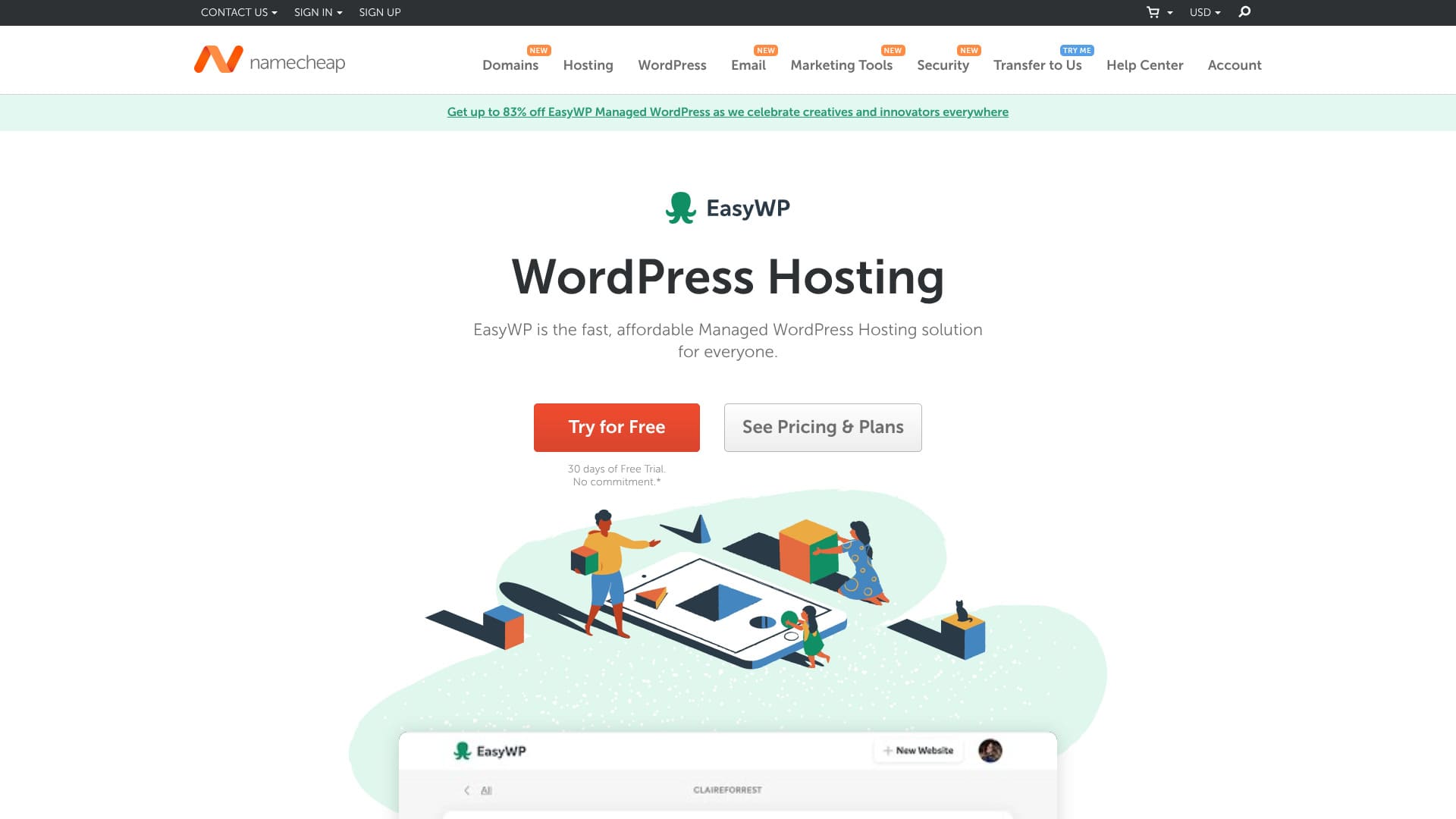
Namecheap is a domain registrar based in Phoenix, Arizona, USA. It also offers hosting. Despite its low price, both its quality and support are highly regarded. It has very few drawbacks, so I can recommend it to almost anyone.
| Server type | Shared hosting |
| Server response speed (TTFB) | 440ms |
| Recommended plan and term | EasyWP Starter, 1 year |
| Trial / money-back guarantee | 30-day money-back guarantee |
| Monthly fee (12-month plan) | $2.98 (437 yen) |
| Initial setup fee | Free |
| Free domain | None |
| Support | 24/7 chat |
| Uptime | 99.9% |
| Storage | 10GB |
| Number of databases | 1 |
| SSL | Free SSL |
| Backups | Yes |
| Email accounts | None |
| Email security measures | None |
| Server / website migration service | None |
| WordPress preinstall | None |
| CDN | Free |
| Data center locations | Phoenix, Arizona, USA; Timico, Midlands, UK; Amsterdam, Netherlands |

Namecheap's support was extremely polite and helpful. It felt like “the best support any hosting company has ever given me.”
It is the kind of server that makes you want to keep using it for a long time.
- Data based on market research conducted on November 4, 2025, sorted by speed
- The monthly fee is the first-year cost of the lowest-priced plan that can run WordPress
- Speed is the Time to First Byte value measured on demo sites under identical conditions
| Hosting server (plan) | Speed | Monthly fee | WordPress preinstalled | Uptime | Support (hours) |
|---|---|---|---|---|---|
| Average and recommended | 222.2ms | 1,109 yen | Yes | 99.99% or higher | 24/7 or more |
| Kinsta
| 30ms | $30 (4,525 yen) | Yes | 99.9% | Chat (Japanese support, 24/7) / Email |
【Hostinger】
 (Premium) (Premium) | 31ms | 439 yen | None | 99.9% | Chat (24/7) |
XServerビジネス
 (Shared Hosting) (Shared Hosting) | 40ms | 2,926 yen | Yes | 99.99% | Phone / Email (weekdays 10:00-18:00) |
wpX Speed
 (W1) (W1) | 40ms | 1,320 yen | None | Not disclosed | Phone / Email (10:00-18:00) |
LOLIPOP
 (Light) (Light) | 80ms | 495 yen | Yes | 99.99% | Email / Chat (weekdays 10:00-18:00) |
スターレンタルサーバー
 (Free) (Free) | 90ms | 418 yen | None | Not disclosed | None |
| Rakko Server(RK1) | 120ms | 440 yen | Yes | Not disclosed | Email (weekdays 10:00-19:00) |
エックスサーバー
 (Standard) (Standard) | 130ms | 770 yen | Yes | 99.99% | Phone / Email / Chat (weekdays 10:00-18:00) |
mixhost
 (Light) (Light) | 150ms | 594 yen | Yes | 99.99% | Email (weekdays 10:00-18:00) |
ConoHa WING
 (Basic) (Basic) | 160ms | 941 yen | Yes | 99.99% | Phone / Email / Chat (weekdays 10:00-18:00) |
ColorfulBox
 (BOX1) (BOX1) | 190ms | 383 yen | Yes | Not disclosed | Phone (accepted 24/7) / Chat / LINE / Email (weekdays 09:30-12:00, 13:00-17:30) |
シンレンタルサーバー
 (Basic) (Basic) | 200ms | 985 yen | Yes | Not disclosed | Phone / Email (10:00-18:00) |
リトルサーバー
 (Mini) (Mini) | 200ms | 165 yen | None | Not disclosed | Email (business hours not disclosed) |
CoreServer
 (MINI) (MINI) | 210ms | 264 yen | Yes | Not disclosed | Email / Chat (10:00-12:00, 13:00-17:00) |
| DreamHost(WordPress Starter) | 400ms | $2.99 (461 yen) | None | 100% | Chat (24/7) / Email / Phone callback |
| Bluehost(Basic) | 420ms | $4.99 (769 yen) | None | 100% | Chat (24/7) |
さくらのレンタルサーバ
 (Standard) (Standard) | 440ms | 550 yen | None | 99.99% | Chat / Email / Phone / callback reservation (10:00-18:00) |
| Namecheap(EasyWP Supersonic) | 440ms | $9.88 (1,523 yen) | None | 99.9% | Chat (24/7) |
| Shin Free Server | — | Free | None | Not disclosed | None |
XREA
 (Free) (Free) | — | Free | None | Not disclosed | None |
Value Server
 (Eco) (Eco) | — | 220 yen | None | Not disclosed | Email / Chat (weekdays 10:00-17:00) |
| KAGOYA JAPAN(Grade 1) | — | 440 yen | Yes | 99.999% | Phone / Email (weekdays 10:00-17:00) |
| SiteGround(StartUp) | — | $3.99 (615 yen) | None | 99.99% | Chat (24/7) / Email / Phone |
| Hostgator(Baby) | — | $4.45 (686 yen) | None | 99.9% | Phone / Chat (24/7) |
| IONOS(Start) | — | $1.00 (154 yen) | None | 99.98% | Phone / Email / Chat (24/7) |
onamae.com Rental Server
 | — | 2,398 yen | None | 99.99% | Phone / Email / Chat (weekdays 10:00-18:00) |
ABLENET RentalServer
 (Light) (Light) | — | 830 yen | None | 99.99% | Email (business hours not disclosed) |
| Godaddy(Basic) | — | 899 yen | Yes | 99.9% | Chat (24/7) / Phone (weekdays 10:00-17:00) |
iCLUSTA+ byGMO
 (Mini) (Mini) | — | 1,027 yen | None | 100% | Phone (weekdays 10:00-18:00) Email is available 24/7 |
ムームーサーバー
 | — | 1,430 yen | None | 99.99% | Email / Chat (9:30-13:00, 14:00-17:30) |
WADAX
 (WP Standard) (WP Standard) | — | 2,200 yen | None | 99.9% | Weekdays 09:00-22:00, weekends 09:00-18:00 |
| WebARENA SuiteX | — | 1,997 yen | None | 100% | Email / Chat (weekdays 09:30-17:00) |
heteml
 | — | 2,035 yen | None | 99.99% | Phone / Email (weekdays 10:00-18:00) |
CPI
 (Shared) (Shared) | — | 4,840 yen | None | 100% | Phone / Email (weekdays 10:00-18:00) |
Namecheap review and five features

Low server pricing
Namecheap has low hosting fees.
The lowest-priced EasyWP Starter plan starts at $1.24 per month for the first 12-month term. At the current exchange rate, that comes to 2,229 yen for the year. It is inexpensive.
Let's compare it with major Japanese hosting companies.
| Hosting company | Total cost for one year |
|---|---|
| Namecheap | 2,229 yen |
| ConoHa WING | 11,292 yen |
| Xserver | 10,560 yen |
| heteml | 24,420 yen |
| mixhost | 8,712 yen |
This comparison shows that Namecheap is cheaper than major Japanese hosting services. If you want to keep hosting costs as low as possible, it is a strong candidate.
WordPress speed was at a standard level
According to our site's own testing, Namecheap's server response time was 440 ms, which is a standard level.
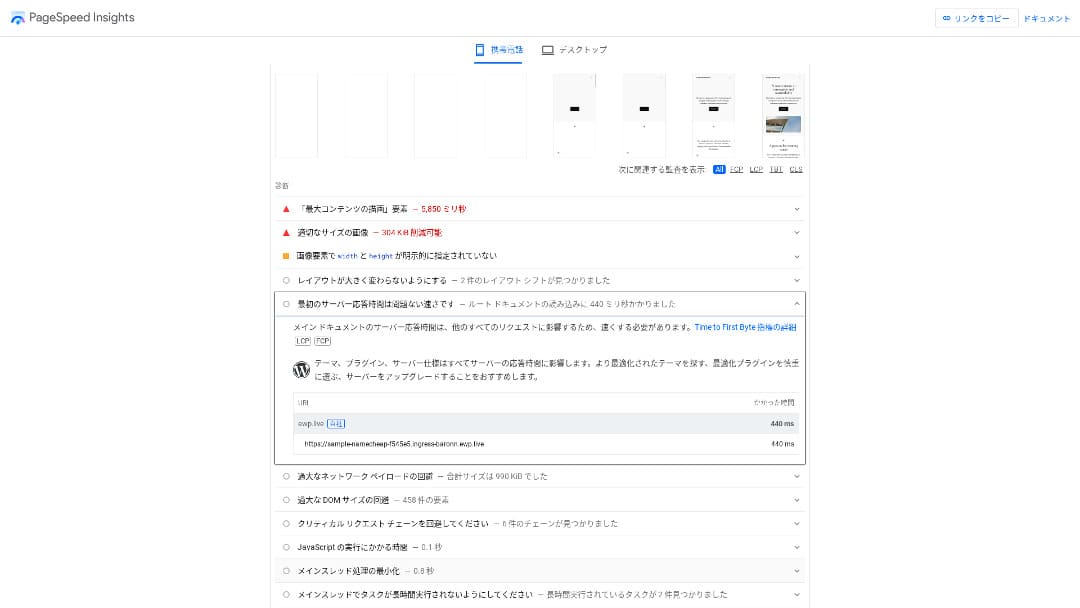
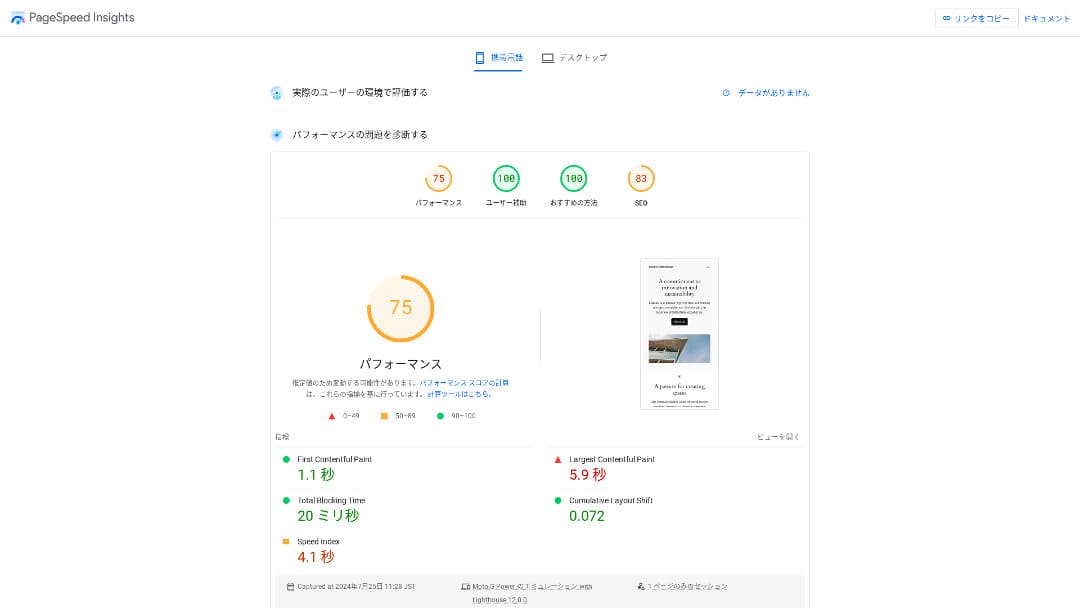
It is slower than high-speed servers in Japan. Out of 15 measured servers, it tied for 14th place.
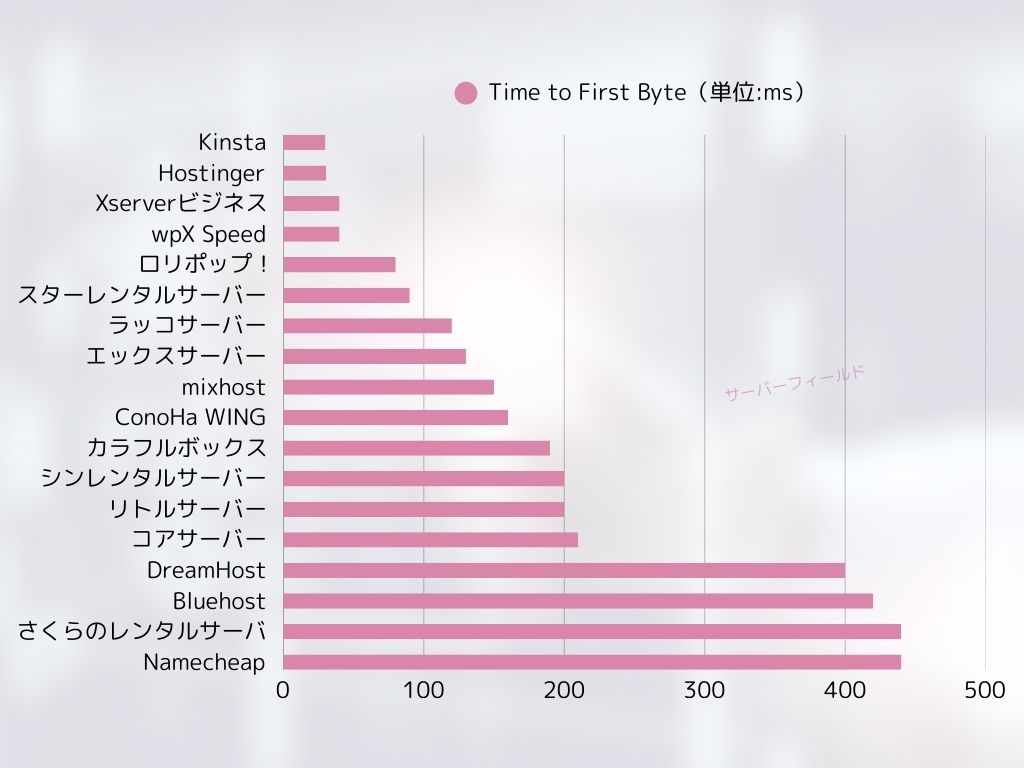
That may sound extremely slow. However, at 440 ms, it will not make a WordPress site feel unusably slow. As explained below, Namecheap also includes a CDN, so it can maintain standard-level speed anywhere in the world.
★ Is it fast? I compared hosting speed rankings across 15 rental servers
Its 24/7 support was extremely courteous
Namecheap offers 24/7 chat support. When I actually contacted them in chat, they responded with remarkable courtesy.
I contacted chat support because I could not delete my saved credit card details. I was connected to a staff member in about 30 seconds, and they removed the saved information for me.
Because I had not added any other payment method, deleting my credit card information effectively meant I would not continue using the service. Even so, they helped immediately instead of trying to talk me out of it, which impressed me.
The servers are stable with 99.9% uptime
Namecheap is very stable, with 99.9% uptime. Because the server is stable, websites are displayed reliably as well.
If a server is unstable, websites may fail to load or become slow. For affiliate sites and corporate websites, stable display performance directly affects revenue and credibility.
On this important point of stability, Namecheap's 99.9% uptime is high enough to feel reassuring.
For reference, the higher-tier EasyWP Supersonic plan improves uptime to 99.99%, making it even more stable.
★ A beginner's guide to hosting uptime and SLAs
You can use a global CDN for free
Namecheap lets you use a global CDN for free. With a CDN, your site loads quickly and consistently no matter where in the world your visitors are.
★ What is a CDN? Improve speed and performance with distributed servers
The drawback of Namecheap is that the cheapest plan allows only one WordPress install

One of Namecheap's few drawbacks is that the cheapest plan allows only one WordPress installation. If you want a second site, such as an employee blog in addition to your main website, you need to move up to a higher plan.
With EasyWP Starter, the hosting fee is $2.91 per month on a 12-month term. If you upgrade to EasyWP Turbo, it rises to $4.91 per month on a 12-month term, which is nearly double.
Compare Namecheap with two competing servers
I compared Namecheap with two other overseas hosting services.
DreamHost
DreamHost is a server that WordPress officially recommends. Compared with Namecheap, it offers more storage. It is also a server with top-tier stability, backed by 100% uptime.
However, Namecheap is cheaper. If you want to keep costs down, I recommend Namecheap.
| Comparison point | Namecheap | DreamHost |
|---|---|---|
| Biggest strength | Excellent value for money | Ultra-long money-back guarantee |
| Trial / money-back guarantee | 30-day money-back guarantee | 97-day money-back guarantee |
| Uptime | 99.9% | 100% |
| Storage | 10GB | 50GB |
| First-year hosting cost | 2,229 yen | 5,303 yen |
HOSTINGER
HOSTINGER is also a server that WordPress officially recommends. Its backup features are excellent, with seven daily backups and seven weekly backups stored. If seven-week-old backup data is still available, you can recover in most cases even if it takes time to notice a problem on the site.
However, because Namecheap is cheaper, I recommend Namecheap if you want to keep costs down.
| Comparison point | Namecheap | 【Hostinger】
|
|---|---|---|
| Biggest strength | Excellent value for money | Excellent value for money |
| Trial / money-back guarantee | 30-day money-back guarantee | 30-day money-back guarantee |
| Uptime | 99.9% | 99.9% |
| Storage | 10GB | 100GB |
| First-year hosting cost | 2,229 yen | 4,405 yen |
Seven steps to start a WordPress website with Namecheap right now
- STEP.1Create or log in to your Namecheap account
Visit the official Namecheap website and either create a new account or log in to your existing one.
- STEP.2Choose an EasyWP plan
On the Namecheap website, choose “WordPress Hosting” or “EasyWP,” then select the EasyWP Starter plan.
Review the plan and click the “Get Started” button.
- STEP.3Choose a domain
To use EasyWP, you need a domain. You have two options:
- Buy a new domain: You can purchase a new domain from Namecheap.
- Use an existing domain: You can also use a domain you already own.
- STEP.4Start the WordPress installation
After you choose your domain, EasyWP installs WordPress automatically. The required settings are handled for you, so you only need to wait for it to finish.
- STEP.5Configure your site
Once WordPress has finished installing, you can access the EasyWP dashboard. From there, log in to your WordPress site and configure your theme and plugins.
- STEP.6Log in to WordPress
From the EasyWP dashboard, click the “Manage” button and choose “Access WordPress Admin” to open the WordPress admin panel.
From there, you can customize your site design and start creating posts and pages.
- STEP.7Publish your site
Once your site is ready in WordPress, you can publish it easily from the EasyWP dashboard. Just press the publish button, and your site will go live on the internet.
How to cancel Namecheap
- STEP.1Log in to your Namecheap account
Visit the official Namecheap site and log in to your account.
- STEP.2Open the dashboard
After logging in, go to the “Dashboard” in the upper right corner of the screen.
- STEP.3Select the EasyWP menu
In the menu on the left side of the dashboard, you will see an item called “EasyWP.” Click it.
- STEP.4Open the site management screen
When you move to the EasyWP management screen, you will see a list of the EasyWP sites you are currently using. Click the “Manage” button next to the site you want to cancel.
- STEP.5Go to site settings
When the site management screen opens, look for the “Settings” or “Advanced Options” menu in the upper right or lower section and open it.
- STEP.6Cancel the subscription
In the settings menu, you will see an option such as “Cancel the subscription” or “Cancel.” Select it.
- STEP.7Confirm the cancellation
Finally, a confirmation pop-up or email may appear. Follow the instructions to complete the cancellation.
Frequently asked questions about Namecheap
Are Namecheap domains inexpensive?
Namecheap's domains are relatively inexpensive. There is no additional fee for Whois privacy proxy publication, either.
However, please remember that payments are affected by exchange rates.
How do you pronounce Namecheap?
Namecheap is pronounced “name-cheap.”
Summary
Namecheap is an affordable overseas hosting service. Its high uptime and courteous support are especially well regarded. Among overseas hosting providers, I find it highly recommendable. Give it a try.
If you want a cost-performance-focused server you can use from overseas, I recommend Namecheap.