Kinsta Review: Pros and Cons of the Ultra-Fast Server Recommended by Google, Plus a WordPress Setup Guide
Kinsta
is an ultra-fast overseas hosting service operated by Kinsta Inc.It is well known as a server recommended by Google.It is built with a strong focus on fast page display speeds.
| Server type | Dedicated managed server |
| Display speed (TTFB) | 30ms |
| Recommended plan and billing term | Single35k |
| Trial / money-back guarantee | 30-day money-back guarantee |
| Monthly fee (12-month plan) | 4,407 yen |
| Initial setup fee | Free |
| Free domain | None |
| Support | 24/7 chat support (available in Japanese) and email |
| Uptime | 99.9% |
| Server storage | 10GB |
| Number of databases | 1 |
| Security | Malware scanning, WAF, firewall, DDoS protection, Google Cloud firewall |
| SSL | Free custom SSL |
| Backups | 14 days of automatic backups |
| Number of email accounts | None |
| Email security features | None |
| Server / website migration service | Free |
| WordPress preinstalled | Yes |
| CDN | Free (125GB) |
| Data centers | Johannesburg, South Africa; Changhua County, Taiwan; Hong Kong; Tokyo; Osaka; Seoul, South Korea; Mumbai, India; Delhi, India; Jurong West, Singapore; Jakarta, Indonesia; Sydney, Australia; Melbourne, Australia; Warsaw, Poland; Hamina, Finland; Madrid, Spain; Saint-Ghislain, Belgium; London, United Kingdom; Frankfurt, Germany; Eemshaven, Netherlands; Zurich, Switzerland; Milan, Italy; Paris, France; Dammam, Saudi Arabia; Tel Aviv, Israel; Montreal, Canada; Toronto, Canada; Sao Paulo, Brazil; Santiago, Chile; Council Bluffs, Iowa, USA; Moncks Corner, South Carolina, USA; Ashburn, Virginia, USA; Columbus, Ohio, USA; Dallas, Texas, USA; The Dalles, Oregon, USA; Los Angeles, California, USA; Salt Lake City, Utah, USA; Las Vegas, Nevada, USA |

Kinsta is often described as a top-tier server, and after actually using it, I felt that description was accurate. Not only is it fast, but the control panel is easy to operate, and getting started with WordPress is also very simple.
It is a server packed with appeal that fully justifies its price.
- November 4, 2025 market research data, arranged by speed
- Monthly fees are the first-year cost of the cheapest plan that can run WordPress
- Speed is the Time to First Byte value from demo sites measured under the same conditions
| Hosting service (plan) | Speed | Monthly fee | WordPress preinstalled | Uptime | Support (hours) |
|---|---|---|---|---|---|
| Average and Recommended | 222.2ms | 1,109 yen | Yes | 99.99% or higher | 24/7 or more |
| Kinsta
| 30ms | 30 USD (4,525 yen) | Yes | 99.9% | Chat (24/7 in Japanese) and email |
【Hostinger】
 (Premium) (Premium) | 31ms | 439 yen | No | 99.9% | Chat (24/7) |
XServerビジネス
 (Shared Server) (Shared Server) | 40ms | 2,926 yen | Yes | 99.99% | Phone and email (weekdays 10:00-18:00) |
wpX Speed
 (W1) (W1) | 40ms | 1,320 yen | No | Not disclosed | Phone and email (10:00-18:00) |
LOLIPOP
 (Light) (Light) | 80ms | 495 yen | Yes | 99.99% | Email and chat (weekdays 10:00-18:00) |
スターレンタルサーバー
 (Free) (Free) | 90ms | 418 yen | No | Not disclosed | No |
| Rakko Server(RK1) | 120ms | 440 yen | Yes | Not disclosed | Email (weekdays 10:00-19:00) |
エックスサーバー
 (Standard) (Standard) | 130ms | 770 yen | Yes | 99.99% | Phone, email, and chat (weekdays 10:00-18:00) |
mixhost
 (Light) (Light) | 150ms | 594 yen | Yes | 99.99% | Email (weekdays 10:00-18:00) |
ConoHa WING
 (Basic) (Basic) | 160ms | 941 yen | Yes | 99.99% | Phone, email, and chat (weekdays 10:00-18:00) |
ColorfulBox
 (BOX1) (BOX1) | 190ms | 383 yen | Yes | Not disclosed | Phone reception available 24/7, chat, LINE, and email (weekdays 09:30-12:00, 13:00-17:30) |
シンレンタルサーバー
 (Basic) (Basic) | 200ms | 985 yen | Yes | Not disclosed | Phone and email (10:00-18:00) |
リトルサーバー
 (Mini) (Mini) | 200ms | 165 yen | No | Not disclosed | Email (business hours not disclosed) |
CoreServer
 (MINI) (MINI) | 210ms | 264 yen | Yes | Not disclosed | Email and chat (10:00-12:00, 13:00-17:00) |
| DreamHost(WordPress Starter) | 400ms | 2.99 USD (461 yen) | No | 100% | Chat (24/7), email, and phone callback |
| Bluehost(Basic) | 420ms | 4.99 USD (769 yen) | No | 100% | Chat (24/7) |
さくらのレンタルサーバ
 (Standard) (Standard) | 440ms | 550 yen | No | 99.99% | Chat, email, phone, and callback reservations (10:00-18:00) |
| Namecheap(EasyWP Supersonic) | 440ms | 9.88 USD (1,523 yen) | No | 99.9% | Chat (24/7) |
| Shin Free Server | N/A | Free | No | Not disclosed | No |
XREA
 (Free) (Free) | N/A | Free | No | Not disclosed | No |
Value Server
 (Eco) (Eco) | N/A | 220 yen | No | Not disclosed | Email and chat (weekdays 10:00-17:00) |
| KAGOYA JAPAN(Grade 1) | N/A | 440 yen | Yes | 99.999% | Phone and email (weekdays 10:00-17:00) |
| SiteGround(StartUp) | N/A | 3.99 USD (615 yen) | No | 99.99% | Chat (24/7), email, and phone |
| Hostgator(Baby) | N/A | 4.45 USD (686 yen) | No | 99.9% | Phone and chat (24/7) |
| IONOS(Start) | N/A | 1.00 USD (154 yen) | No | 99.98% | Phone, email, and chat (24/7) |
onamae.com Rental Server
 | N/A | 2,398 yen | No | 99.99% | Phone, email, and chat (weekdays 10:00-18:00) |
ABLENET RentalServer
 (Light) (Light) | N/A | 830 yen | No | 99.99% | Email (business hours not disclosed) |
| Godaddy(Basic) | N/A | 899 yen | Yes | 99.9% | Chat (24/7) and phone (weekdays 10:00-17:00) |
iCLUSTA+ byGMO
 (Mini) (Mini) | N/A | 1,027 yen | No | 100% | Phone (weekdays 10:00-18:00) Email support is available 24/7 |
ムームーサーバー
 | N/A | 1,430 yen | No | 99.99% | Email and chat (09:30-13:00, 14:00-17:30) |
WADAX
 (WP Standard) (WP Standard) | N/A | 2,200 yen | No | 99.9% | Weekdays 09:00-22:00, weekends 09:00-18:00 |
| WebARENA SuiteX | N/A | 1,997 yen | No | 100% | Email and chat (weekdays 09:30-17:00) |
heteml
 | N/A | 2,035 yen | No | 99.99% | Phone and email (weekdays 10:00-18:00) |
CPI
 (Shared) (Shared) | N/A | 4,840 yen | No | 100% | Phone and email (weekdays 10:00-18:00) |
“Kinsta
” is a top-tier, fastest-in-class hosting service with data centers in 37 locations worldwide. It ranked No. 1 in our own measurements. There is no denying that it is expensive, but if you want a server that fully prioritizes comfort and performance, I can recommend it without hesitation. Its chat support is also available in Japanese.
- Kinsta's Dashboard: Simple, Stylish, and Easy to Read
- Kinsta Pricing Plans: The Best Choice Is the Annual Plan for One Site
- Kinsta Reviews and Five Key Features
- The Drawback of Kinsta Is Its High Price
- Compare Kinsta with Competing Servers
- Start a WordPress Website with Kinsta in 7 Steps
- Frequently Asked Questions About Kinsta
- Summary
Kinsta's Dashboard: Simple, Stylish, and Easy to Read
Kinsta’s dashboard isextremely simple, stylish, and easy to read.
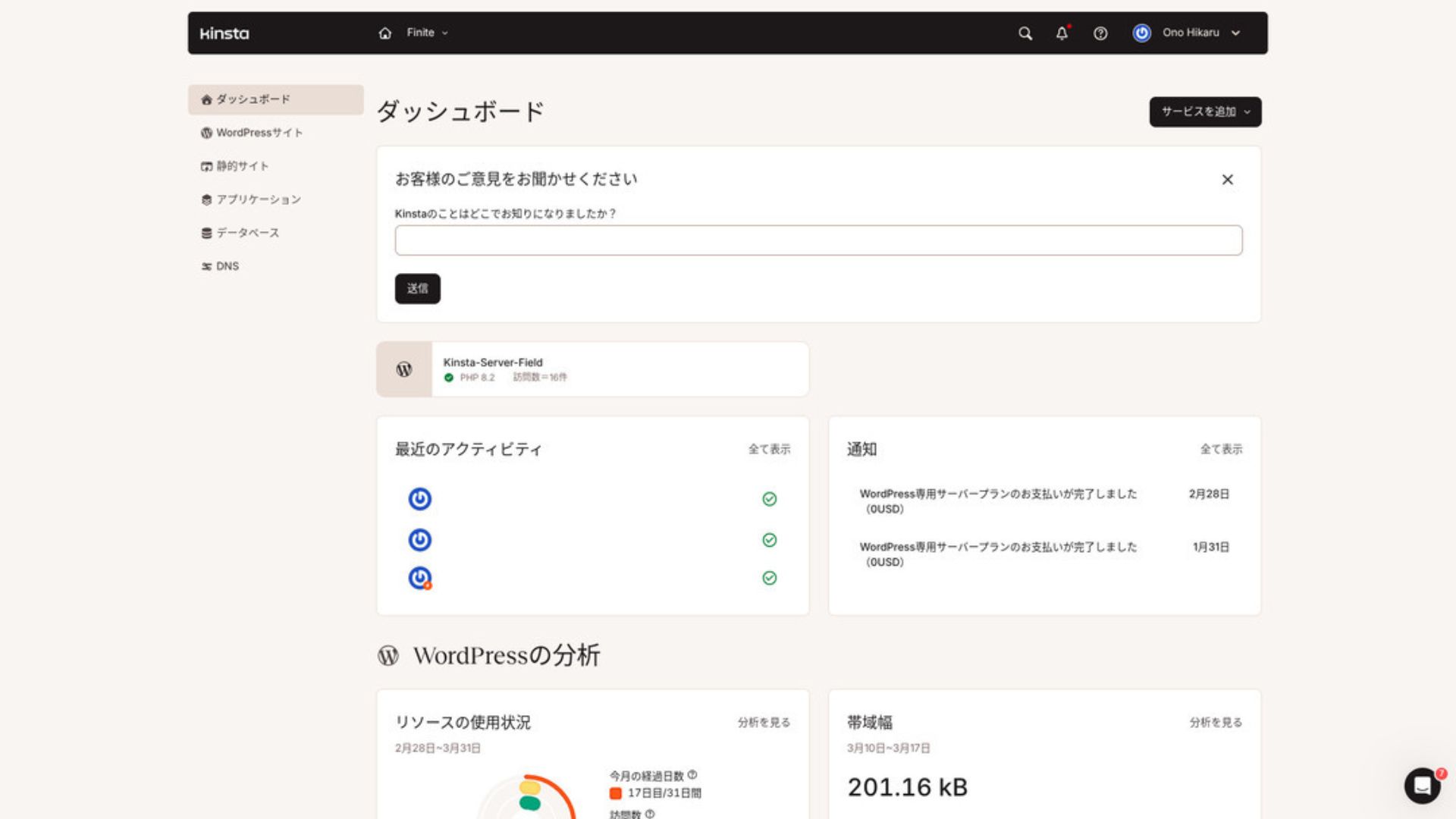
To manage WordPress, click “WordPress Sites” in the menu.
Creating a New WordPress Site or Migrating One Is Easy
Kinsta
makes it easy to create a new site and handle migrations as well. There is no need to worry that it will be difficult just because it is an overseas server.
When you open WordPress Sites and click “Add Site,”
- Create a new site
- Request a site migration
those options appear. Creating a new site is also easy.
- STEP.1Select “WordPress Sites” in MyKinsta
Log in to MyKinsta. Then select “WordPress Sites” from the menu.
- STEP.2Create a new site
Click “Add Site.” Then choose “Create new site.”
- STEP.3Continue with the WordPress settings
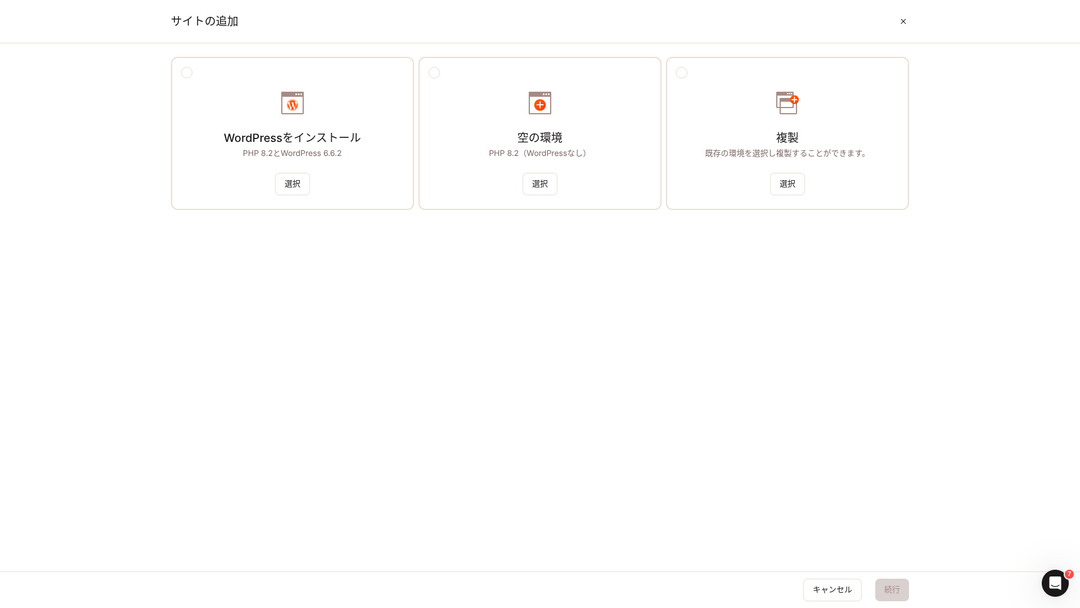
Select “Install WordPress.”
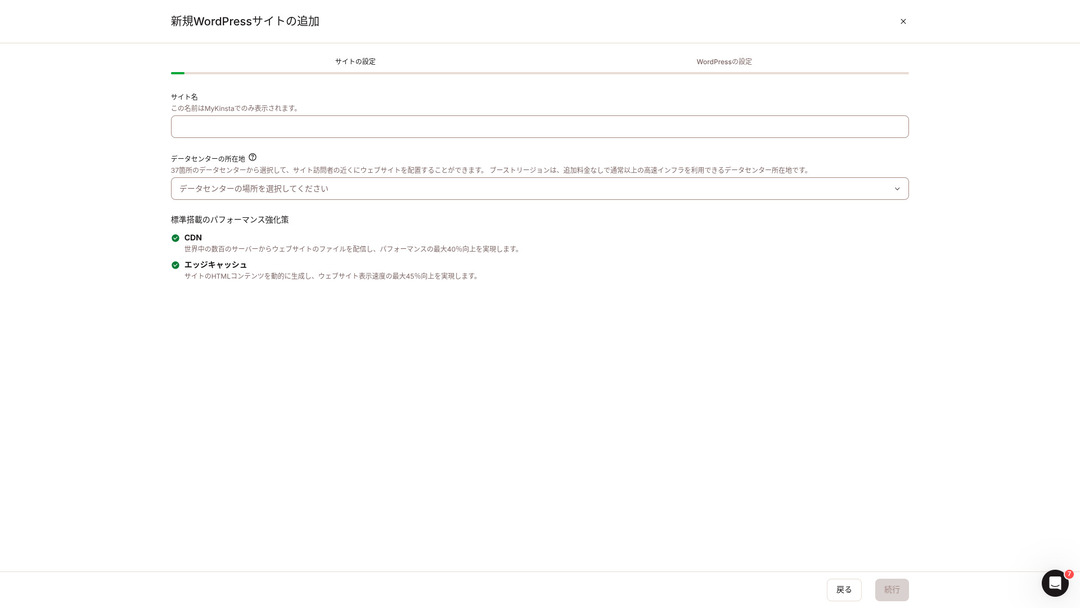
Choose your site name and select a data center location. You can choose from 37 data centers around the world. If most of your visitors are in Japan, choosing Tokyo or Osaka is the safest option.
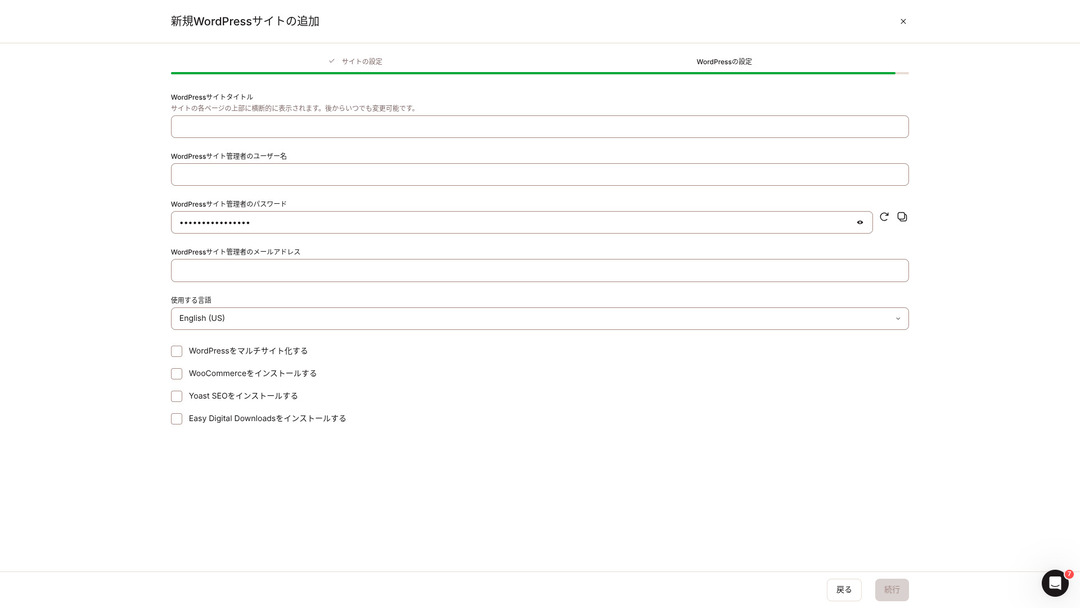
- WordPress site title
- WordPress admin username
- WordPress admin password
- WordPress admin email address
- Language to use
Decide those settings. Once you click “Continue,” your WordPress site setup is complete.
Kinsta Pricing Plans: The Best Choice Is the Annual Plan for One Site
Kinsta
has three pricing plans, and each can be paid monthly or annually.One of them is an agency program intended for production agencies.For individuals and companies, the options to use are
- Single-site plan
- Multi-site plan
one of those two.
| Comparison item | Single-site plan | Multi-site plan |
|---|---|---|
| Monthly fee | 4,459 yen (annual billing) 5,202 yen (monthly billing) | 8,769 yen (annual billing) 10,404 yen (monthly billing) |
| WordPress sites | 1 | 2 |
| Visits | 35,000 | 70,000 |
| Storage | 10GB | 20GB |
| CDN | 125GB | 250GB |
If you are saying, “I’m about to start a blog,” I recommend the single-site plan.
Kinsta Reviews and Five Key Features

WordPress Is Fast: No. 1 in Display Speed
Kinsta
ranked No. 1 in display speed in our own measurements. It truly is a fast server.
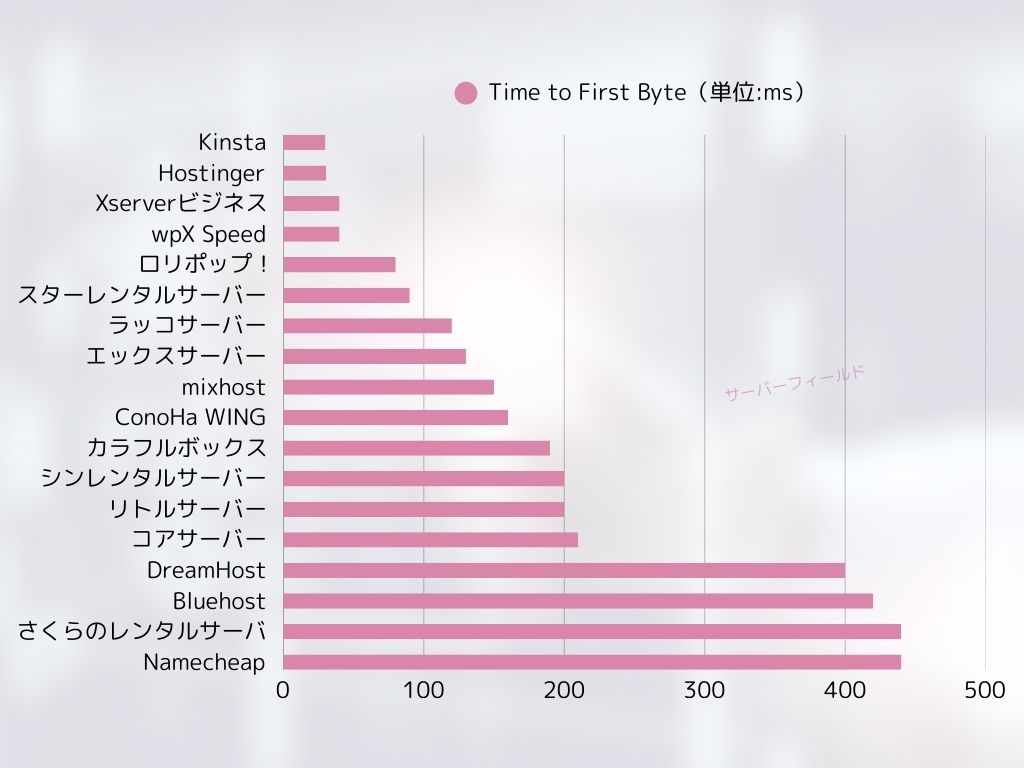
If you are struggling with server speed, I would tell you to choose Kinsta
without hesitation.
A CDN Is Available
Kinsta
uses 37 data centers as server bases around the world while also operating 260 CDN locations. By using a CDN, people viewing your website receive data from the nearest CDN server, which helps pages load faster.
★ What Is a CDN? Improve Speed and Performance with Distributed Servers
Kinsta
’s cheapest WordPress hosting option, the Starter plan, still includes 100GB of CDN.That provides more than enough transfer capacity.
★ What Are Traffic and Data Transfer? Managing and Optimizing Web Traffic
Comes with 14 Days of Automatic Backups
Kinsta
comes with 14 days of automatic backup functionality.
Backups are essential.There is always a possibility that data may be deleted by mistake or altered by a cyberattack.In situations like that, backup data lets you restore the site.
Kinsta
With you can restore everything from up to 14 days of backup data even if something goes wrong, which gives real peace of mind.
24/7 Support from Engineers
Kinsta
has a 24/7 support system staffed by engineers.
You never know when a situation requiring support will arise.If it is not resolved quickly, it may even become a matter of business credibility.
Kinstagives peace of mind because engineers are always there to support you.Especially if you do not have engineers inside your company, Kinsta
the reassurance of being able to contact engineers at any time, as you can with Kinsta, is extremely valuable.
Free Hack-Fix Guarantee
No matter how much effort you put into security, nothing is ever 100 percent guaranteed. Still, Kinsta
comes with a free hack-fix guarantee.
If you are hacked,Kinsta
will work together with you to repair the damage.
- Free site inspection
- Detailed file scans to identify malware
- Repair of core files using a fresh WordPress installation
- Identification and removal of infected plugins and themes
Because the response is so thorough, you do not have to worry that the same hacking damage will happen again.
The Drawback of Kinsta Is Its High Price

Even though it is a top-tier server, Kinsta is expensive.
In terms of price, it belongs in the category of servers used by businesses.I compared it with other business-oriented servers.
- Initial setup fee
- 12-month server contract
- One year of domain cost
- Plan that supports WordPress
| Hosting company | One-year cost |
|---|---|
| Kinsta
| 53,508 yen |
| heteml | 24,420 yen |
| XServer Business | 51,612 yen |
| CPI | 58,080 yen |
| iCLUSTA+ | 12,824 yen |
| WebARENA SuiteX | 23,795 yen |
Kinsta
There are servers that cost more than Kinsta, but all of the others are servers based in Japan.They offer Japanese-language support and a large number of business-oriented features as well.
So although it is truly top-tier in server speed, there is no denying that it still feels expensive.
Compare Kinsta with Competing Servers
I compared it with major Japanese hosting services that, like Kinsta, place a strong emphasis on speed.
ConoHa WING
ConoHa WING is a server built with a strong focus on WordPress display speed. Its key feature is how easy it is to get started with WordPress. Tasks such as acquiring and configuring a domain, creating a database, and installing WordPress are already completed when you sign up for the server, so the settings needed to launch a WordPress website are finished at the time of the server contract.
As a result, even if you have no server knowledge or WordPress skills, you can start your website right away.
| Item | Kinsta
| ConoHa WING
|
|---|---|---|
| Biggest feature | Reputation as a top-tier server | Anyone can get started right away with ease |
| Trial / money-back guarantee | 30-day money-back guarantee | First month free |
| Uptime | 99.9% | 99.99% |
| Storage | 10GB | 300GB |
| First-year server cost | 53,508 yen | 11,292 yen |

XServer
XServer has long been a popular high-speed server in Japan.It boasts the No. 1 user share in the domestic market.Its popularity comes not only from server speed, but also from its stability with 99.99% uptime and its attentive support.
However, when it comes to speed, Kinsta still comes out ahead of XServer.
| Comparison item | Kinsta
| エックスサーバー
|
|---|---|---|
| Biggest feature | Reputation as a top-tier server | No. 1 in number of users |
| Trial / money-back guarantee | 30-day money-back guarantee | 10-day free trial |
| Uptime | 99.9% | 99.99% |
| Storage | 10GB | 500GB |
| First-year server cost | 53,508 yen | 10,560 yen |

Start a WordPress Website with Kinsta in 7 Steps
Here, we will start a WordPress website using Kinsta and MuuMuu Domain.
- STEP.1Get a custom domain with MuuMuu Domain
Sign up for or log in to MuuMuu Domain.
If you do not yet have an account, create a new one on the MuuMuu Domain website. If you already have an account, just log in.
Search for and purchase your custom domain.
Enter your desired domain name into the MuuMuu Domain search bar and check whether it is available. If it is available, purchase that domain.
- STEP.2Set up a new site on Kinsta
First, sign up for Kinsta
. Then add a new site.
Access the Kinsta dashboard and click “Add Site.”
Select the site name and the data center location. Choose “Install WordPress,” then enter the required information such as the site title, admin username, password, and email address.
If necessary, install plugins such as WooCommerce or Yoast SEO.
- STEP.3Update the DNS settings in MuuMuu Domain
Access the MuuMuu Domain dashboard, select the domain you acquired from the “Domain Management” section, and click “DNS Settings.”
From the Kinsta dashboard, check the DNS information for your site, including the name servers. Enter that information on the “DNS Settings” page in MuuMuu Domain and save it.
- STEP.4Set your custom domain in the Kinsta dashboard
Move to the settings page for the WordPress site you were just using.
Go to the “Domains” section and click “Add Domain.” Enter the custom domain name you acquired through MuuMuu Domain and add it.
Next, move to the “Tools” section and click “Install a free Let’s Encrypt SSL certificate” to install the SSL certificate.
- STEP.5Customize your WordPress site
Log in to the WordPress admin area from the Kinsta dashboard. Then install themes and plugins as needed and customize your site.
Frequently Asked Questions About Kinsta
Can I register a domain with Kinsta?
No, you cannot register a domain through Kinsta.Please register your domain through a domain registration service such as MuuMuu Domain.After that, register the acquired domain in MyKinsta.
Is 10GB of storage on Kinsta too little?
If you are running a WordPress site, 10GB is not a problem at all.As of March 2025, this site with more than 90 articles uses only 1.5GB of storage.Unless you are building something like a portfolio site with an extreme number of images, there is no need to worry.
How do you pronounce “Kinsta”?
“Kinsta” is pronounced “Kin-sta.”
Summary
“Kinsta
” is the fastest top-tier rental server with data centers in 37 locations worldwide. It ranked No. 1 in our own measurements. There is no denying the high price, but if you want a server that fully pursues comfort and performance, it is an excellent choice without question. Japanese chat support is also available.
Kinsta
is a top-tier server. If you want to improve your site’s display speed with confidence, please give it a try.
It offers not only speed, but also an excellent support system, so you can use it with confidence.
Comparison of 10 Overseas Hosting Services

With overseas hosting services, many people struggle to decide which server to choose because of language barriers and cultural differences.
In this article, we thoroughly compare 10 carefully selected overseas hosting services from around the world and explain each service’s features, pricing plans, and actual user experience in detail.
You will find information that covers a wide range of needs, from selection criteria beginners can rely on to advanced features that engineers look for.