10 dages gratis prøveperiode
PR
VPS
Hurtigt over 130 Mbps: Byg Outline VPN på ABLENET VPS
Udgivet: 2025.06.26
Opdateret: 2025.06.26
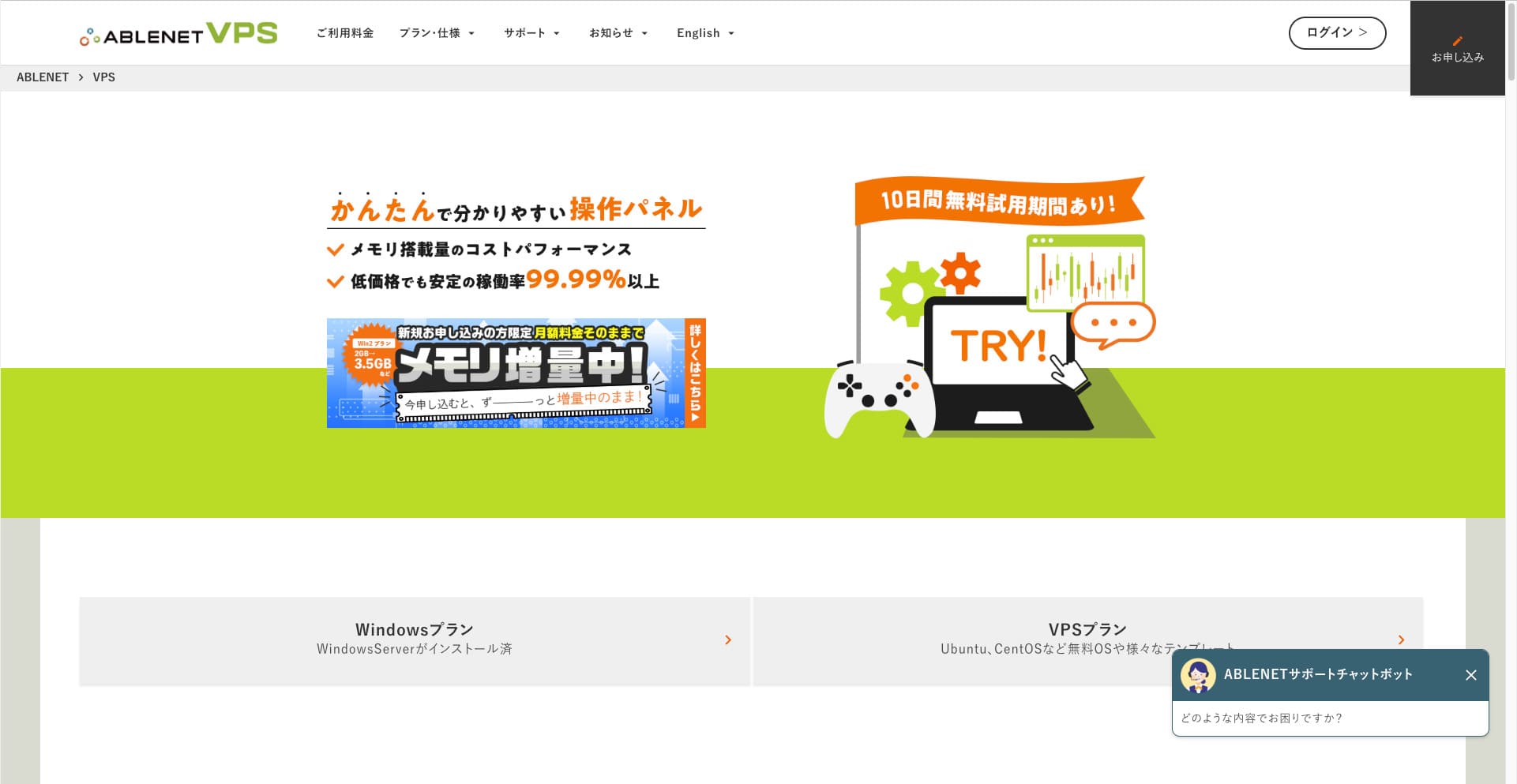
Folk, der vil surfe på internettet via et VPN, bliver stadig flere.
Brug af et VPN (Virtual Private Network) forbedrer sikkerheden og giver dig også mulighed for at få adgang til tjenester og indhold, der kun findes i Japan, fra udlandet.
Når det er sagt, bekymrer du dig naturligvis om hastigheden og sikkerheden af en VPN-forbindelse.
Den bedste måde at få en sikker og hurtig VPN-forbindelse på er at bygge dit eget VPN-miljø. For at gøre det skal du bruge et servermiljø til VPN'en. Denne gang har jeg bygget et VPN-miljø ved hjælp af ABLENET VPS og Outline VPN.
Hvorfor I Recommend ABLENET VPS
Den største grund til, at jeg valgte ABLENET VPS er dens stabilitet.
- Historie på markedet: Det er en af Japans førende og mest etablerede servervirksomheder med mere end 25 års drift. Dens VPS-tjeneste har også været tilgængelig siden 2011.
- Oppetid: En oppetid på over 99,99 % giver dig klar og målbar ro i sindet.
- Trafikgrænse: Det tilbyder også ubegrænset dataoverførsel, hvilket gør det ideelt til brug som VPN.
I Japan tilbyder Xserver og Sakura Internet også VPS-tjenester, men ABLENET er bestemt lige så pålidelig. Ubegrænset dataoverførsel er måske standard hos mange serverudbydere nu, men ABLENET var en af pionererne.

Hikaru Ono
Disse oplysninger har tidligere været vist på den officielle hjemmeside, og det ser ud til, at der var en superbruger på ABLENET, som brugte hele 25 TB på en enkelt måned. Man kan i sandhed sige, at dataoverførslen var virkelig ubegrænset.
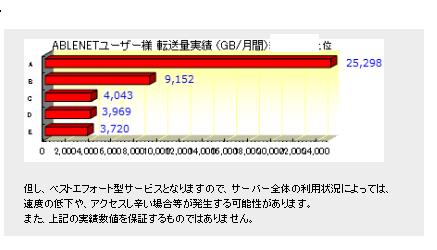
Så hvis du forventer et stort dataforbrug til ting som at se film og videoindhold eller udføre programmeringsarbejde, anbefaler jeg byg dit VPN på ABLENET VPS.
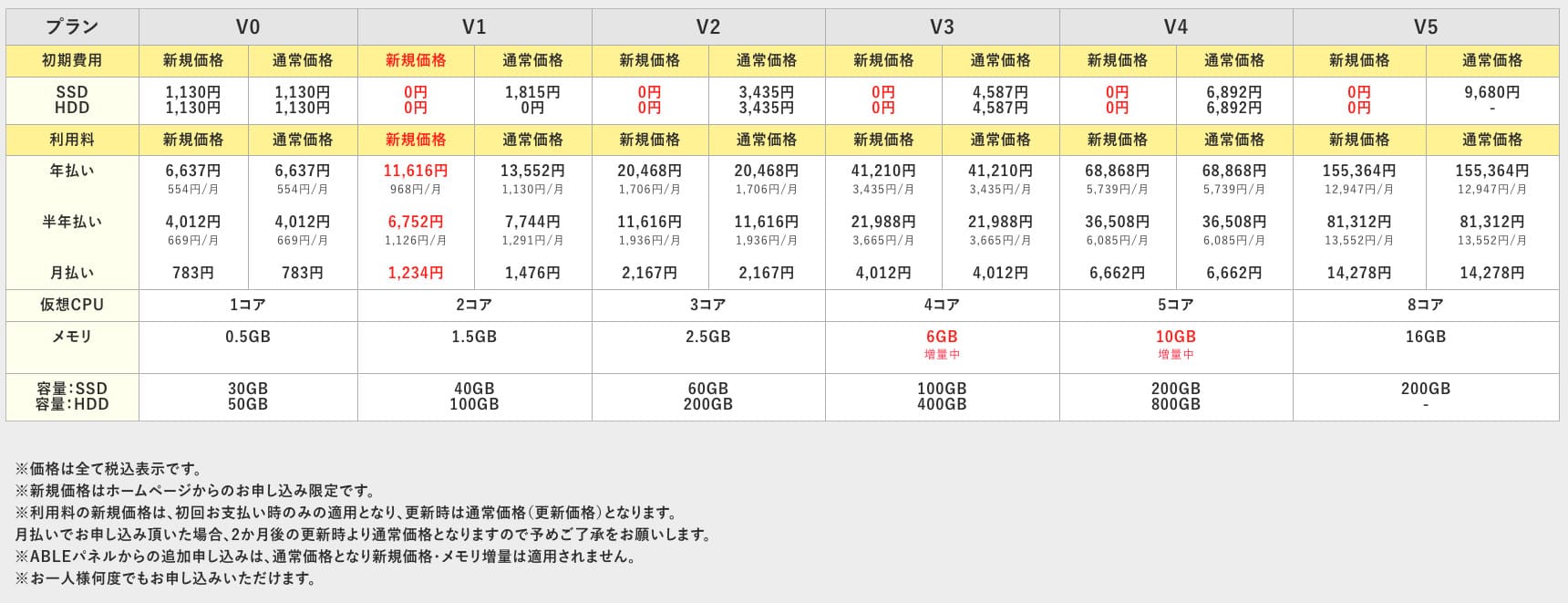
ABLENET VPS er en stabil VPS med en oppetid på 99,99 %, selvom den er prisvenlig. Den tilbyder et bredt udvalg af abonnementer, lige fra det lettilgængelige V0-abonnement med 0,5 GB hukommelse til det højtydende V5-abonnement med 16 GB hukommelse, så du kan finde den rigtige løsning til dine behov.

Hvad er Outline VPN? En enkel VPN-opsætning, som selv begyndere kan forstå
VPN (Virtual Private Network) er en teknologi, der skaber en krypteret tunnel på tværs af internettet og forhindrer aflytning og manipulation fra tredjeparter. Ved at route din trafik gennem en VPN-server kan den også skjule din rigtige IP-adresse og forbedre anonymiteten.
Outline VPN er designet til at gøre denne type VPN-forbindelse ekstremt enkel.
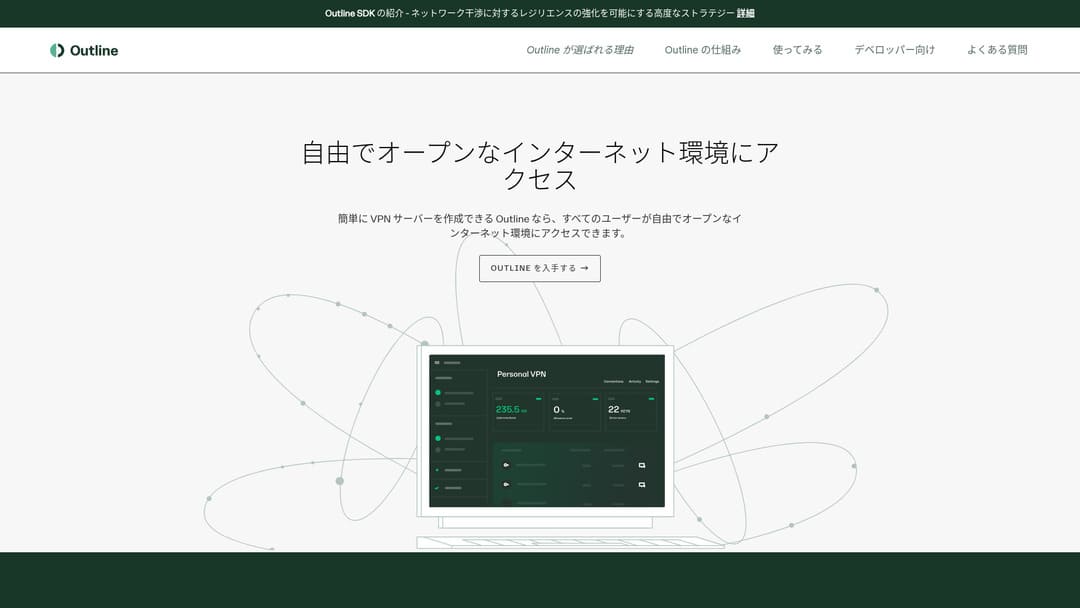
"Outline" er en gratis og nem applikation fra Jigsaw, et selskab under Google, som lader dig oprette forbindelse via et VPN. Selv hvis du aldrig har sat et VPN op før, kan du komme i gang med blot få klik.
Download fra den officielle hjemmeside
Hikaru Ono
Denne gang bruger jeg Outline VPN, så alle kan bygge et VPN nemt.
Byg Outline VPN på ABLENET VPS i 6 nemme trin
Lad mig nu guide dig igennem processen med at bygge Outline VPN på ABLENET VPS i detaljer.
Trin 1: Kom i gang med ABLENET VPS
Hvis du ikke har tilmeldt dig ABLENET VPS endnu, skal du gøre det først.
Kom i gang med ABLENET VPS
- TRIN 1Vælg et abonnement på ABLENET VPS
Gå til ABLENET VPS og klik på "Apply".
Du kan vælge enten en Windows-plan eller en VPS-plan. Til denne VPN-opsætning skal du bruge VPS-planen. Jeg anbefaler V1-planen uden startgebyr og med hurtig SSD-lagring.
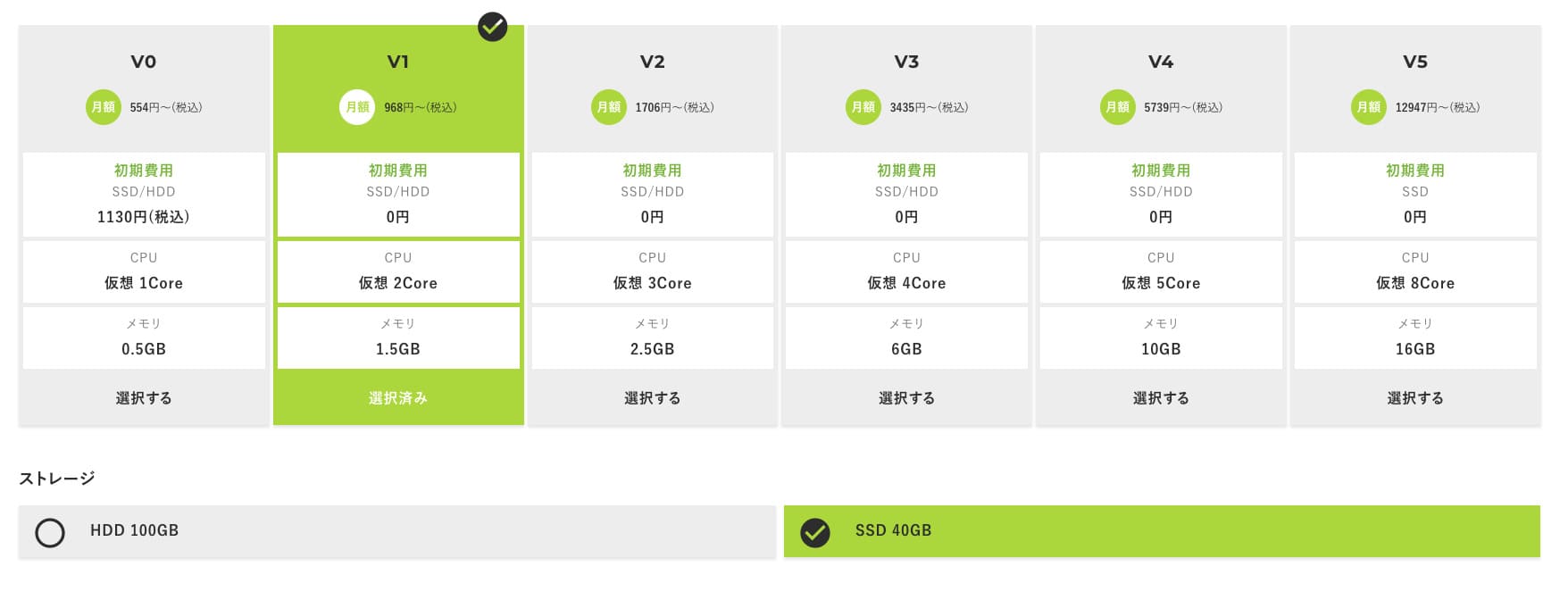
Start med V1-abonnementet, og hvis du får brug for højere specifikationer senere, kan du opgradere til V2 eller V3. Når din tjeneste starter, kan du anmode om en specifikationsopgradering fra ABLE-panelet.
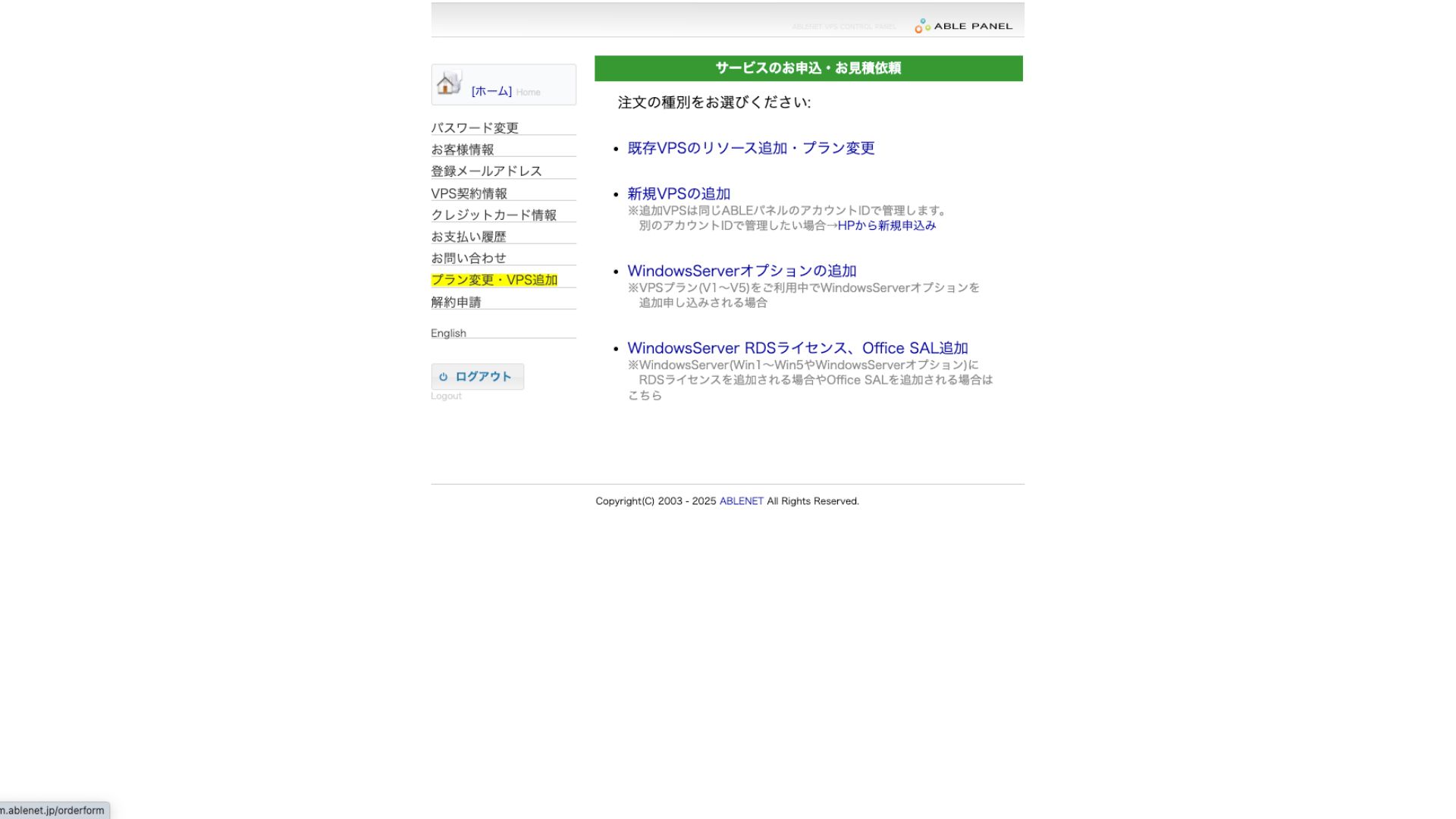
Som betalingsmetode er det fint at bruge prøveperioden med kreditkort.

Læs brugervilkårene igennem, og marker afkrydsningsfeltet.
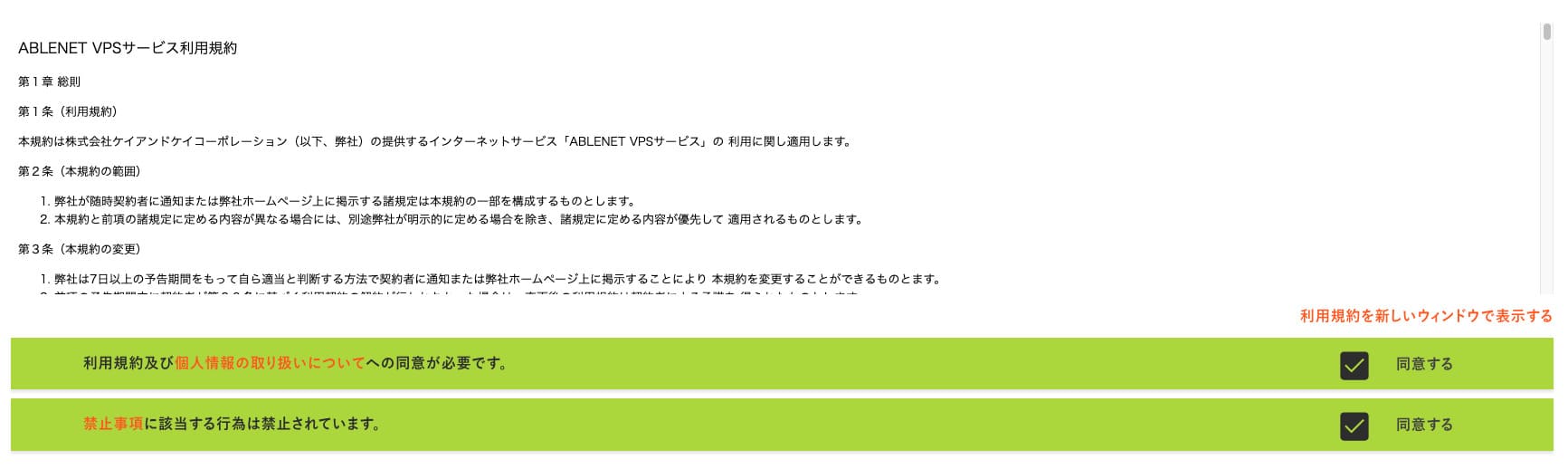
Klik på "Proceed to select the contract term".
- TRIN 2Vælg kontraktperioden
En årlig kontrakt er den bedste løsning i forhold til serverperioden. Da vi bruger VPS-abonnementet denne gang, er der ikke brug for ekstra tilvalg.
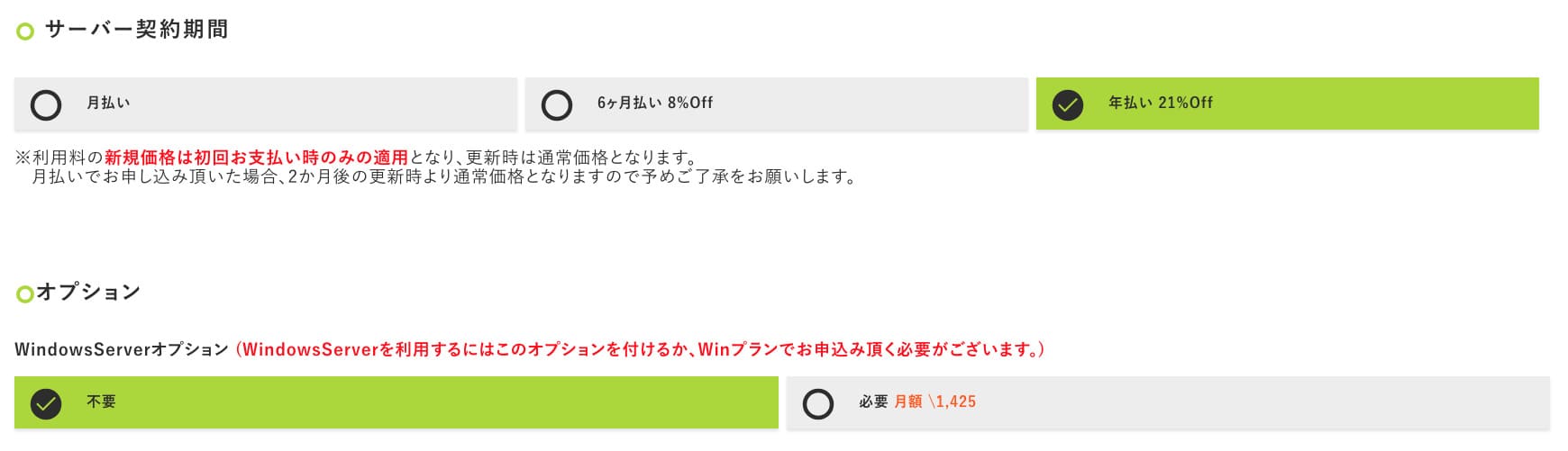
Når du har udfyldt oplysningerne, skal du klikke på "Proceed to the estimate screen". Gennemse overslaget, og hvis alt ser fint ud, skal du klikke på "Proceed to enter applicant information".
- TRIN 3Indtast ansøgeroplysninger
Indtast dit navn, din adresse og andre ansøgeroplysninger. Fortsæt til skærmen for ordregodkendelse, og indsend ansøgningen.
- TRIN 4Indtast betalingsoplysninger
Hvis du betaler med kreditkort, skal du indtaste kortindehaverens oplysninger og andre nødvendige detaljer. Hvis alt er korrekt, skal du klikke på "Confirm order" for at indsende.
Når du modtager e-mailen med dine VPS-oplysninger, er ansøgningen fuldført.
Trin 2: Installer Outline Manager - Nem opsætning
Installer derefter Outline Manager på din computer, så du kan konfigurere og administrere VPN-serveren.
Installer Outline Manager
- TRIN 1Besøg Outlines officielle hjemmeside
Gå til Outline.
- TRIN 2Download Outline Manager
Fra afsnittet "Get Outline Manager" skal du downloade den version af Outline Manager, der passer til din computers operativsystem (Windows, macOS eller Linux).
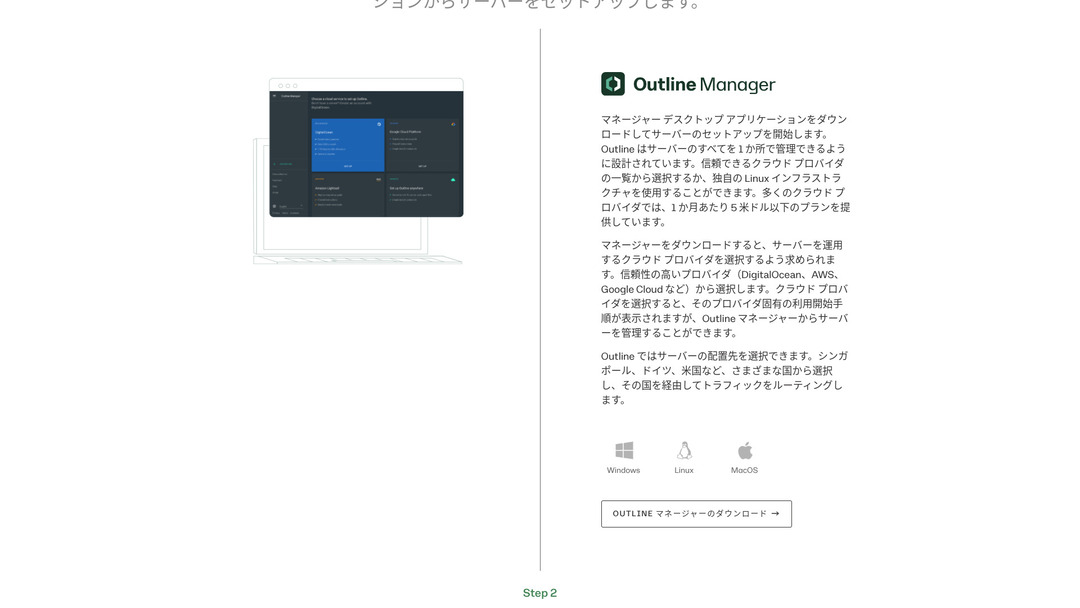
- TRIN 3Installer
Kør den downloadede fil, og følg instruktionerne på skærmen for at installere Outline Manager.
Trin 3: Byg en Outline-server på din VPS med Outline Manager
Brug Outline Manager til at installere en Outline-server på ABLENET VPS.
Byg en Outline-server på din VPS med Outline Manager
- TRIN 1Start Outline Manager
Når installationen er fuldført, skal du starte Outline Manager.
- TRIN 2Klik på "Set up server"
Når du starter programmet for første gang, vises skærmen for serveropsætning. Klik på "Set up server".
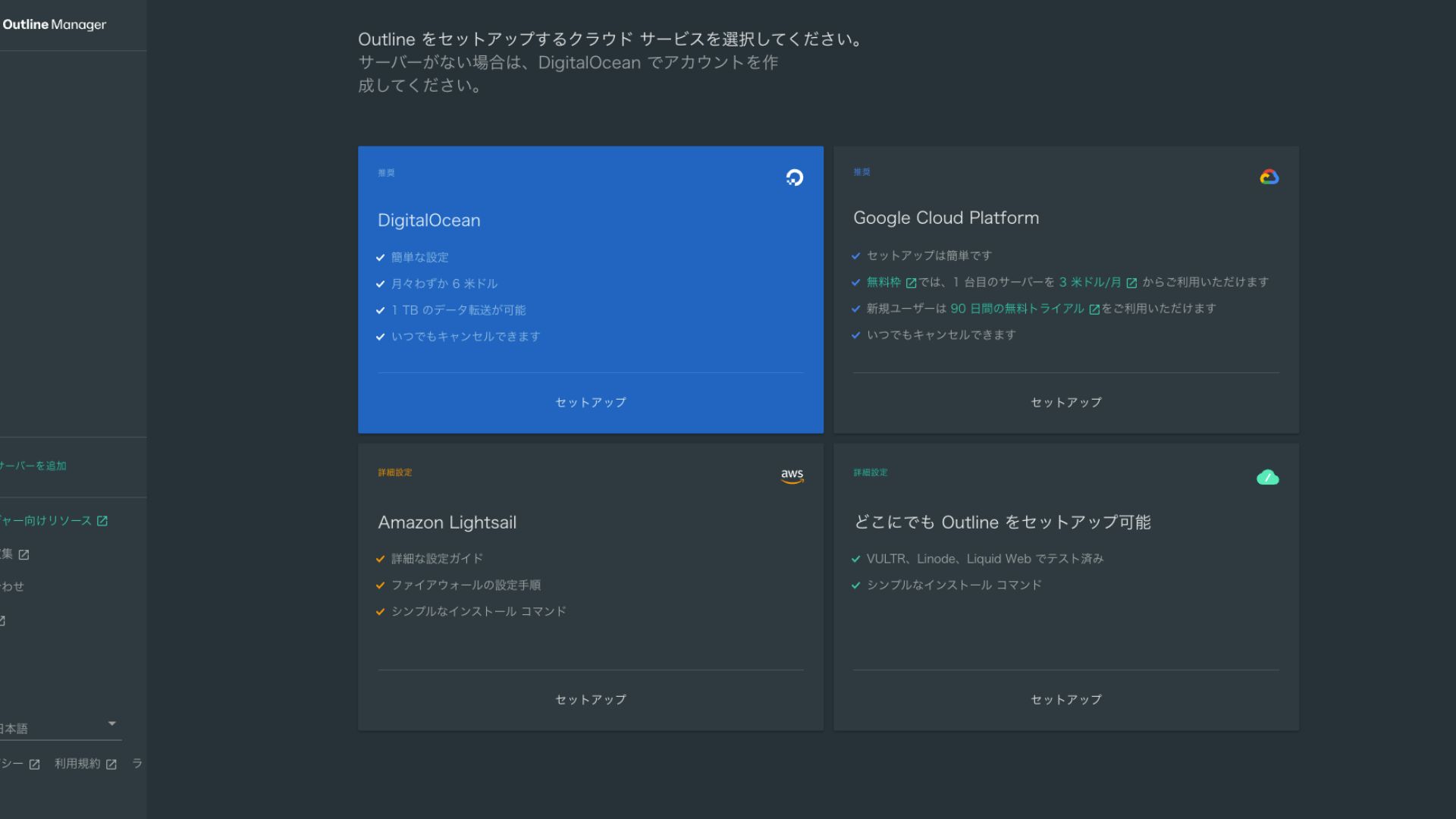
- TRIN 3Vælg "Set up Outline anywhere"
Du vil se skærmen til valg af cloududbyder. Vælg "Set up Outline anywhere".
- TRIN 4Indtast installationskommandoen
Skærmen viser den kommando, der bruges til at installere Outline-serveren på din VPS. Indtast denne kommando manuelt.
Hikaru OnoDa du ikke kan kopiere og indsætte den, skal du være omhyggelig med ikke at lave fejl.
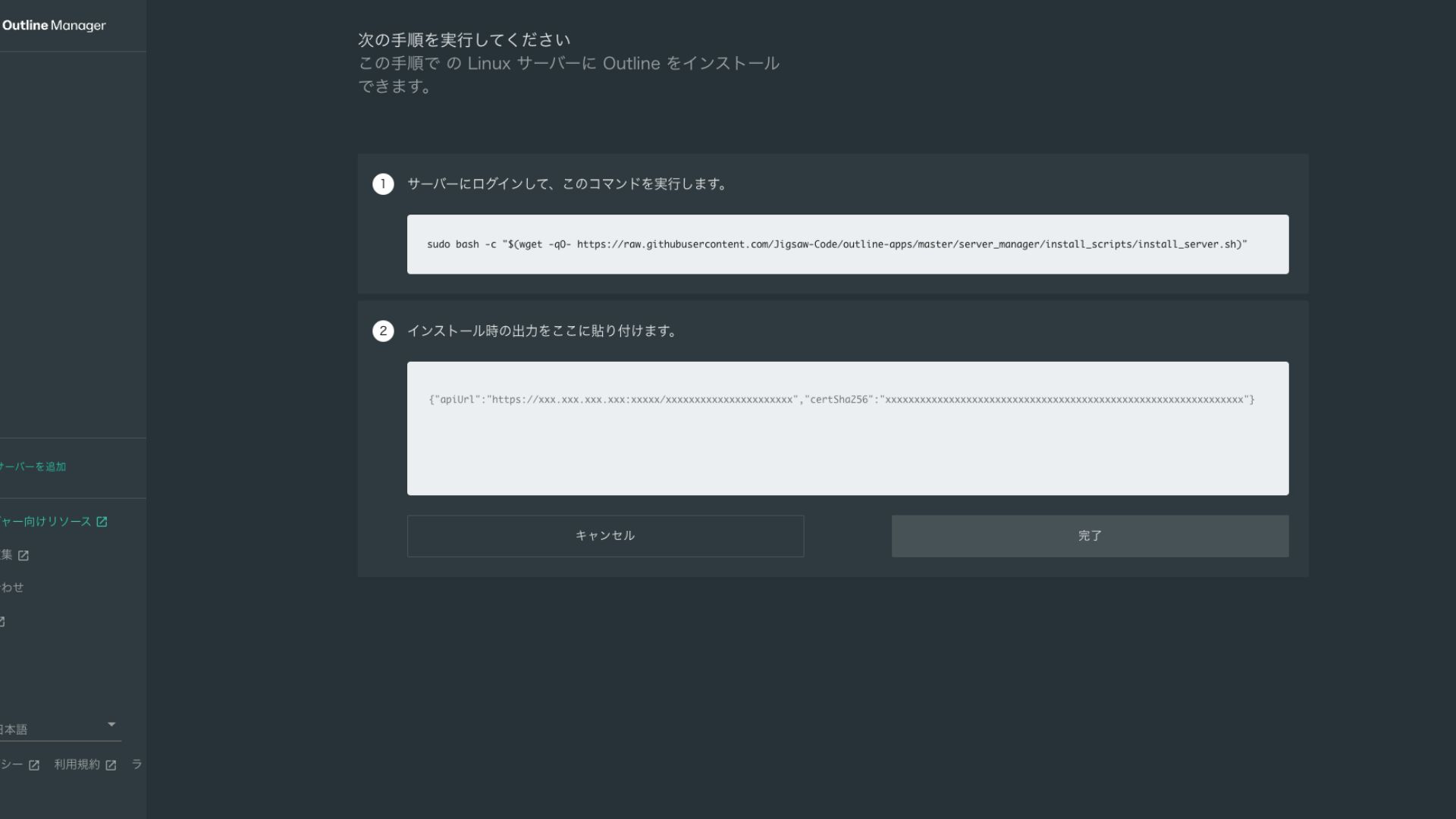
- TRIN 5Kør kommandoen
- Installationen kan tage flere minutter. Hold godt øje med de meddelelser, der vises på skærmen, og vent, til den er færdig.
- Du kan blive stillet et par spørgsmål undervejs, men i de fleste tilfælde er det fint at trykke på Enter for at acceptere standardvalget.
- TRIN 6Indtast oplysningerne i Outline Manager
Når installationen er færdig, viser Outline Manager en skærm, hvor du skal indtaste "Serveroplysninger".
- Admin API URL: API-URL'en genereret under installationen på VPS'en vises her. Normalt overføres den automatisk til Outline Manager, men hvis den ikke gør, skal du kopiere og indsætte API-URL'en, der vises i SSH-terminalen.
- Serverplacering (valgfri): Du kan indtaste serverens placering (f.eks. Tokyo, Japan). Dette er kun til administration og påvirker ikke forbindelsen.
- TRIN 7Klik på "Done with server"
Når du har indtastet alle oplysningerne, skal du klikke på "Done with server".
Trin 4: Opret en adgangsnøgle og tillad VPN-forbindelser
Når Outline-serveren er bygget, skal du oprette en adgangsnøgle til den faktiske VPN-forbindelse.
Opret en adgangsnøgle og tillad VPN-forbindelser
- TRIN 1Tjek Outline Manager-skærmen
Én standardadgangsnøgle vises på Outline Manager-skærmen. Herek kaldes den Key 0.
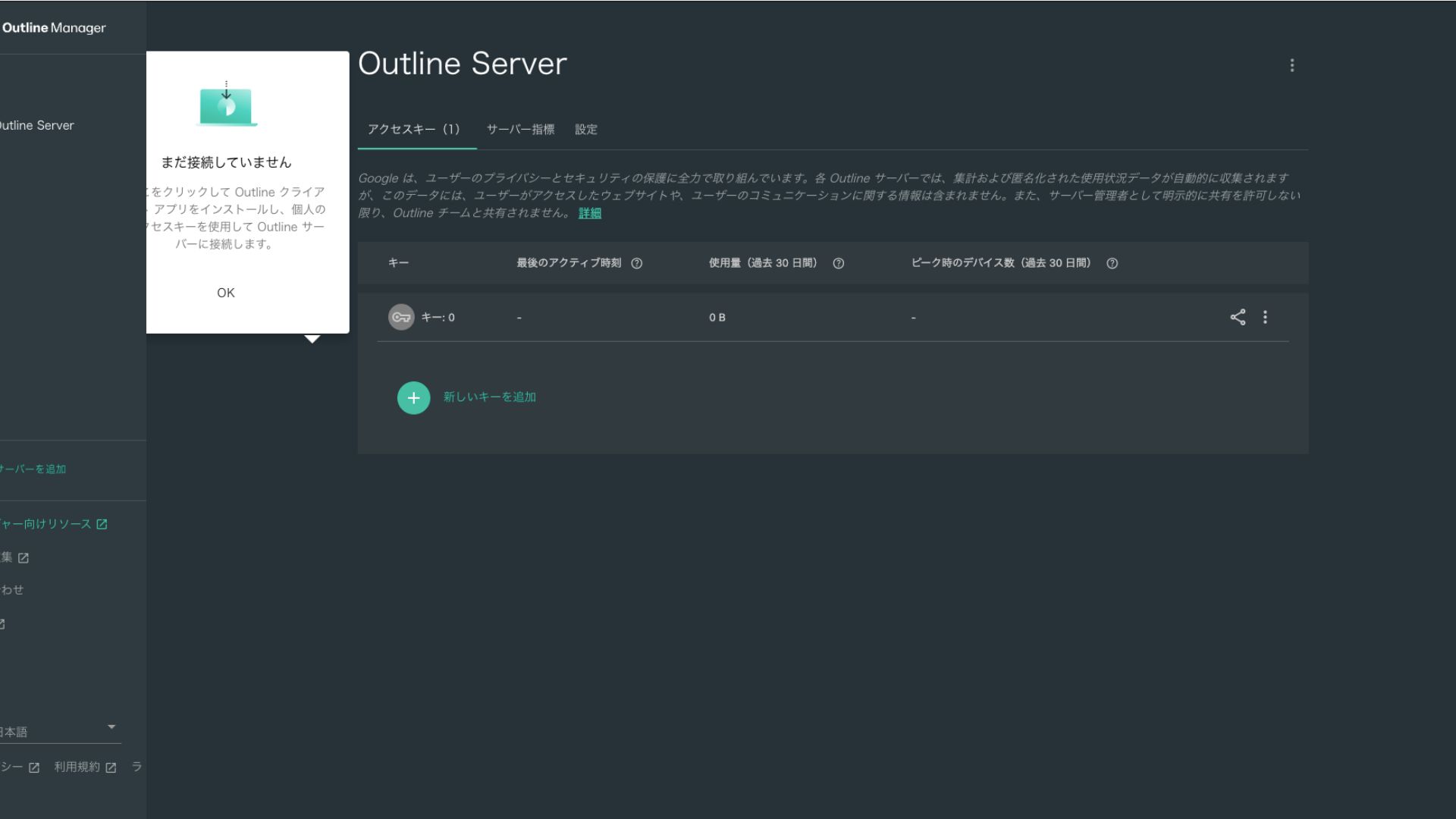
- TRIN 2Del adgangsnøglen
Den adgangsnøgle, du har oprettet, er påkrævet, når du opretter forbindelse med Outline-klienten. Når du vælger adgangsnøglen, vises en knap med teksten "Share invite".
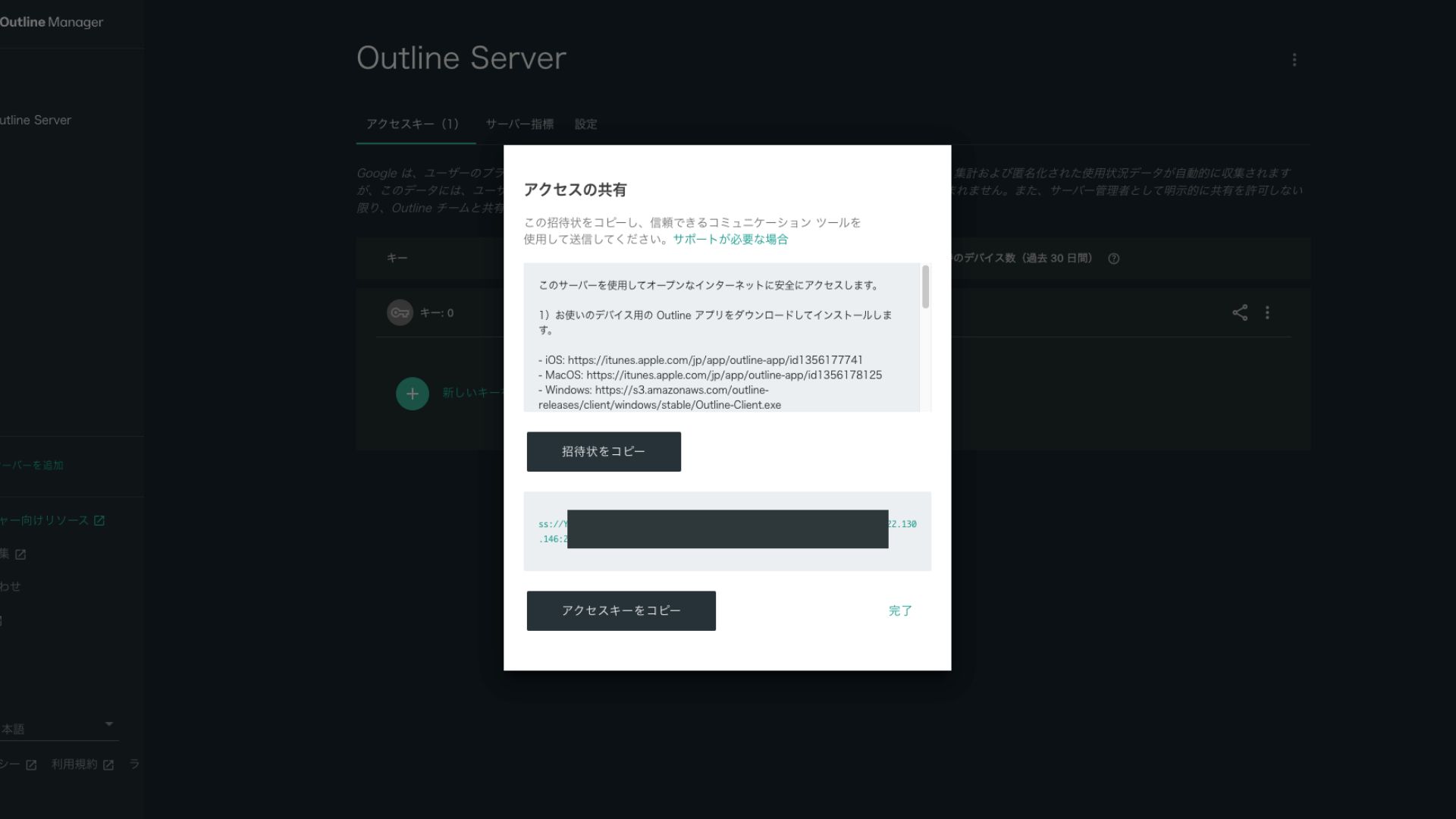
Når du klikker på den, kopieres URL’en til adgangsnøglen. Del denne URL med den enhed, du vil oprette forbindelse fra via VPN.
Trin 5: Installer Outline Client og opret forbindelse til VPN’et
Installer Outline Client på den enhed, du vil bruge til VPN-forbindelsen (pc, smartphone, tablet osv.). Denne gang installerede jeg den på en Android-smartphone.
Forbind til Outline VPN ved hjælp af den udstedte adgangsnøgle
- TRIN 1Start Outline-klienten
Start den installerede Outline-klient.
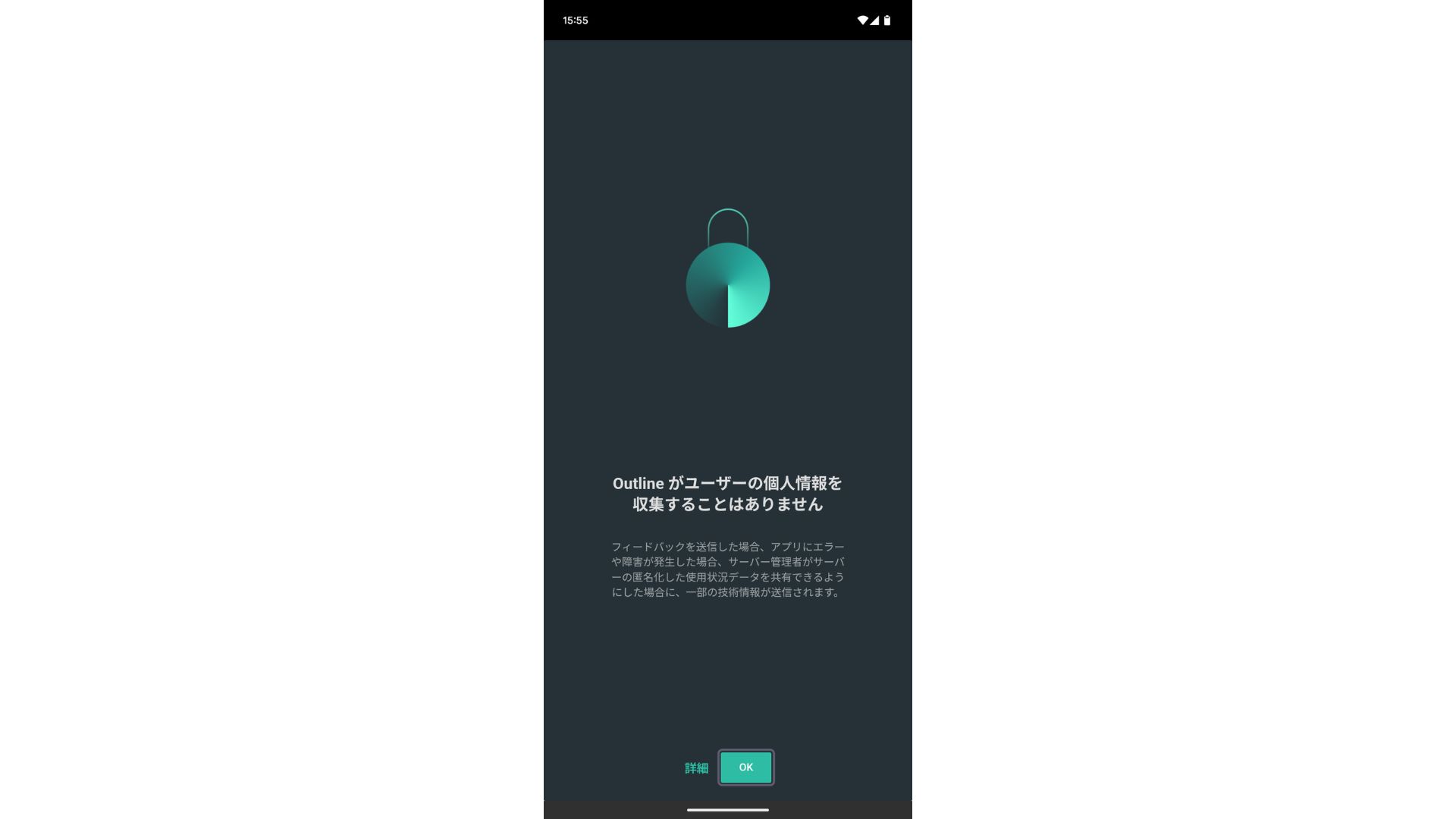
- TRIN 2Tilføj adgangsnøglen
- På computer (PC): Klik på "Add server" eller en lignende knap, indsæt adgangsnøglens URL, som du kopierede i trin 4, og klik på "Add server".
- På smartphone eller tablet: Når du åbner appen, bliver du muligvis bedt om at indtaste en adgangsnøgle. Kopier og indsæt adgangsnøglens URL, der blev delt i trin 4. Hvis der vises en QR-kode, kan du også scanne den.
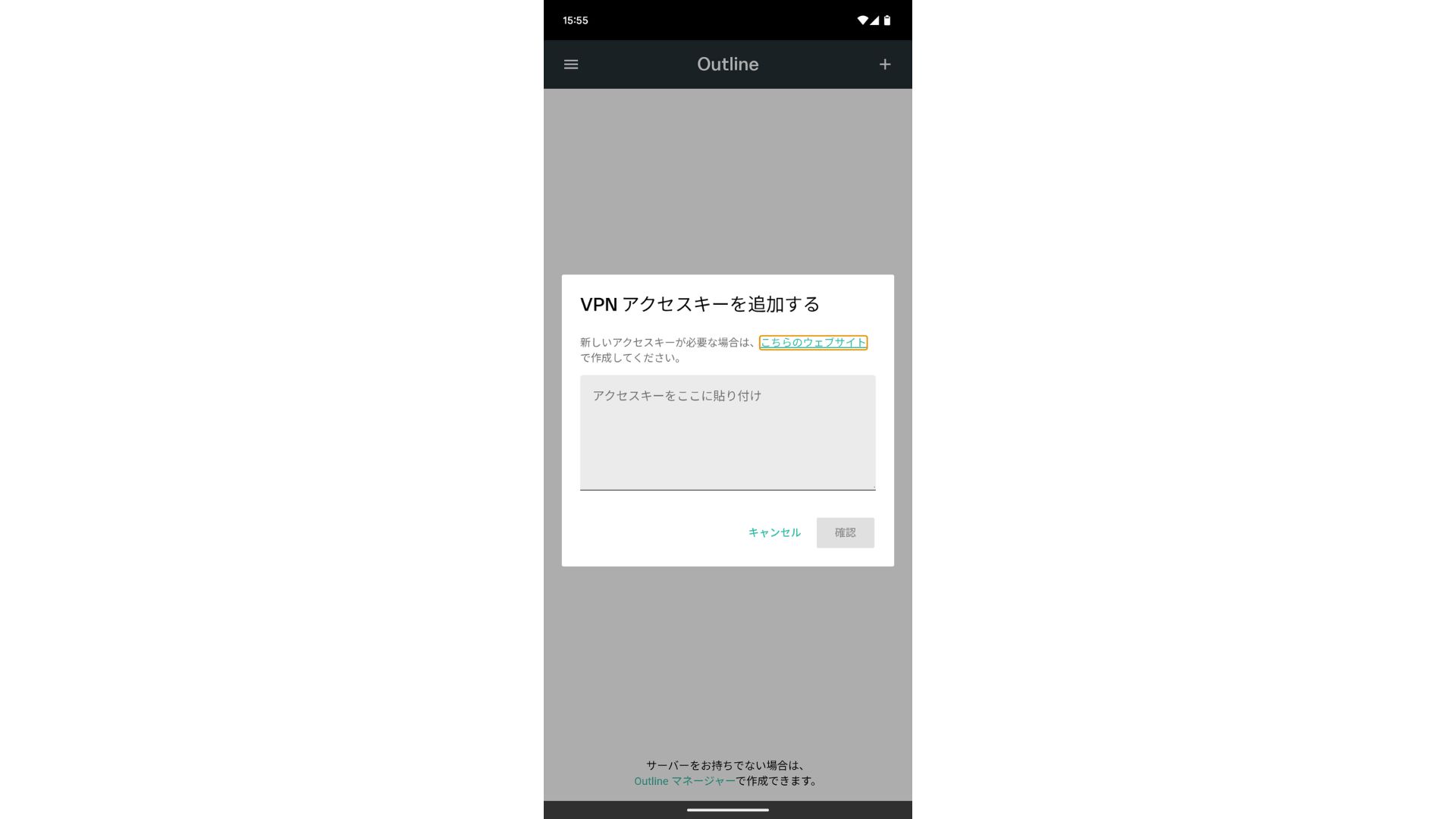
Når du har tilføjet adgangsnøglen, skal du trykke på Bekræft.
- TRIN 3Forbind
Når serveren er tilføjet, skal du trykke på "Forbind".
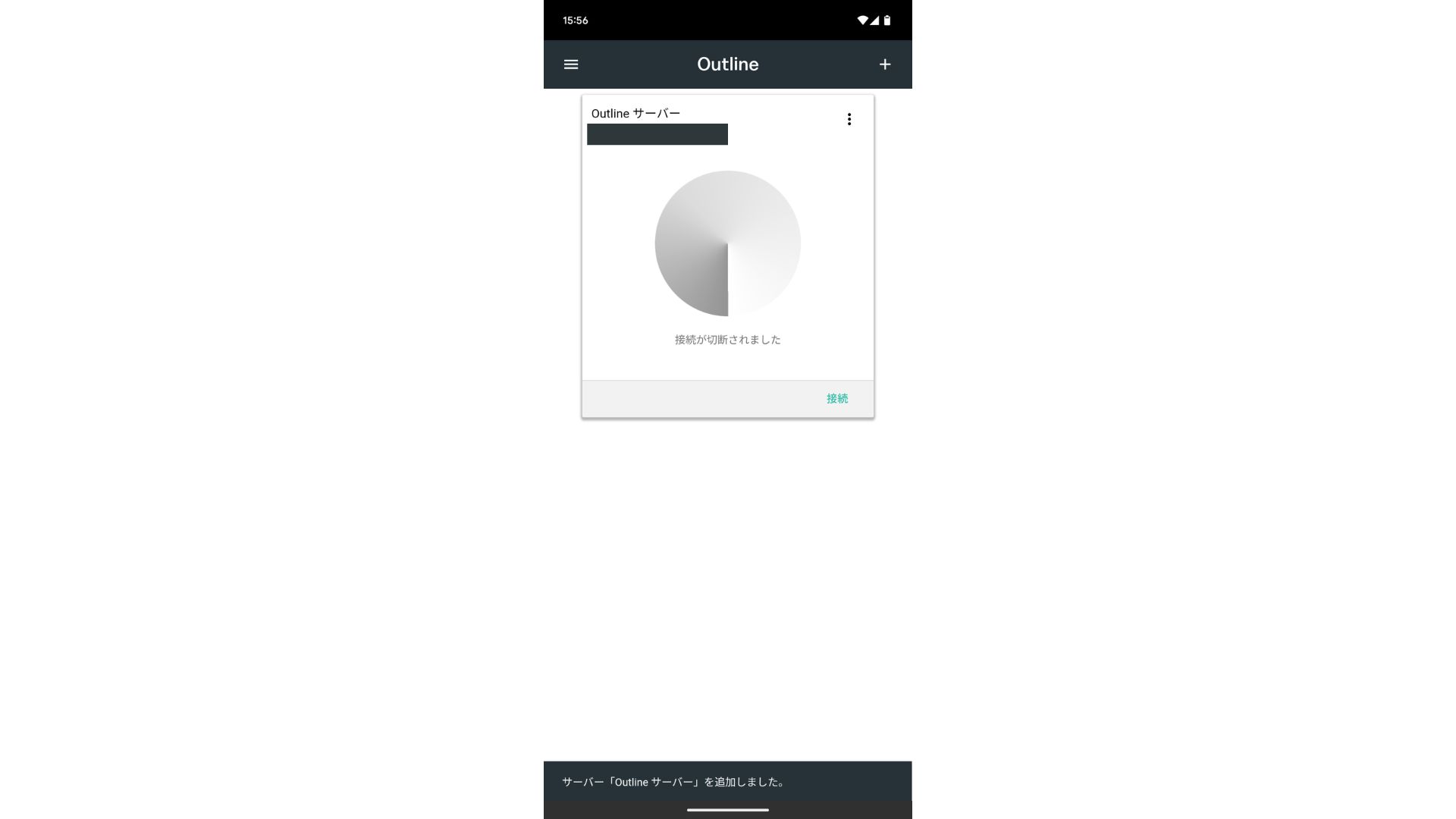
Tryk på "OK" ved anmodningen om forbindelse.
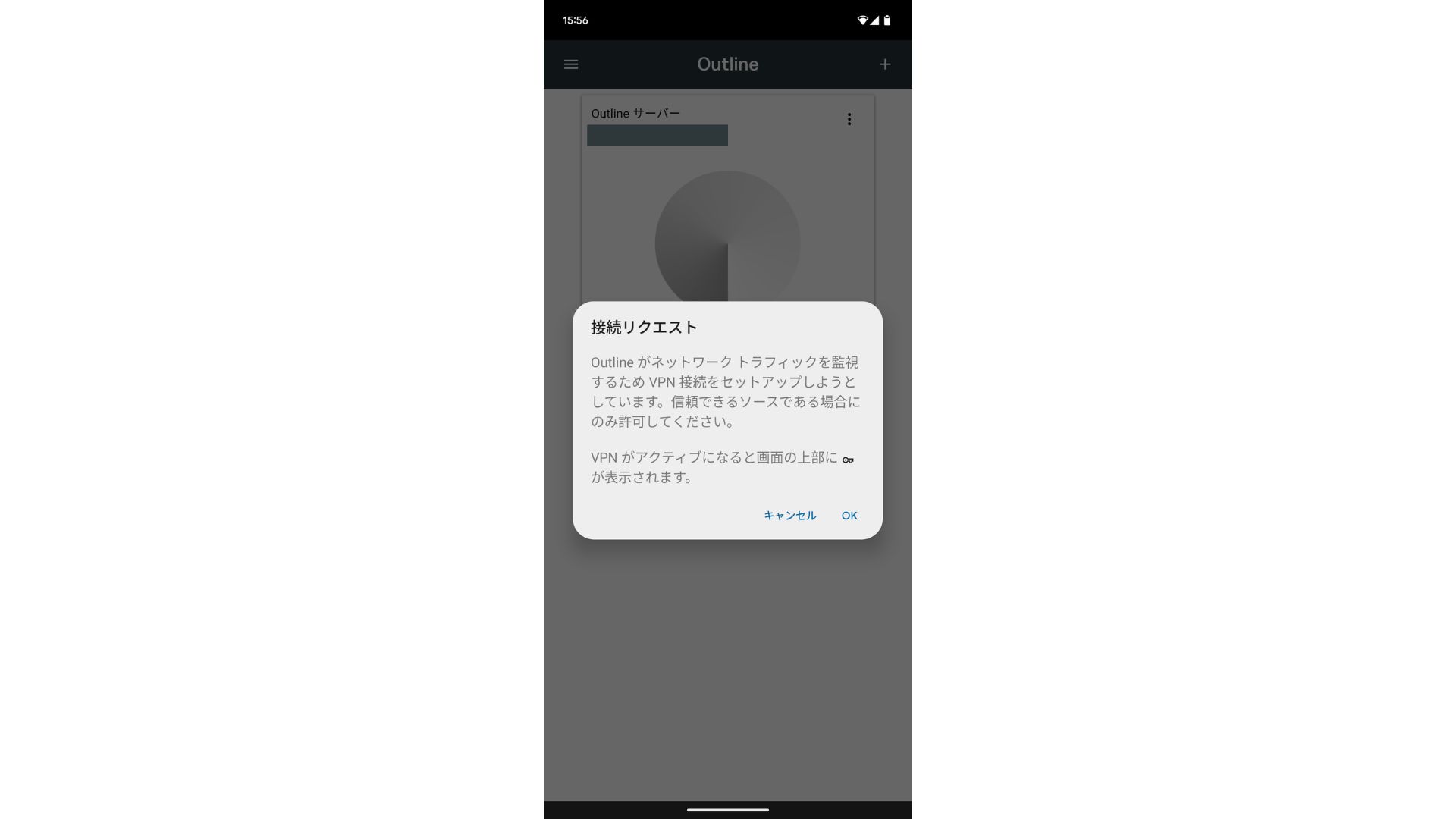
Forbindelsen er nu oprettet.
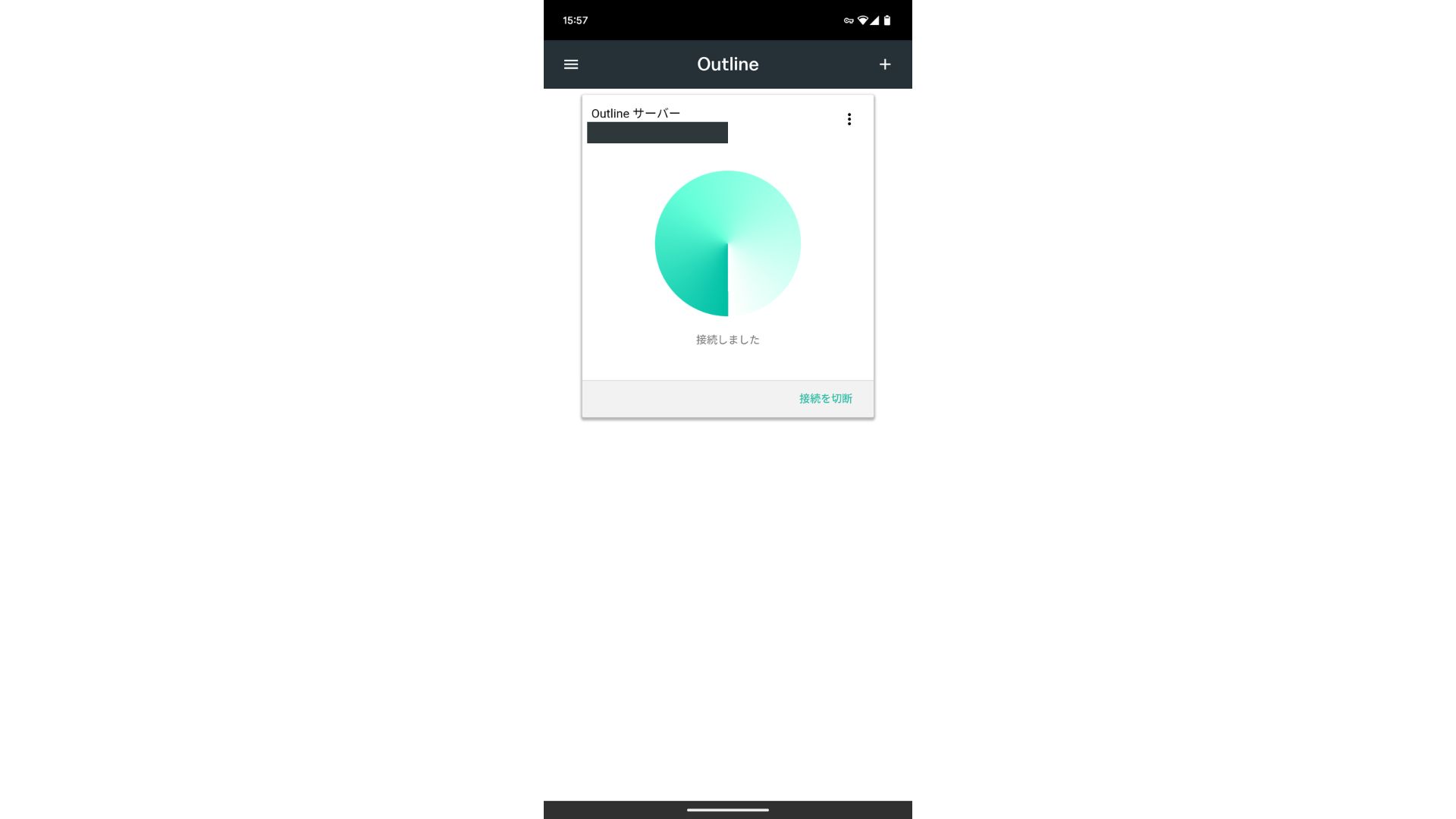
Når serveren er tilføjet, vises en Connect-knap. Når du klikker på denne knap, starter VPN-forbindelsen.
Dermed er din VPN-forbindelse ved hjælp af Outline VPN og ABLENET VPS er fuldført. Din internettrafik er krypteret, hvilket gør den mere sikker, og den vil blive dirigeret gennem placeringen af den server, du har valgt.
ABLENET VPS og Outline VPN er hurtige og behagelige
Folk siger ofte, at internethastigheden er langsommere over en VPN, så du undrer dig måske over, hvor hurtig ABLENET VPS er. Da jeg målte den, nåede den op på 130 Mbps, hvilket viser, at den yder en behagelig ydeevne uden frustration.
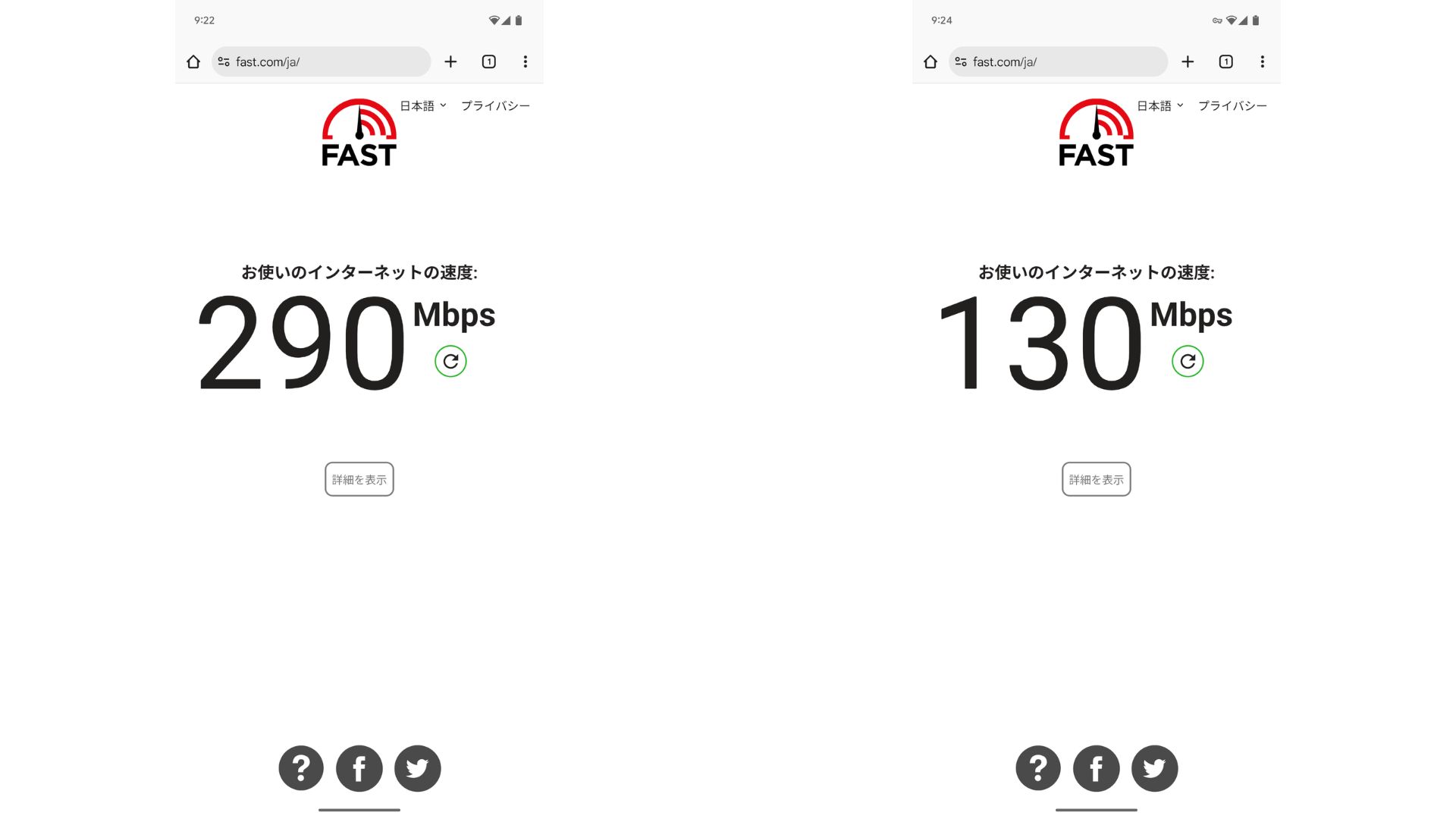
Sammenlignet med ikke at have en VPN, bevarer den omkring halvdelen af hastigheden. Grunden til, at den kan nå dette ydeevneniveau, er at ABLENET VPS bruger en delt 200 Mbps-forbindelse. Da 100 Mbps generelt er mere almindeligt, er dette hurtigt.

Hikaru Ono
Takket være ABLENET VPS var jeg i stand til at kommunikere med en meget høj hastighed.
ABLENET VPS Specifikationer og Priser
| Servertype | VPS |
| Connection hastighed | Delt 200 Mbps |
| IPv4 | 1 adresse |
| IPv6 | 65.536 adresser |
| Trafikgrænse | Ubegrænset |
| Anbefalet abonnement og kontraktperiode | V1 årligt abonnement |
| Virtuel CPU | 2 kerner |
| Hukommelse | 1,5 GB |
| Lagerplads | 40 GB SSD eller 100 GB HDD |
| Prøveperiode / refusionsgaranti | 10 dages gratis prøveperiode |
| Månedlig pris (12-måneders kontrakt) | 968 yen |
| Oprettelsesgebyr | Gratis |
| Support | |
| Oppetid | 99,99 % eller højere |
| Operativsystem (OS) | Ubuntu Server 22.04 LTS / Ubuntu Server 20.04 LTS / AlmaLinux 9.5 / AlmaLinux 8.10 / Rocky Linux 9.5 / Rocky Linux 8.10 / Oracle Linux 9.5 / Oracle Linux 8.10 / CentOS Stream8 / CentOS Stream9 / Minecraft Server(ubuntu/java/Integrated)/Rust Server(ubuntu)/Palworld Server(ubuntu)/ARK Server(ubuntu)/7days Server(ubuntu)/Valheim Server(ubuntu)/Ubuntu Desktop 22.04 med MT4/5/Ubuntu Desktop 22.04 med AutoGPT/ CentOS 7.9 med mere |
Opsummering
Med Outline VPN, som gør det let at bygge en VPN, kan selv folk, der aldrig har brugt en VPN før, komme i gang på kort tid.
Men da VPN-forbindelser har en tendens til at være langsommere, anbefaler jeg ABLENET VPS, som giver en hurtig forbindelse. Med årlig afregning koster den mindre end 1.000 yen om måneden, så den tilbyder også fremragende værdi for pengene. Frem for alt giver dens ubegrænsede dataoverførsel og stabilitet med over 99,99 % oppetid dig mulighed for at nyde et stressfrit internetmiljø.
ABLENET VPS er en stabil VPS med en oppetid på 99,99 %, selvom den er prisvenlig. Den tilbyder et bredt udvalg af abonnementer, lige fra det lettilgængelige V0-abonnement med 0,5 GB hukommelse til det højtydende V5-abonnement med 16 GB hukommelse, så du kan finde den rigtige løsning til dine behov.
10 dages gratis prøveperiode