১০ দিনের ফ্রি ট্রায়াল
PR
VPS
১৩০Mbps-এর বেশি দ্রুত: ABLENET VPS-এ Outline VPN তৈরি করা
প্রকাশিত: 2025.06.26
আপডেট: 2025.06.26
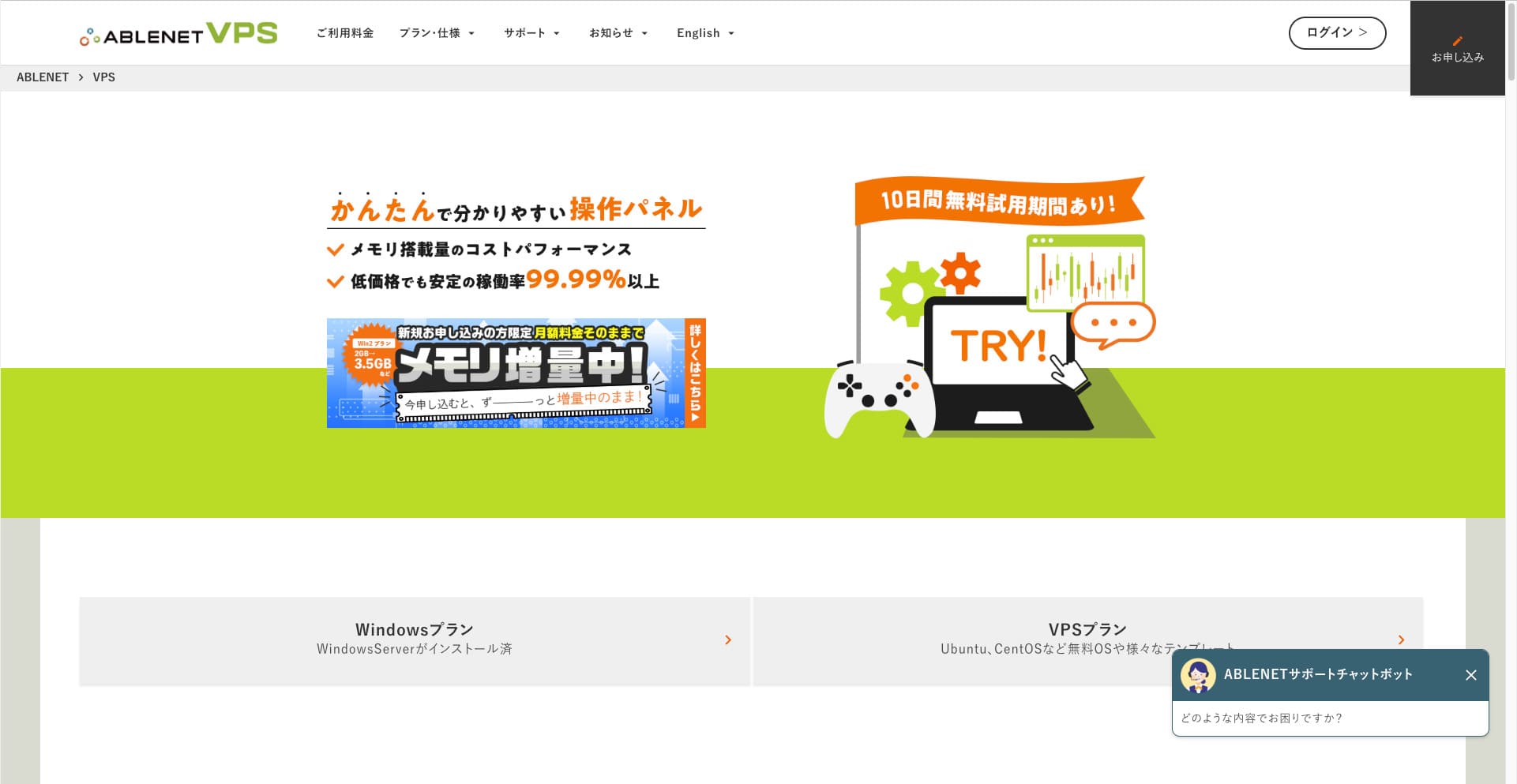
ভিপিএন-এর মাধ্যমে ইন্টারনেট ব্রাউজ করতে চান এমন মানুষ দিন দিন বাড়ছে।
একটি ভিপিএন (ভার্চুয়াল প্রাইভেট নেটওয়ার্ক) ব্যবহার করা নিরাপত্তা বাড়ায় এবং বিদেশ থেকে কেবল জাপানের জন্য উপলব্ধ পরিষেবা ও কনটেন্ট অ্যাক্সেস করতে দেয়।
তা সত্ত্বেও, ভিপিএন সংযোগের গতি এবং নিরাপত্তা নিয়ে আপনি স্বাভাবিকভাবেই চিন্তিত থাকেন।
একটি নিরাপদ এবং দ্রুত ভিপিএন সংযোগ পাওয়ার সবচেয়ে ভালো উপায় হলো নিজের ভিপিএন পরিবেশ তৈরি করা। এটি করতে আপনার ভিপিএন-এর জন্য একটি সার্ভার পরিবেশ প্রয়োজন। এবার, আমি নিম্নলিখিতগুলো ব্যবহার করে একটি ভিপিএন পরিবেশ তৈরি করেছি: ABLENET VPS এবং আউটলাইন ভিপিএন।
কেন আমি ABLENET VPS-এর সুপারিশ করি
আমার বেছে নেওয়ার সবথেকে বড় কারণ ছিল ABLENET VPS হলো এর স্থিতিশীলতা।
- পরিচালনার ইতিহাস: এটি জাপানের অন্যতম শীর্ষ সুপ্রতিষ্ঠিত সার্ভার কোম্পানি, যা ২৫ বছরেরও বেশি সময় ধরে পরিচালিত হচ্ছে। এর VPS পরিষেবাও ২০১১ সাল থেকে উপলব্ধ রয়েছে।
- আপটাইম: ৯৯.৯৯%-এর বেশি আপটাইম আপনাকে স্পষ্ট এবং পরিমাপযোগ্য মানসিক শান্তি দেয়।
- ডেটা ট্রান্সফারের পরিমাণ: এটি আনলিমিটেড ডেটা ট্রান্সফারও অফার করে, যা এটিকে ভিপিএন হিসেবে ব্যবহারের জন্য আদর্শ করে তোলে।
জাপানে, Xserver এবং Sakura Internet-ও VPS পরিষেবা অফার করে, তবে ABLENET কোনোভাবেই কম নির্ভরযোগ্য নয়। আনলিমিটেড ডেটা ট্রান্সফার এখন অনেক সার্ভার কোম্পানিতে আদর্শ হতে পারে, তবে ABLENET ছিল অন্যতম অগ্রযুদ্ধ।

Hikaru Ono
এই তথ্যটি অতীতে অফিসিয়াল সাইটে প্রদর্শিত হয়েছিল, তবে মনে হয় ABLENET-এ এমন একজন পাওয়ার ইউজারও ছিলেন যিনি এক মাসেই ২৫টিবি ব্যবহার করেছিলেন। আপনি সত্যিই বলতে পারেন যে ডেটা ট্রান্সফার সত্যিই আনলিমিটেড ছিল।
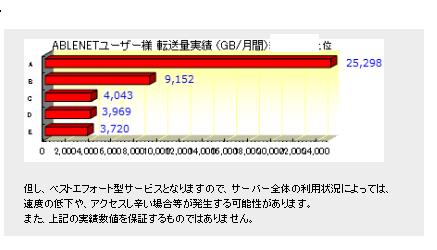
তাই আপনি যদি সিনেমা ও ভিডিও কনটেন্ট দেখা বা প্রোগ্রামিংয়ের কাজের জন্য প্রচুর ডেটা ব্যবহার করতে চান, তবে আমি সুপারিশ করব ABLENET VPS-এ আপনার ভিপিএন তৈরি করা।
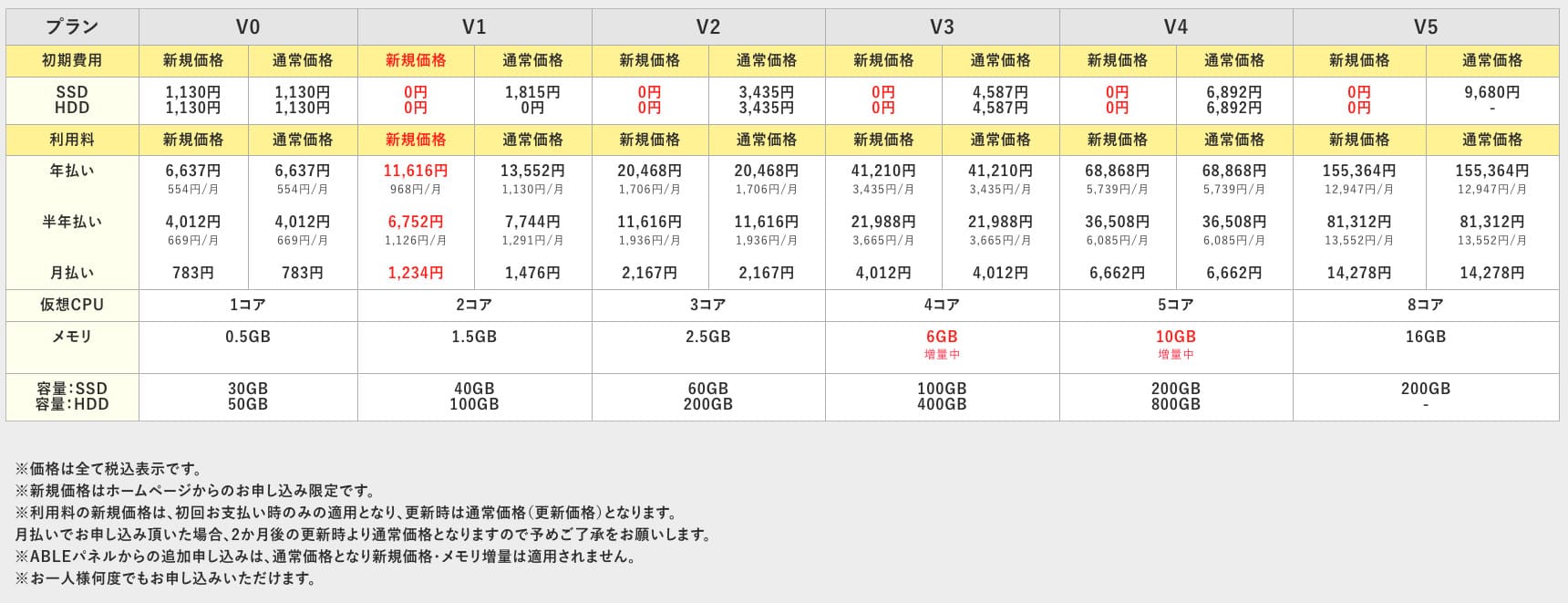
ABLENET VPS সাশ্রয়ী মূল্যের হওয়া সত্ত্বেও এটি ৯৯.৯৯% আপটাইমসহ একটি স্থিতিশীল VPS। এটি ০.৫জিবি মেমরির অ্যাক্সেসযোগ্য V0 প্ল্যান থেকে শুরু করে ১৬জিবি মেমরির হাই-স্পেক V5 প্ল্যান পর্যন্ত বিস্তৃত পরিসরের প্ল্যান অফার করে, যাতে আপনি আপনার প্রয়োজন অনুযায়ী সঠিক বিকল্পটি খুঁজে পেতে পারেন।

আউটলাইন ভিপিএন কী? একটি সহজ ভিপিএন সেটআপ যা নতুনরাও বুঝতে পারবেন
ভিপিএন (ভার্চুয়াল প্রাইভেট নেটওয়ার্ক) হলো এমন একটি প্রযুক্তি যা ইন্টারনেটে একটি এনক্রিপ্টেড টানেল তৈরি করে এবং তৃতীয় পক্ষ দ্বারা আড়ি পাতা ও পরিবর্তন করা প্রতিরোধ করে। একটি ভিপিএন সার্ভারের মাধ্যমে আপনার ট্রাফিক চালনা করে এটি আপনার আসল আইপি ঠিকানাও লুকিয়ে রাখতে পারে এবং নাম প্রকাশ না করার সুবিধা বাড়িয়ে দেয়।
Outline VPN এই ধরণের ভিপিএন সংযোগকে অত্যন্ত সহজ করার জন্য ডিজাইন করা হয়েছে।
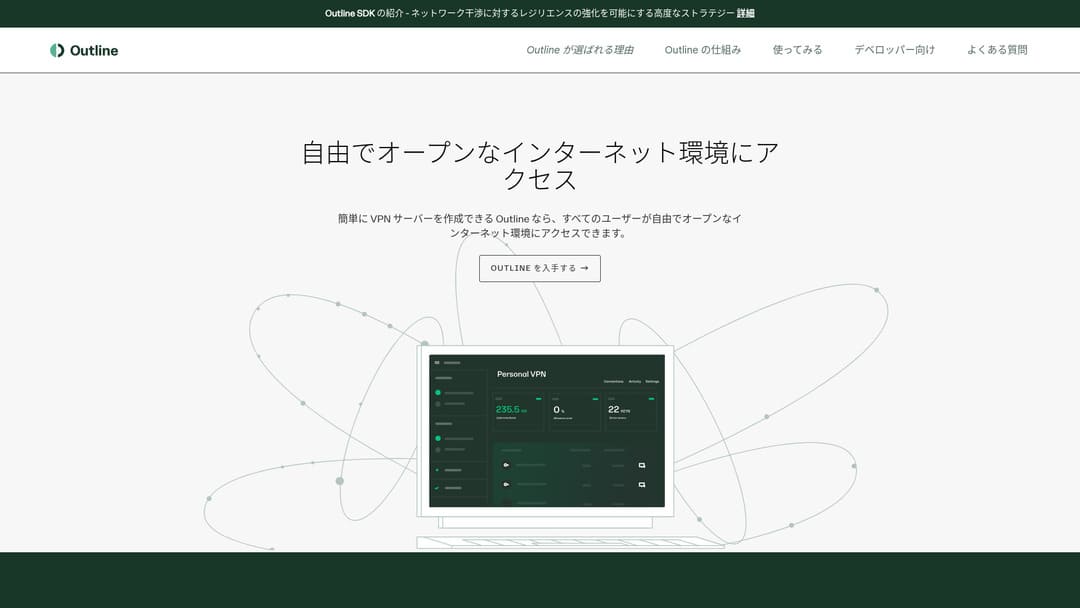
"আউটলাইন" হলো ভিপিএন-এর মাধ্যমে সংযোগ করার জন্য গুগলের অধীনস্থ কোম্পানি জিগস (Jigsaw)-এর একটি বিনামূল্যের এবং সহজ অ্যাপ্লিকেশন। এমনকি আপনি যদি এর আগে কখনো ভিপিএন সেট আপ না করে থাকেন, তবুও মাত্র কয়েকটি ক্লিকে এটি শুরু করতে পারেন।
অফিসিয়াল সাইট থেকে ডাউনলোড করুন
Hikaru Ono
এবার, আমি আউটলাইন ভিপিএন ব্যবহার করছি যাতে যে কেউ সহজেই একটি ভিপিএন তৈরি করতে পারেন।
৬টি সহজ ধাপে ABLENET VPS-এ আউটলাইন ভিপিএন তৈরি করুন
এখন, আমি আপনাকে ভিপিএন তৈরির বাস্তব পদক্ষেপগুলোর মধ্য দিয়ে নিয়ে যাই Outline VPN -এ ABLENET VPS বিস্তারিতভাবে。
ধাপ ১: ABLENET VPS দিয়ে শুরু করুন
আপনি যদি এখনও ABLENET VPS, প্রথমে সেটি সম্পন্ন করুন।
ABLENET VPS দিয়ে শুরু করুন
- STEP.1ABLENET VPS-এ একটি প্ল্যান বেছে নিন
যান ABLENET VPS এবং "Apply"-তে ক্লিক করুন।
আপনি উইন্ডোজ প্ল্যান বা ভিপিএস প্ল্যান যেকোনো একটি বেছে নিতে পারেন। এই ভিপিএন সেটআপের জন্য, ভিপিএস প্ল্যানটি ব্যবহার করুন। আমি কোনো প্রাথমিক ফি ছাড়া এবং দ্রুত SSD স্টোরেজ সহ V1 প্ল্যানটির সুপারিশ করছি।
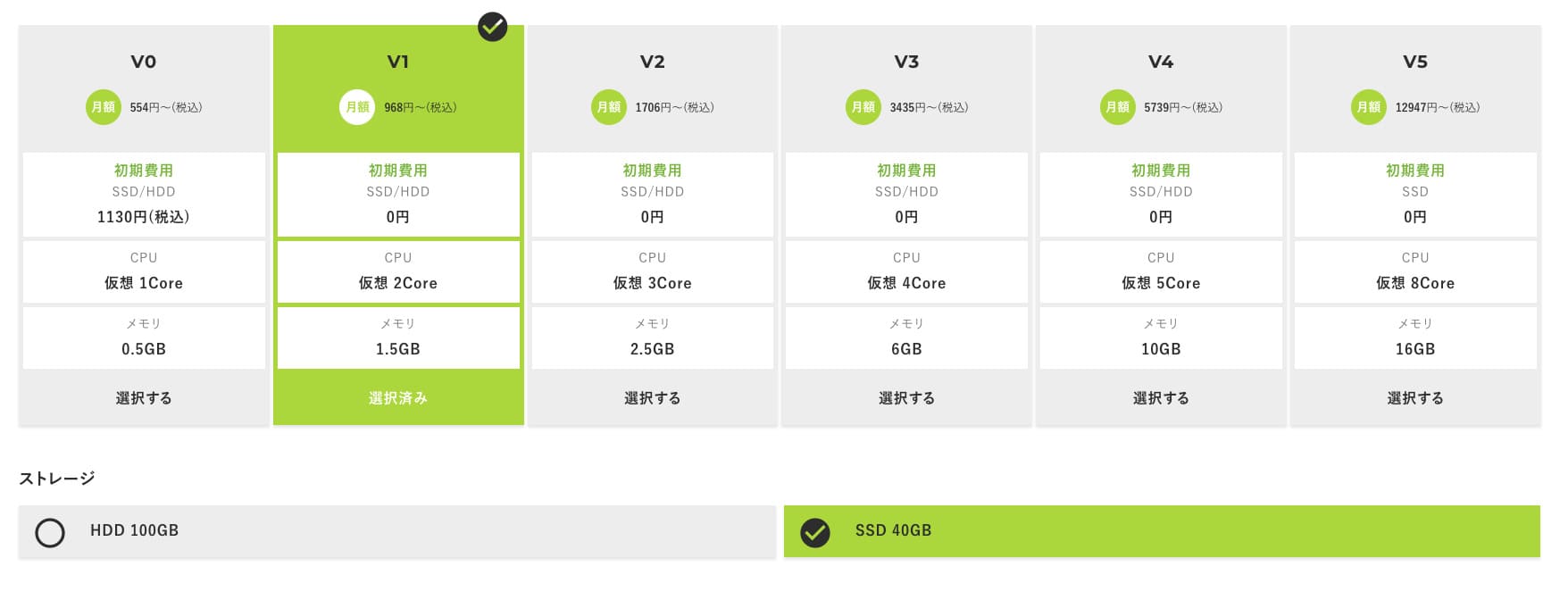
V1 প্ল্যান দিয়ে শুরু করুন, এবং পরবর্তীতে যদি স্পেসিফিকেশন কম মনে হয়, তবে V2 বা V3-তে আপগ্রেড করুন। আপনার পরিষেবা শুরু হওয়ার পর, আপনি ABLE প্যানেল থেকে স্পেক আপগ্রেডের অনুরোধ করতে পারেন।
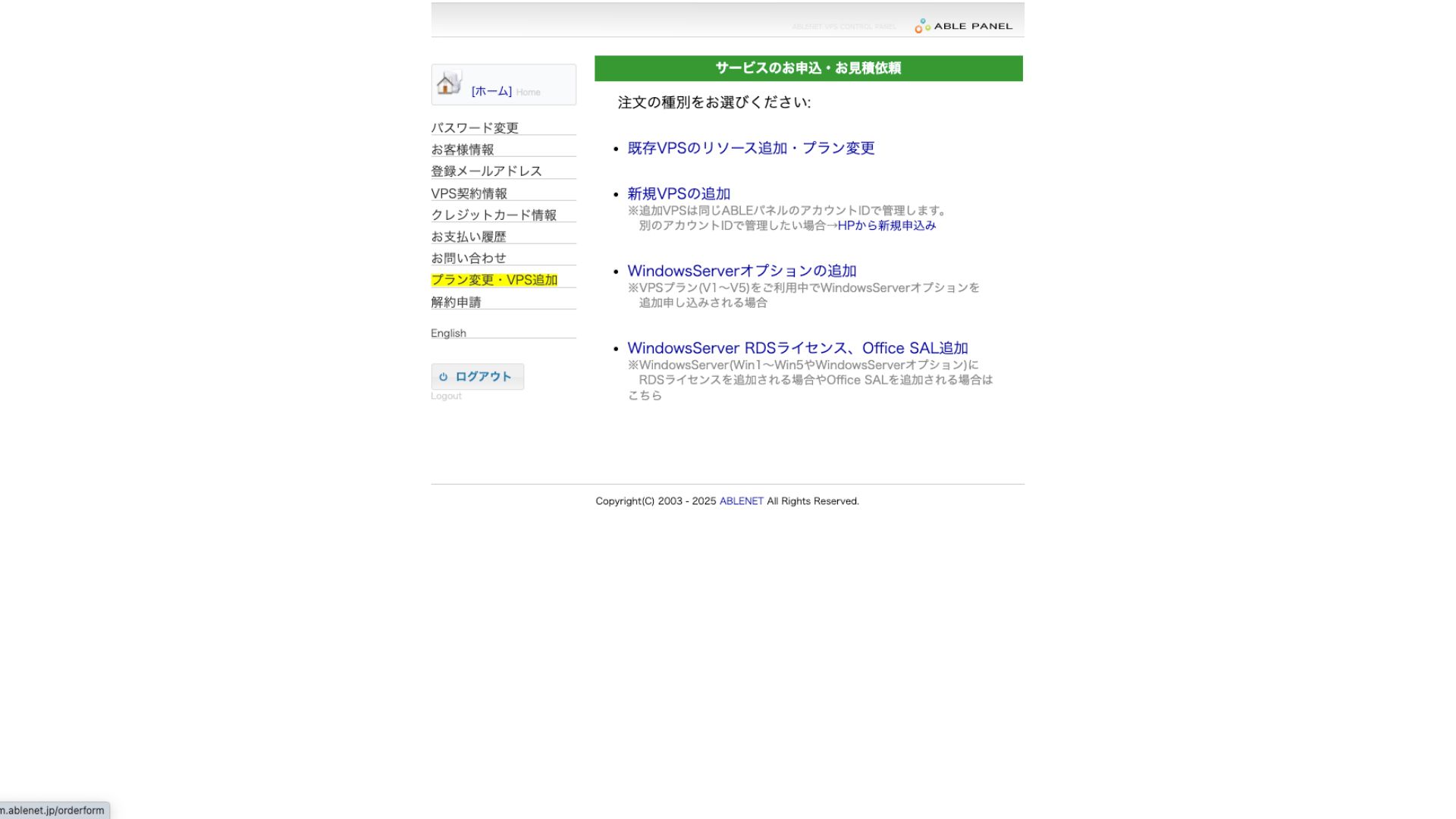
পেমেন্ট পদ্ধতির জন্য, ক্রেডিট কার্ডের ট্রায়াল পিরিয়ড ব্যবহার করা ঠিক আছে।

ব্যবহারের শর্তাবলী পর্যালোচনা করুন এবং বক্সে টিক দিন।
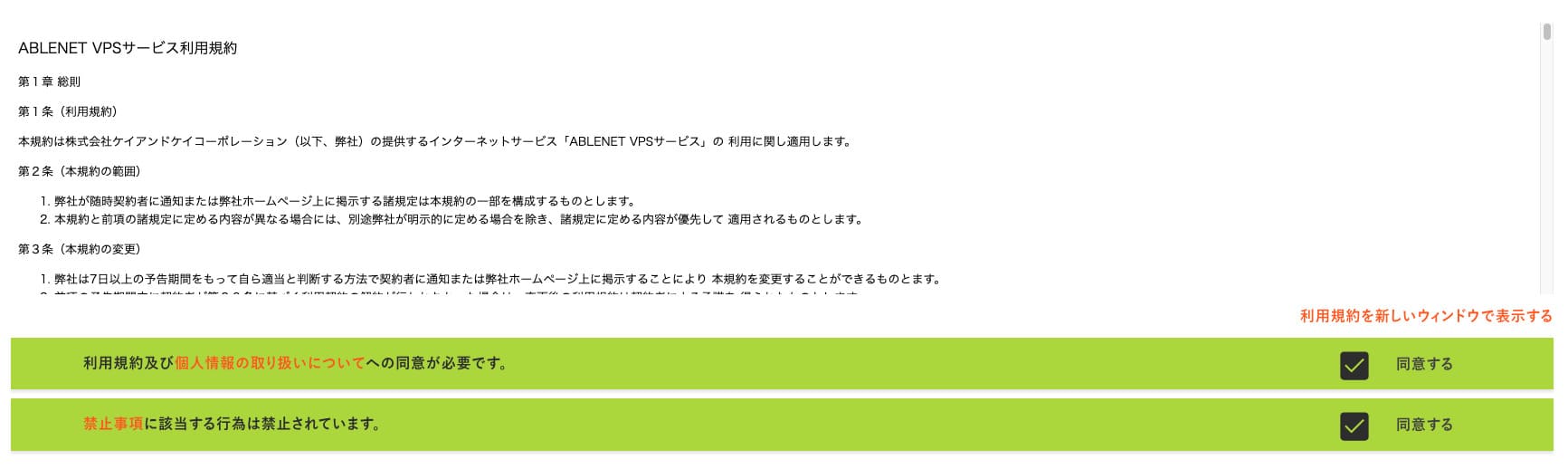
"প্রোসিড টু সিলেক্ট দ্য কন্ট্রাক্ট টার্ম"-এ ক্লিক করুন।
- STEP.2চুক্তির মেয়াদ নির্বাচন করুন
সার্ভারের মেয়াদের জন্য বার্ষিক চুক্তিটি আরও লাভজনক। যেহেতু আমরা এবার VPS প্ল্যানটি ব্যবহার করছি, তাই কোনো অতিরিক্ত অপশনের প্রয়োজন নেই।
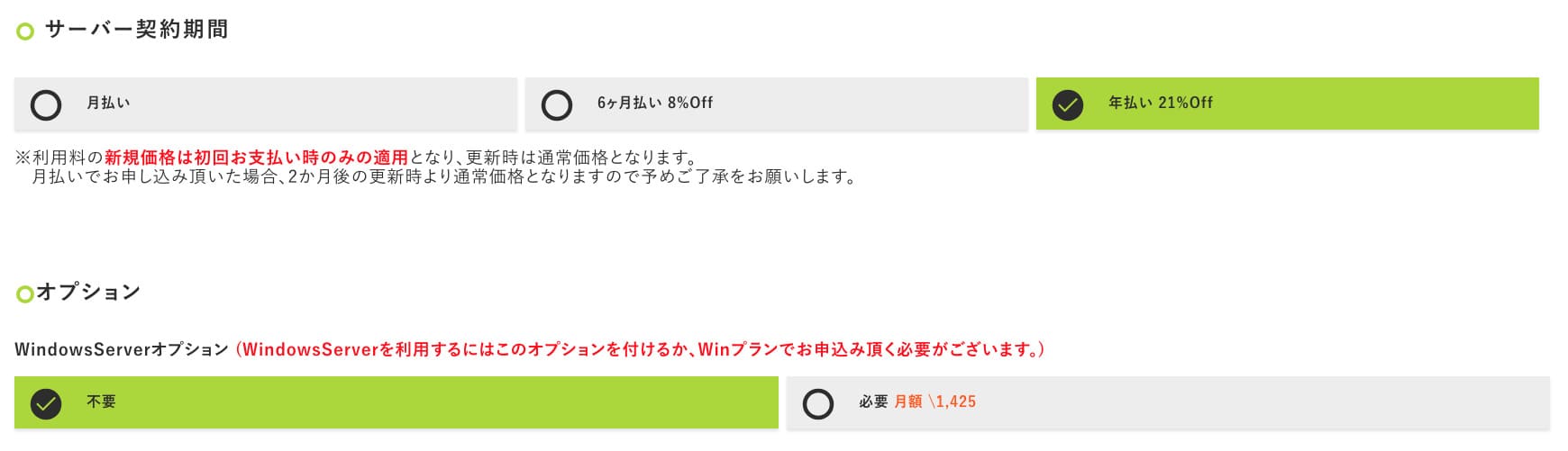
পূরণ করার পর, "প্রোসিড টু দ্য এস্টিমেট স্ক্রিন"-এ ক্লিক করুন। এস্টিমেটটি পর্যালোচনা করুন এবং সবকিছু ঠিক থাকলে "প্রোসিড টু এন্টার অ্যাপ্লিকেন্ট ইনফরমেশন"-এ ক্লিক করুন।
- STEP.3আবেদনকারীর তথ্য লিখুন
আপনার নাম, ঠিকানা এবং অন্যান্য আবেদনকারীর বিবরণ লিখুন। অর্ডার পর্যালোচনা স্ক্রিনে এগিয়ে যান এবং আবেদনটি সাবমিট করুন।
- STEP.4পেমেন্টের তথ্য লিখুন
আপনি যদি ক্রেডিট কার্ডের মাধ্যমে অর্থ প্রদান করেন, তবে কার্ডধারীর তথ্য এবং অন্যান্য প্রয়োজনীয় বিবরণ লিখুন। সবকিছু সঠিক হলে, সাবমিট করতে "Confirm order"-এ ক্লিক করুন।
আপনার VPS-এর তথ্যসহ ইমেলটি পাওয়ার পর আবেদনটি সম্পন্ন হবে।
ধাপ ২: আউটলাইন ম্যানেজার ইনস্টল করুন - সহজ সেটআপ
এরপরে, আপনার কম্পিউটারে আউটলাইন ম্যানেজার ইনস্টল করুন যাতে আপনি ভিপিএন সার্ভার কনফিগার এবং পরিচালনা করতে পারেন।
VPN সেটআপ প্রসঙ্গে: Install Outline Manager
- STEP.1আউটলাইন অফিসিয়াল সাইট ভিজিট করুন
যান Outline।
- STEP.2VPN সেটআপ প্রসঙ্গে: Download Outline Manager
"Get Outline Manager" সেকশন থেকে আপনার কম্পিউটারের অপারেটিং সিস্টেমের (উইন্ডোজ, ম্যাকওএস বা লিনাক্স) সাথে সামঞ্জস্যপূর্ণ আউটলাইন ম্যানেজারের সংস্করণটি ডাউনলোড করুন।
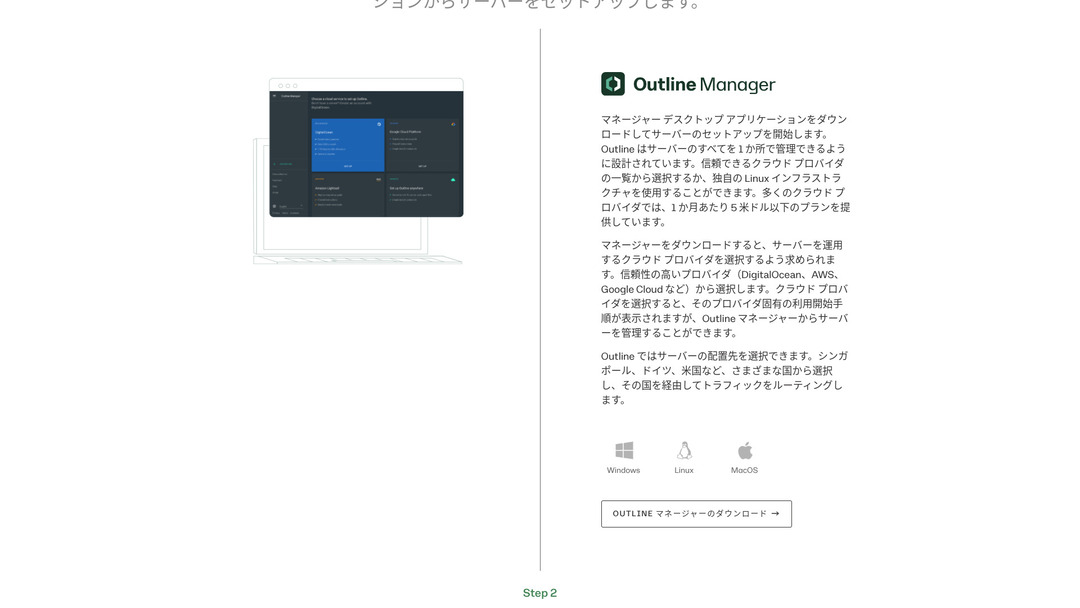
- STEP.3VPN সেটআপ প্রসঙ্গে: Install
ডাউনলোড করা ফাইলটি রান করুন এবং আউটলাইন ম্যানেজার ইনস্টল করতে স্ক্রিনের নির্দেশনাবলী অনুসরণ করুন।
ধাপ ৩: আউটলাইন ম্যানেজার দিয়ে আপনার ভিপিএস-এ একটি আউটলাইন সার্ভার তৈরি করুন
আউটলাইন ম্যানেজার ব্যবহার করে একটি আউটলাইন সার্ভার ইনস্টল করুন ABLENET VPS।
আউটলাইন ম্যানেজার দিয়ে আপনার ভিপিএস-এ একটি আউটলাইন সার্ভার তৈরি করুন
- STEP.1আউটলাইন ম্যানেজার চালু করুন
ইনস্টলেশন সম্পন্ন হওয়ার পর, আউটলাইন ম্যানেজার চালু করুন।
- STEP.2"Set up server"-এ ক্লিক করুন
আপনি যখন এটি প্রথমবার চালু করবেন, তখন সার্ভার সেটআপ স্ক্রিনটি উপস্থিত হবে। "Set up server"-এ ক্লিক করুন।
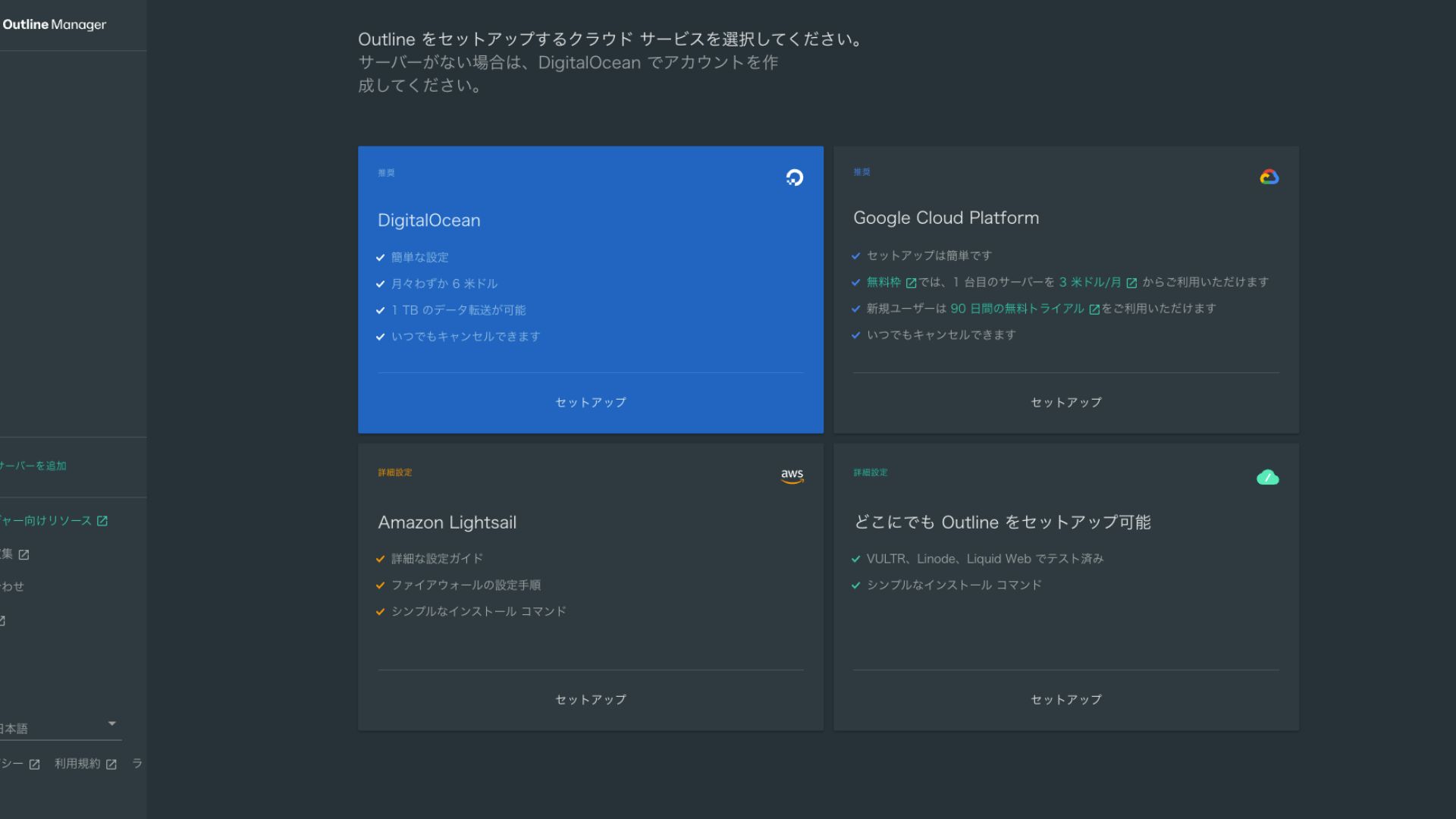
- STEP.3"Set up Outline anywhere" নির্বাচন করুন
আপনি ক্লাউড প্রোভাইডার নির্বাচন স্ক্রিন দেখতে পাবেন। "Set up Outline anywhere" বেছে নিন।
- STEP.4ইনস্টলেশন কমান্ডটি প্রবেশ করান
স্ক্রিনটি আপনার ভিপিএস-এ আউটলাইন সার্ভার ইনস্টল করতে ব্যবহৃত কমান্ডটি প্রদর্শন করে। ম্যানুয়ালি এই কমান্ডটি প্রবেশ করান।
Hikaru Onoযেহেতু আপনি এটি কপি এবং পেস্ট করতে পারবেন না, তাই কোনো ভুল না করার ব্যাপারে সতর্ক থাকুন।
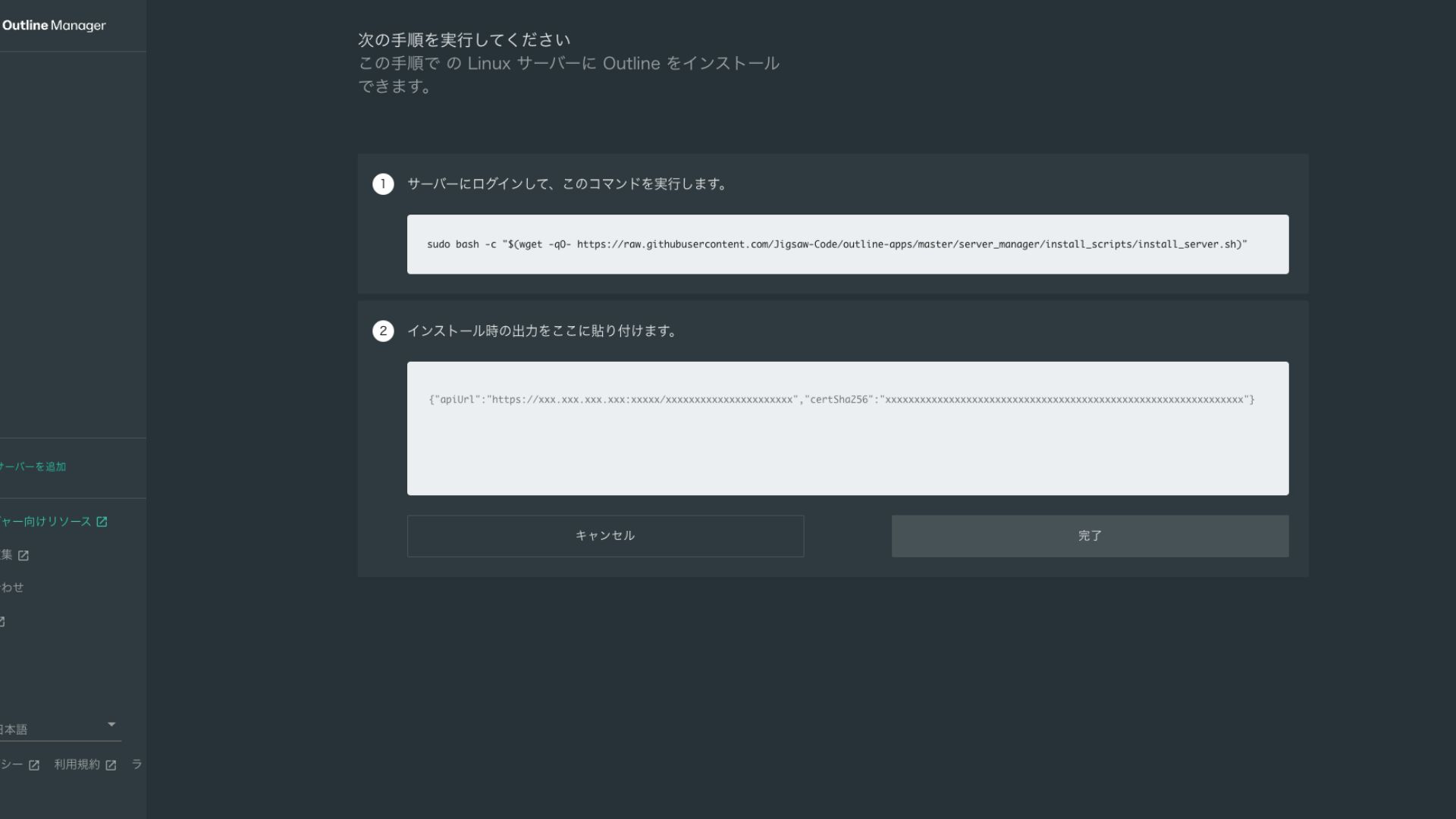
- STEP.5কমান্ডটি রান করুন
- ইনস্টলেশন সম্পন্ন হতে কয়েক মিনিট সময় লাগতে পারে। স্ক্রিনে প্রদর্শিত বার্তাগুলো মনোযোগ সহকারে দেখুন এবং এটি শেষ হওয়া পর্যন্ত অপেক্ষা করুন।
- পথে আপনাকে কয়েকটি প্রশ্ন জিজ্ঞাসা করা হতে পারে, তবে বেশিরভাগ ক্ষেত্রে ডিফল্ট বিকল্পটি গ্রহণ করতে এন্টার চাপাই যথেষ্ট।
- STEP.6আউটলাইন ম্যানেজারে তথ্য প্রবেশ করান
ইনস্টলেশন শেষ হলে, আউটলাইন ম্যানেজার একটি স্ক্রিন প্রদর্শন করে যেখানে আপনি "Server details" প্রবেশ করান।
- Admin API URL: VPS-এ ইনস্টলেশনের সময় তৈরি হওয়া API URLটি এখানে প্রদর্শিত হবে। সাধারণত এটি আউটলাইন ম্যানেজারে স্বয়ংক্রিয়ভাবে প্রতিফলিত হয়, তবে তা না হলে SSH টার্মিনালে প্রদর্শিত API URLটি কপি এবং পেস্ট করুন।
- সার্ভারের অবস্থান (ঐচ্ছিক): আপনি সার্ভারের অবস্থান লিখতে পারেন (যেমন, টোকিও, জাপান)। এটি কেবল পরিচালনার জন্য এবং সংযোগকে প্রভাবিত করে না।
- STEP.7"ডান উইথ সার্ভার"-এ ক্লিক করুন
সব তথ্য দেওয়ার পর, "ডান উইথ সার্ভার"-এ ক্লিক করুন।
ধাপ ৪: একটি অ্যাক্সেস কি তৈরি করুন এবং ভিপিএন সংযোগের অনুমতি দিন
আউটলাইন সার্ভার তৈরি হয়ে গেলে, বাস্তব ভিপিএন সংযোগের জন্য একটি অ্যাক্সেস কি তৈরি করুন।
একটি অ্যাক্সেস কি তৈরি করুন এবং ভিপিএন সংযোগের অনুমতি দিন
- STEP.1আউটলাইন ম্যানেজার স্ক্রিনটি চেক করুন
আউটলাইন ম্যানেজার স্ক্রিনে একটি ডিফল্ট অ্যাক্সেস কি প্রদর্শিত হয়। এখানে এটিকে Key 0 হিসেবে লেবেল করা হয়েছে।
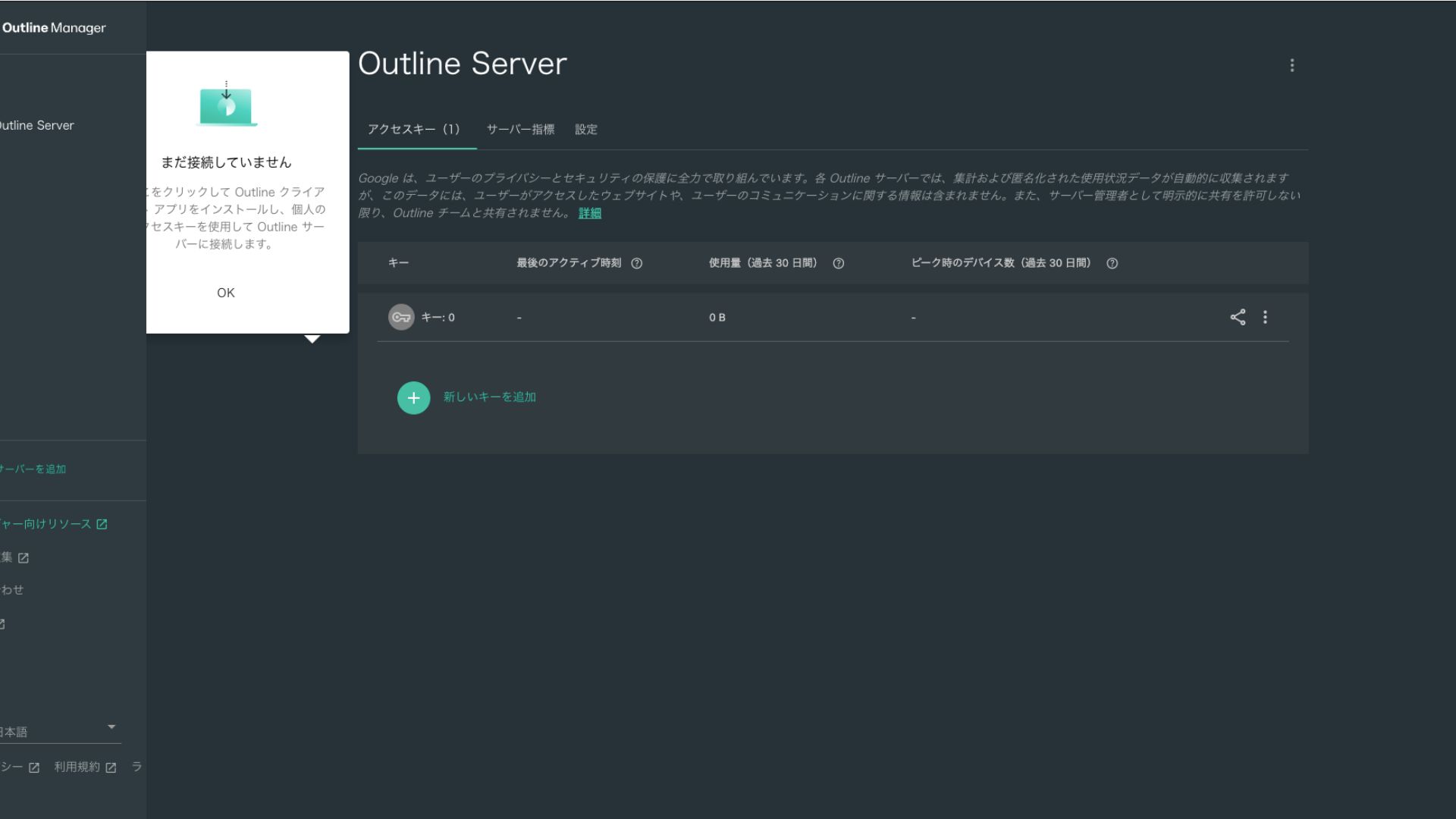
- STEP.2অ্যাক্সেস কি শেয়ার করুন
আপনার তৈরি করা অ্যাক্সেস কি-টি আউটলাইন ক্লায়েন্টের সাথে সংযুক্ত হওয়ার সময় প্রয়োজন হবে। আপনি যখন অ্যাক্সেস কি-টি নির্বাচন করবেন, তখন "Share invite" লেবেলযুক্ত একটি বোতাম উপস্থিত হবে।
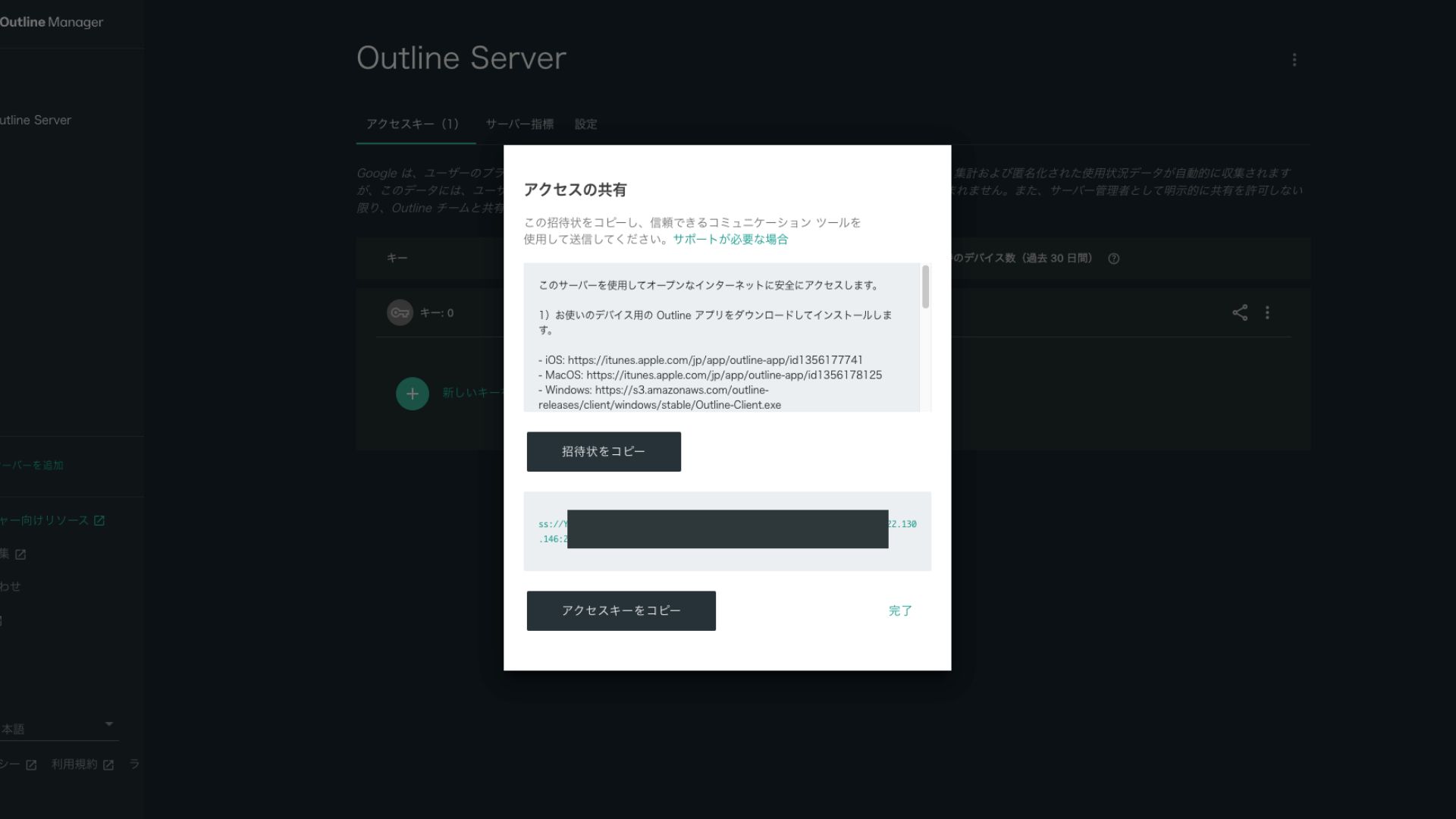
এটি ক্লিক করলে অ্যাক্সেস কি ইউআরএল কপি হয়ে যাবে। ভিপিএন-এর মাধ্যমে সংযুক্ত হতে চান এমন ডিভাইসের সাথে এই ইউআরএলটি শেয়ার করুন।
ধাপ ৫: আউটলাইন ক্লায়েন্ট ইনস্টল করুন এবং ভিপিএন-এ সংযুক্ত হন
ভিপিএন সংযোগের জন্য আপনি যে ডিভাইসটি ব্যবহার করতে চান (পিসি, স্মার্টফোন, ট্যাবলেট ইত্যাদি) তাতে আউটলাইন ক্লায়েন্ট ইনস্টল করুন। এবার, আমি এটি একটি অ্যান্ড্রয়েড স্মার্টফোনে ইনস্টল করেছি।
ইস্যু করা অ্যাক্সেস কি ব্যবহার করে আউটলাইন ভিপিএন-এ সংযুক্ত হন
- STEP.1আউটলাইন ক্লায়েন্ট চালু করুন
আপনার ইনস্টল করা আউটলাইন ক্লায়েন্টটি চালু করুন।
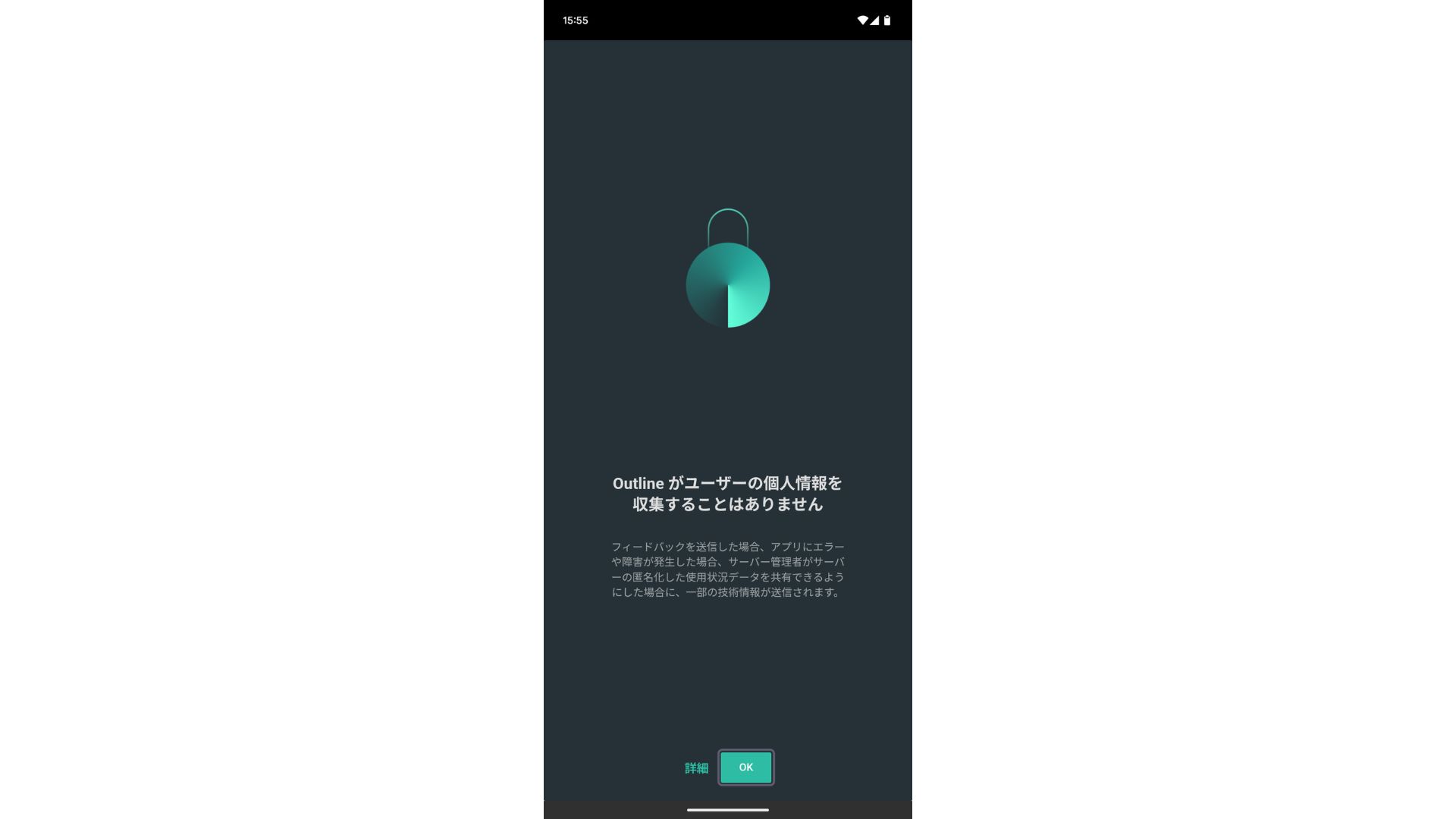
- STEP.2অ্যাক্সেস কি যোগ করুন
- পিসিতে: "Add server" বা অনুরূপ বোতামে ক্লিক করুন, ধাপ ৪-এ কপি করা অ্যাক্সেস কি ইউআরএল পেস্ট করুন এবং "Add server"-এ ক্লিক করুন।
- স্মার্টফোন বা ট্যাবলেটে: আপনি যখন অ্যাপটি খুলবেন, আপনাকে একটি অ্যাক্সেস কি প্রবেশ করাতে বলা হতে পারে। ধাপ ৪-এ শেয়ার করা অ্যাক্সেস কি ইউআরএল কপি এবং পেস্ট করুন। কিউআর কোড দেখালে আপনি সেটিও স্ক্যান করতে পারেন।
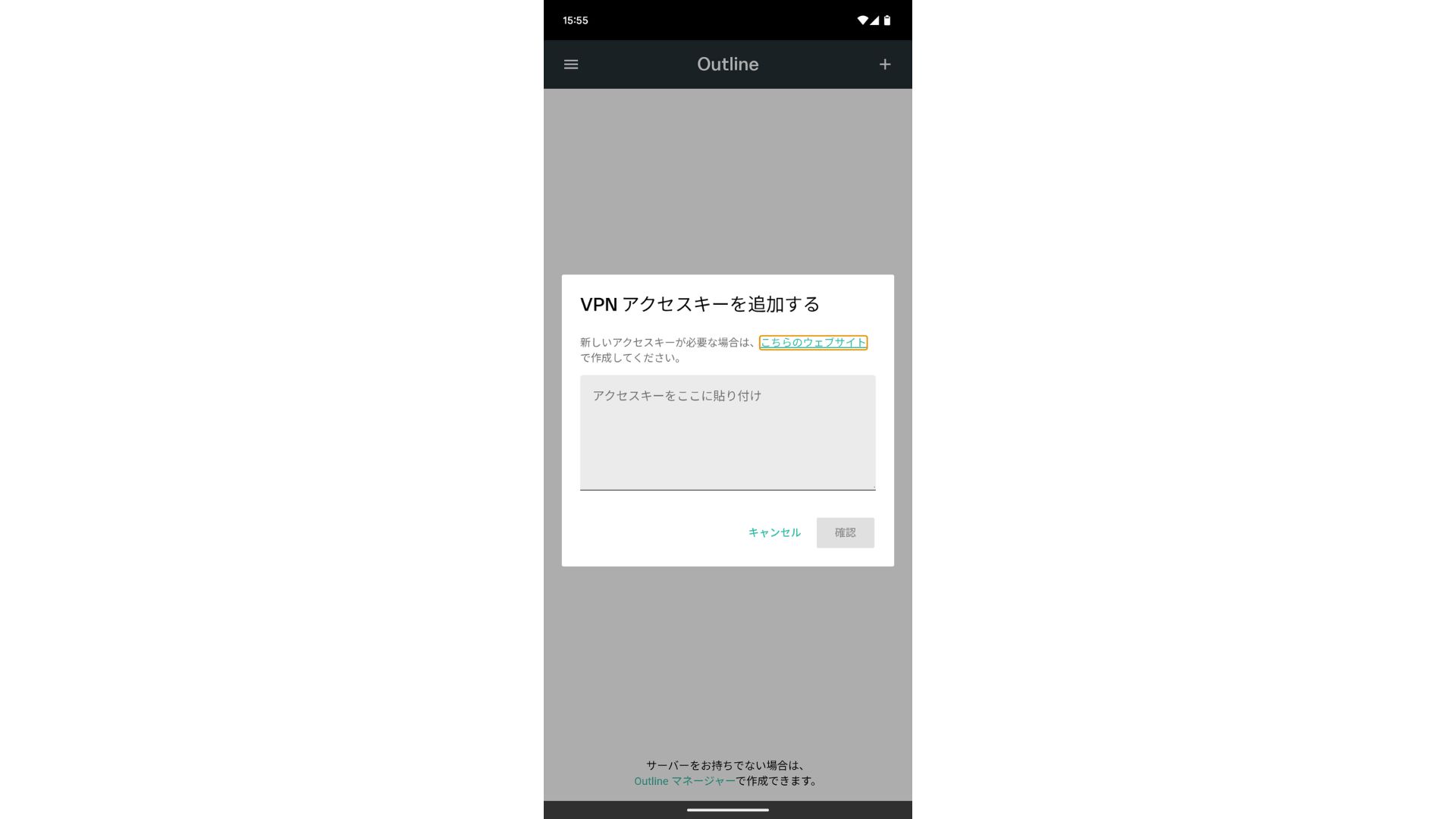
অ্যাক্সেস কি যোগ করার পর, Confirm প্রেস করুন।
- STEP.3সংযুক্ত হন
সার্ভারটি যোগ হয়ে গেলে, "Connect" চাপুন।
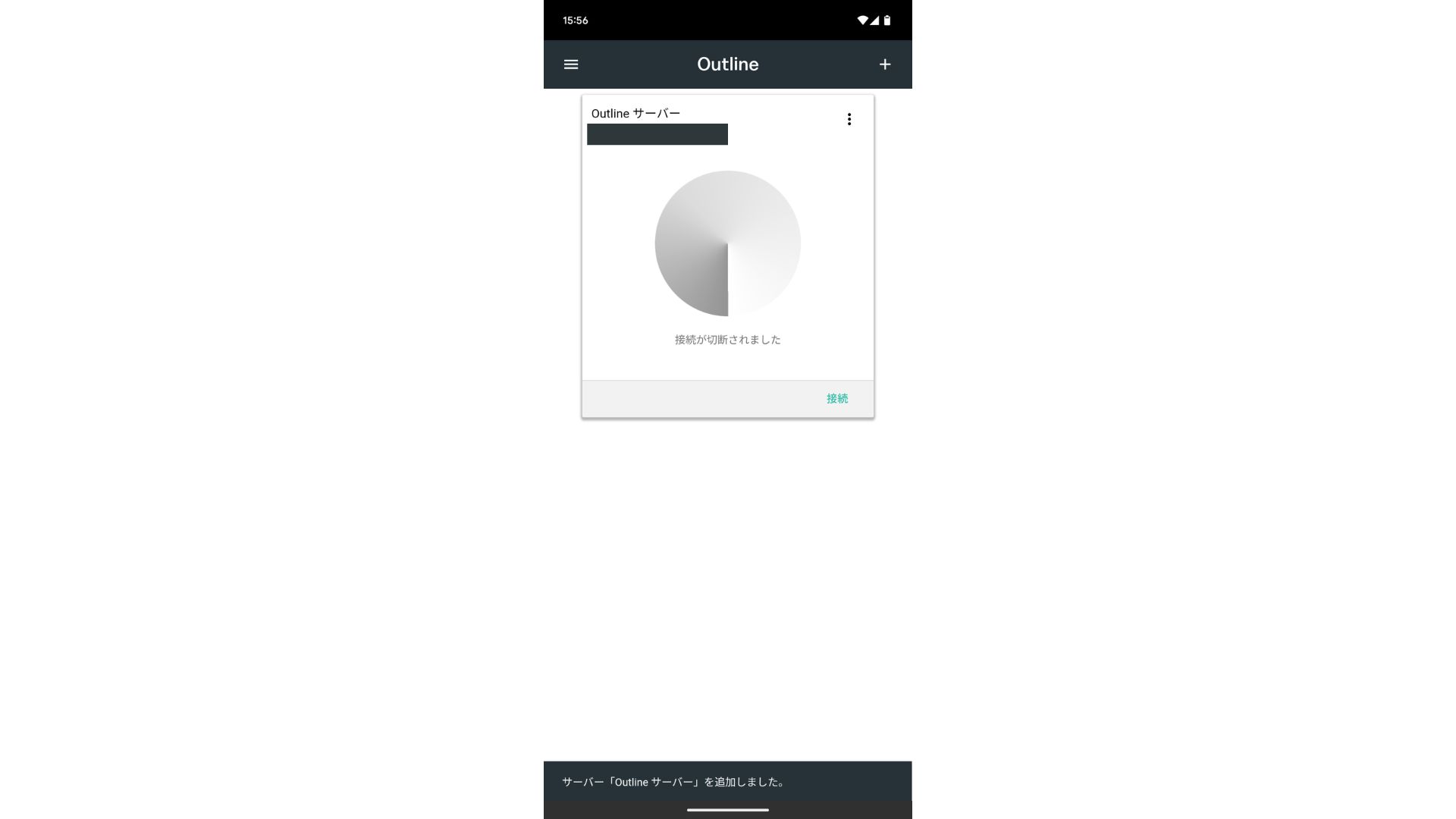
সংযোগের অনুরোধে "OK" ট্যাপ করুন।
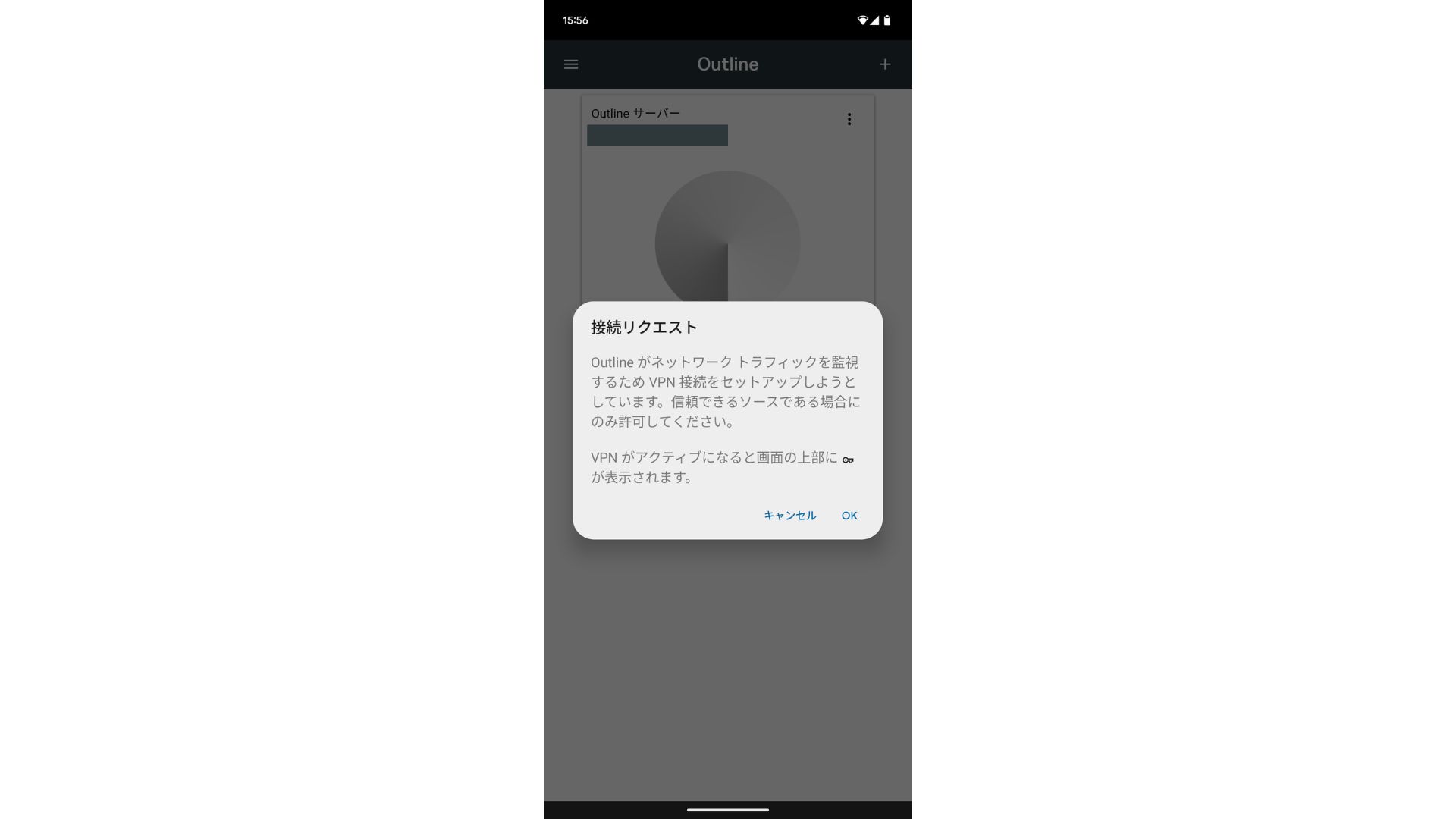
সংযোগটি এখন সম্পন্ন হয়েছে।
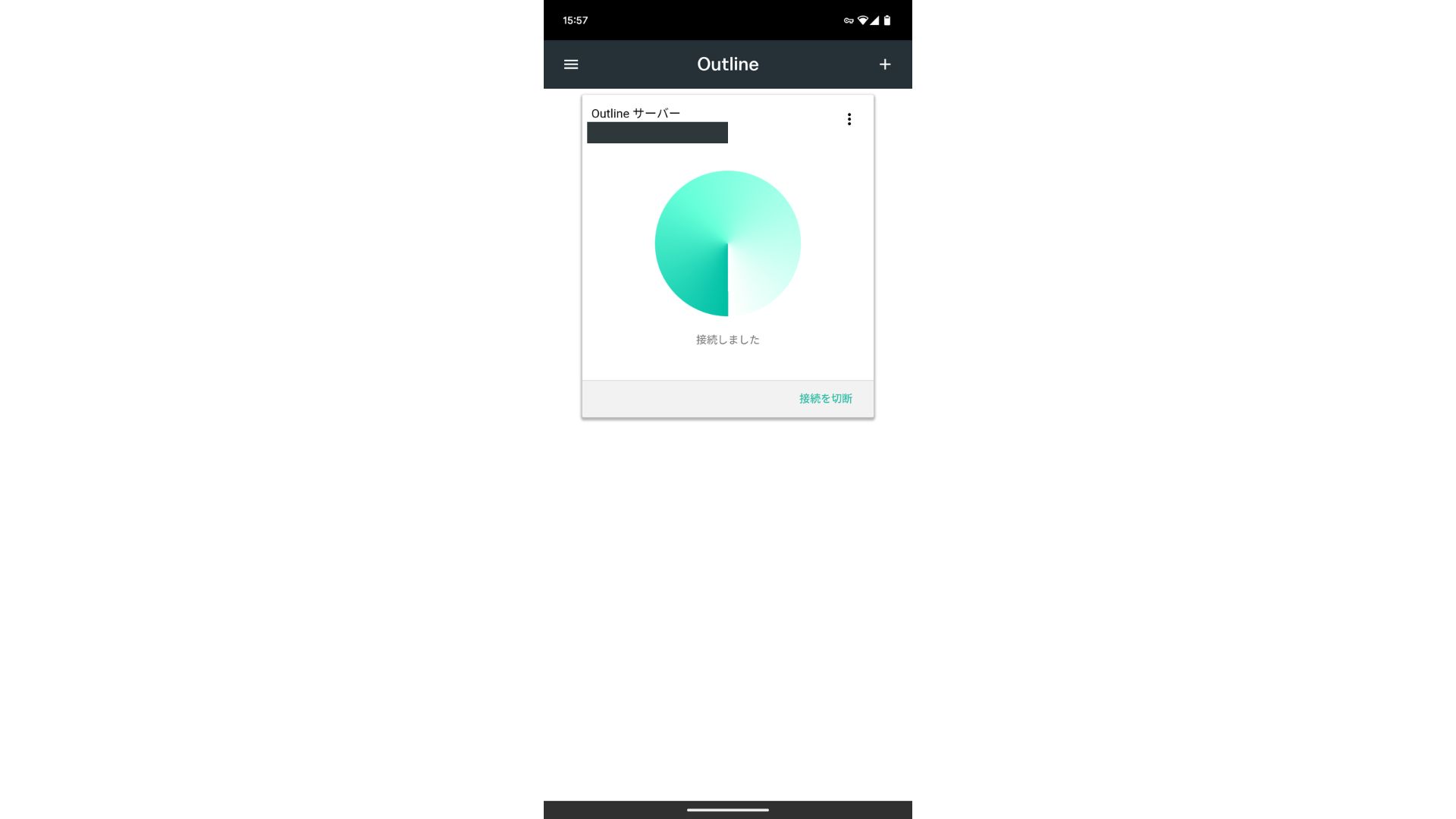
সার্ভারটি যোগ হয়ে গেলে একটি Connect বোতাম প্রদর্শিত হবে। এই বোতামে ক্লিক করলে ভিপিএন সংযোগ শুরু হয়।
এর মাধ্যমে, আপনার ভিপিএন সংযোগ যা ব্যবহার করে Outline VPN এবং ABLENET VPS সম্পন্ন হয়েছে। আপনার internet ট্রাফিক এনক্রিপ্ট করা হয়েছে, যা এটিকে আরও নিরাপদ করে তোলে, এবং এটি আপনার নির্বাচিত সার্ভারের অবস্থানের মাধ্যমে পরিচালিত হবে।
ABLENET VPS এবং আউটলাইন ভিপিএন দ্রুত এবং আরামদায়ক
লোকেরা প্রায়ই বলে যে ভিপিএন-এ ইন্টারনেটের গতি ধীর হয়ে যায়, তাই আপনি হয়তো ভাবছেন যে গতি কতটা দ্রুত ABLENET VPS। যখন আমি এটি পরিমাপ করেছিলাম, তখন এটি ১৩০ এমবিপিএস স্পর্শ করেছিল, যা দেখায় যে এটি কোনো রকম ঝামেলা ছাড়াই আরামদায়ক পারফরম্যান্স প্রদান করে।
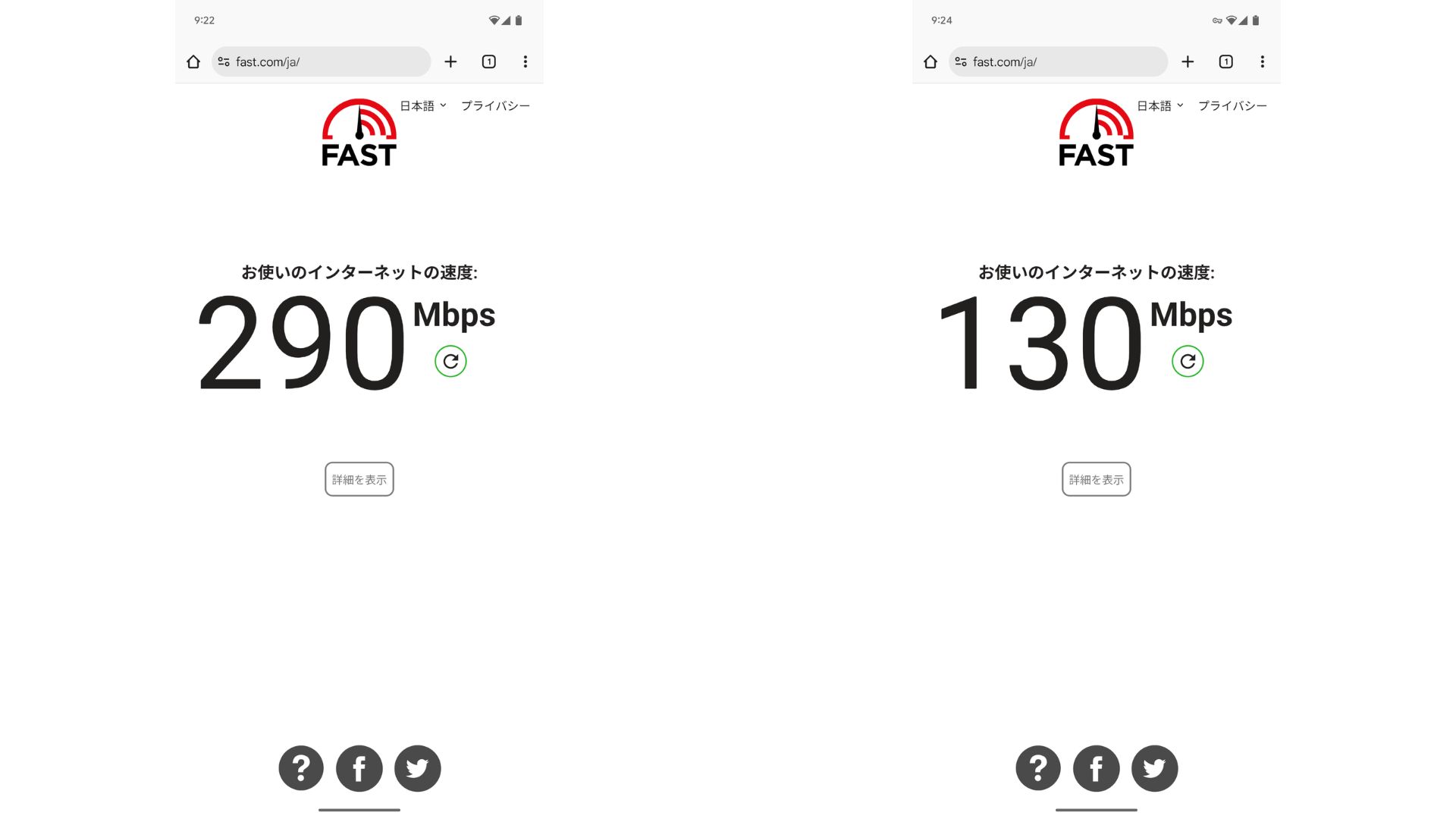
ভিপিএন ছাড়া সংযোগের তুলনায় এটি প্রায় অর্ধেক গতি ধরে রাখে। এটি এই স্তরের পারফরম্যান্স অর্জন করতে পারার কারণ হলো ABLENET VPS একটি শেয়ার্ড ২০০ এমবিপিএস লাইন ব্যবহার করে। যেহেতু সাধারণত ১০০ এমবিপিএস বেশি দেখা যায়, তাই এটি বেশ দ্রুত।

Hikaru Ono
ABLENET VPS-এর কারণে, আমি খুব উচ্চ গতিতে যোগাযোগ করতে সক্ষম হয়েছি।
ABLENET VPS-এর স্পেসিফিকেশন এবং মূল্য নির্ধারণ
| সার্ভারের ধরন | VPS |
| সংযোগের গতি | শেয়ার্ড ২০০ এমবিপিএস |
| VPN সেটআপ প্রসঙ্গে: IPv4 | ১টি ঠিকানা |
| VPN সেটআপ প্রসঙ্গে: IPv6 | ৬৫,৫৩৬টি ঠিকানা |
| ডেটা ট্রান্সফারের পরিমাণ | আনলিমিটেড |
| সুপারিশকৃত প্ল্যান এবং চুক্তির মেয়াদ | V1 বার্ষিক প্ল্যান |
| ভার্চুয়াল সিপিইউ | ২ কোর |
| মেমরি | VPN সেটআপ প্রসঙ্গে: 1.5GB |
| স্টোরেজ | 40GB SSD or 100GB HDD |
| ট্রায়াল / রিফান্ড গ্যারান্টি | ১০ দিনের ফ্রি ট্রায়াল |
| মাসিক মূল্য (১২ মাসের চুক্তি) | ৯৬৮ ইয়েন |
| প্রাথমিক অ্যাডমিন ফি | ফ্রি |
| সাপোর্ট | ইমেল |
| আপটাইম | ৯৯.৯৯% বা তার বেশি |
| OS | Ubuntu Server 22.04 LTS / Ubuntu Server 20.04 LTS / AlmaLinux 9.5 / AlmaLinux 8.10 / Rocky Linux 9.5 / Rocky Linux 8.10 / Oracle Linux 9.5 / Oracle Linux 8.10 / CentOS Stream8 / CentOS Stream9 / Minecraft Server(ubuntu/java/Integrated)/Rust Server(ubuntu)/Palworld Server(ubuntu)/ARK Server(ubuntu)/7days Server(ubuntu)/Valheim Server(ubuntu)/Ubuntu Desktop 22.04 with MT4/5VPN সেটআপ প্রসঙ্গে: /Ubuntu Desktop 22.04 with AutoGPT/ CentOS 7.9 and more |
সংক্ষেপ
আউটলাইন ভিপিএন, যা একটি ভিপিএন তৈরি করা সহজ করে তোলে, এর সাহায্যে এমনকি যারা আগে কখনো ভিপিএন ব্যবহার করেননি তারাও অল্প সময়ের মধ্যে শুরু করতে পারেন।
তবে, ভিপিএন সাধারণত ধীরগতির হওয়ার কারণে, আমি সুপারিশ করছি ABLENET VPS, যা দ্রুত সংযোগ প্রদান করে। বার্ষিক বিলিংয়ের ক্ষেত্রে প্রতি মাসে ১,০০০ ইয়েনেরও কম খরচ হয়, তাই এটি চমৎকার কস্ট পারফরম্যান্সও অফার করে। সর্বোপরি, এর আনলিমিটেড ডেটা ট্রান্সফার এবং ৯৯.৯৯%-এর বেশি আপটাইমসহ স্থিতিশীলতা আপনাকে দুশ্চিন্তামুক্ত ইন্টারনেট পরিবেশ উপভোগ করতে দেয়।
ABLENET VPS সাশ্রয়ী মূল্যের হওয়া সত্ত্বেও এটি ৯৯.৯৯% আপটাইমসহ একটি স্থিতিশীল VPS। এটি ০.৫জিবি মেমরির অ্যাক্সেসযোগ্য V0 প্ল্যান থেকে শুরু করে ১৬জিবি মেমরির হাই-স্পেক V5 প্ল্যান পর্যন্ত বিস্তৃত পরিসরের প্ল্যান অফার করে, যাতে আপনি আপনার প্রয়োজন অনুযায়ী সঠিক বিকল্পটি খুঁজে পেতে পারেন।
১০ দিনের ফ্রি ট্রায়াল