30-дневна гаранция за връщане на парите
PR
Сървъри
Ревю на Kinsta: предимства и недостатъци на ултрабързия сървър, препоръчван от Google, плюс ръководство за WordPress
Публикувано: 2025.07.13
Обновено: 2025.07.13
Оценка: 4.0
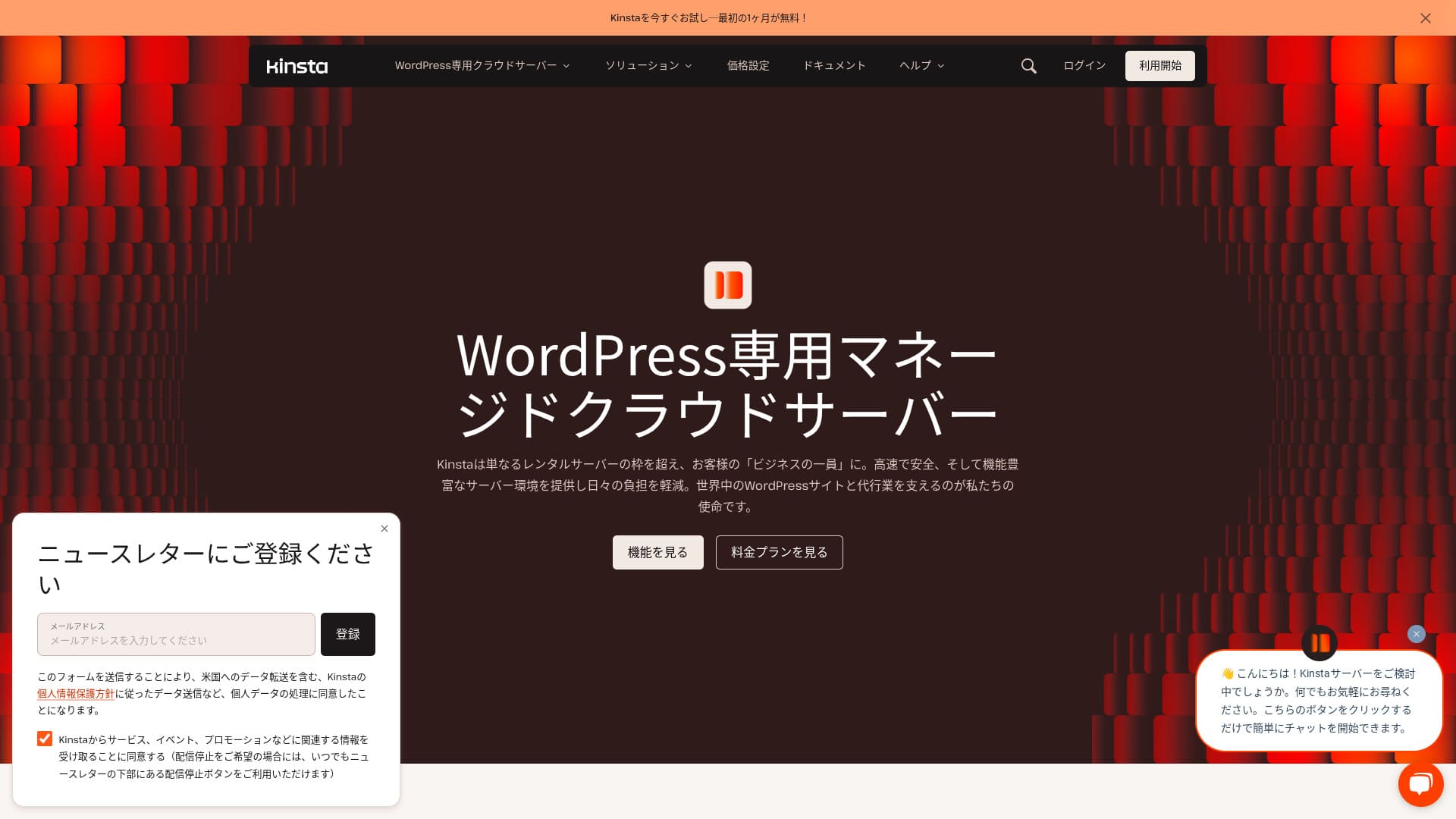
Kinstaе ултрабърза чуждестранна хостинг услуга, управлявана от Kinsta Inc.Добре известна е като сървър, препоръчван от Google.Изградена е със силен фокус върху бързото показване на страниците.
| Тип сървър | Специализиран управляван сървър |
| Скорост на показване (TTFB) | 30ms |
| Препоръчан план и период на плащане | Single35k |
| Пробен период / гаранция за връщане на парите | 30-дневна гаранция за връщане на парите |
| Месечна такса (12-месечен план) | 4407 йени |
| Първоначална такса за настройка | Безплатно |
| Безплатен домейн | Няма |
| Поддръжка | Чат поддръжка 24/7 (налична на японски) и имейл |
| Наличност | 99.9% |
| Сървърно пространство | 10GB |
| Number of databases | 1 |
| Security | Malware scanning, WAF, firewall, DDoS protection, Google Cloud firewall |
| SSL | Free custom SSL |
| Backups | 14 days of automatic backups |
| Number of email accounts | None |
| Email security features | None |
| Server / website migration service | Free |
| WordPress preinstalled | Yes |
| CDN | Free (125GB) |
| Data centers | Johannesburg, South Africa; Changhua County, Taiwan; Hong Kong; Tokyo; Osaka; Seoul, South Korea; Mumbai, India; Delhi, India; Jurong West, Singapore; Jakarta, Indonesia; Sydney, Australia; Melbourne, Australia; Warsaw, Poland; Hamina, Finland; Madrid, Spain; Saint-Ghislain, Belgium; London, United Kingdom; Frankfurt, Germany; Eemshaven, Netherlands; Zurich, Switzerland; Milan, Italy; Paris, France; Dammam, Saudi Arabia; Tel Aviv, Israel; Montreal, Canada; Toronto, Canada; Sao Paulo, Brazil; Santiago, Chile; Council Bluffs, Iowa, USA; Moncks Corner, South Carolina, USA; Ashburn, Virginia, USA; Columbus, Ohio, USA; Dallas, Texas, USA; The Dalles, Oregon, USA; Los Angeles, California, USA; Salt Lake City, Utah, USA; Las Vegas, Nevada, USA |

Hikaru Ono
Kinsta често се описва като сървър от най-висок клас и след реална употреба смятам, че това описание е точно. Той е не само бърз, но и контролният панел е лесен за работа, а започването с WordPress е много просто.
Това е сървър с много предимства, които напълно оправдават цената му.
- November 4, 2025 market research data, arranged by speed
- Monthly fees are the first-year cost of the cheapest plan that can run WordPress
- Speed is the Time to First Byte value from demo sites measured under the same conditions
„Kinsta“ е хостинг услуга от най-висок клас и сред най-бързите в категорията, с центрове за данни на 37 места по света. В нашите измервания се класира на първо място. Безспорно е скъпа, но ако искате сървър, който поставя удобството и производителността на първо място, мога да я препоръчам без колебание. Чат поддръжката е налична и на японски.
Таблото на Kinsta е просто, стилно и лесно за четене
Таблото на Kinsta еизключително просто, стилно и лесно за четене.
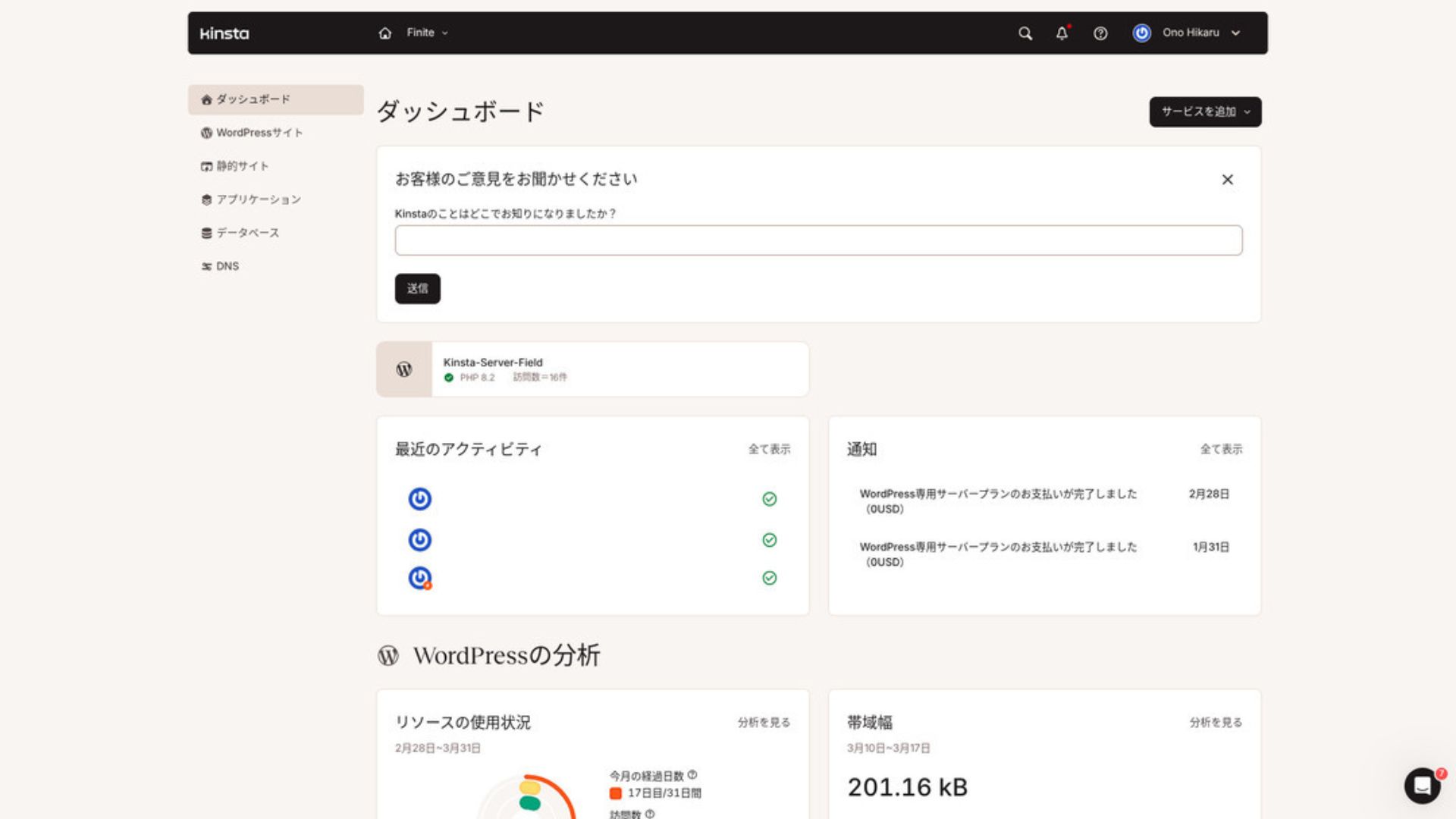
To manage WordPress, click “WordPress Sites” in the menu.
Създаването на нов WordPress сайт или миграцията са лесни
Kinstaулеснява както създаването на нов сайт, така и миграциите. Не е нужно да се притеснявате, че ще бъде трудно само защото това е чуждестранен сървър.
When you open WordPress Sites and click “Add Site,”
- Create a new site
- Request a site migration
those options appear. Creating a new site is also easy.
Създаване на нов WordPress сайт
- STEP.1Select “WordPress Sites” in MyKinsta
Log in to MyKinsta. Then select “WordPress Sites” from the menu.
- STEP.2Create a new site
Click “Add Site.” Then choose “Create new site.”
- STEP.3Continue with the WordPress settings
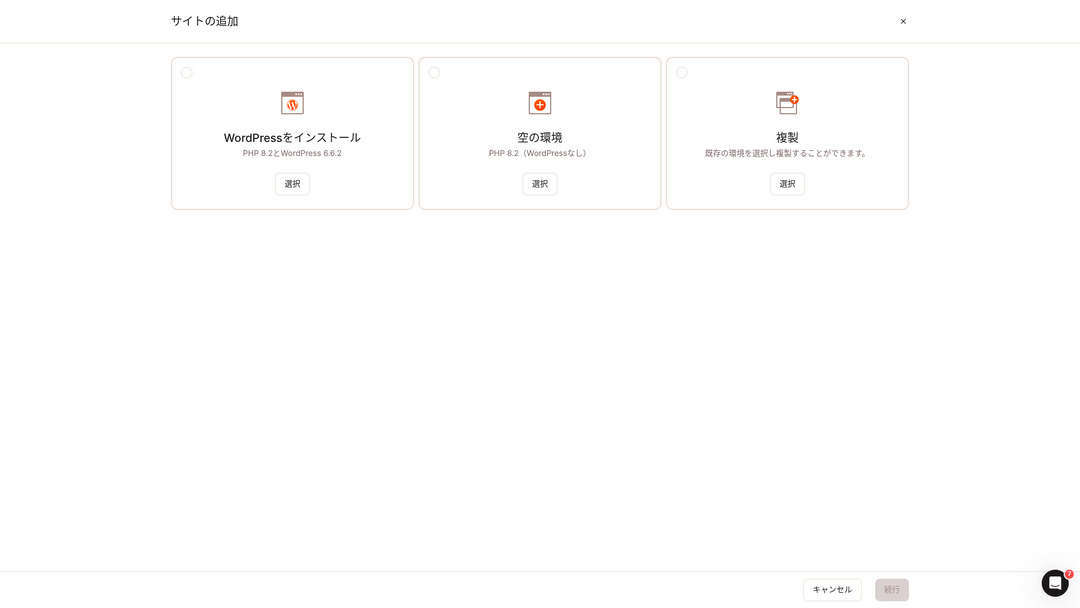
Select “Install WordPress.”
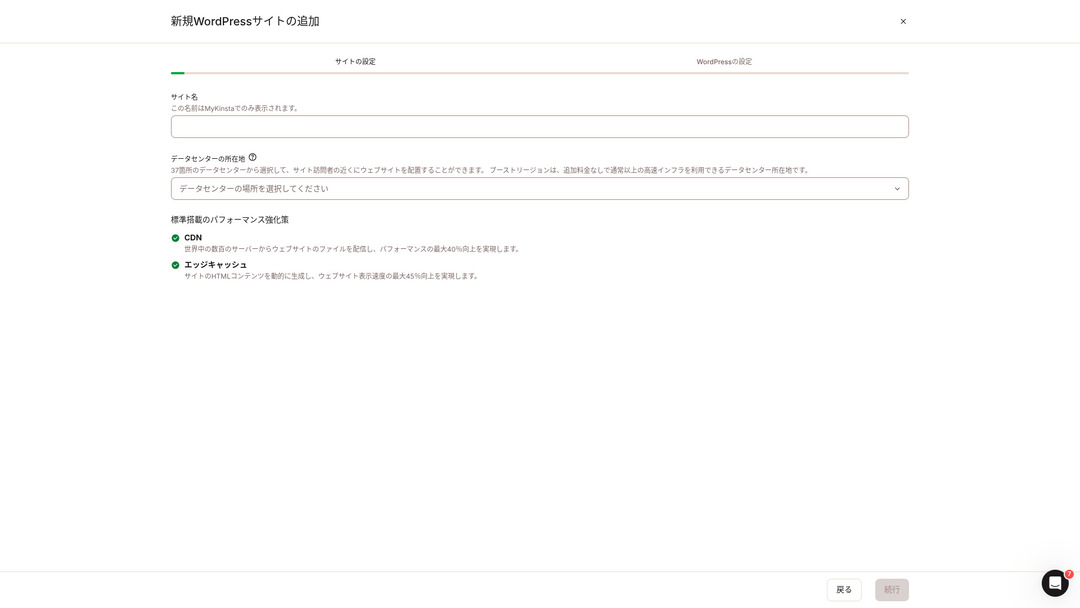
Choose your site name and select a data center location. You can choose from 37 data centers around the world. If most of your visitors are in Japan, choosing Tokyo or Osaka is the safest option.
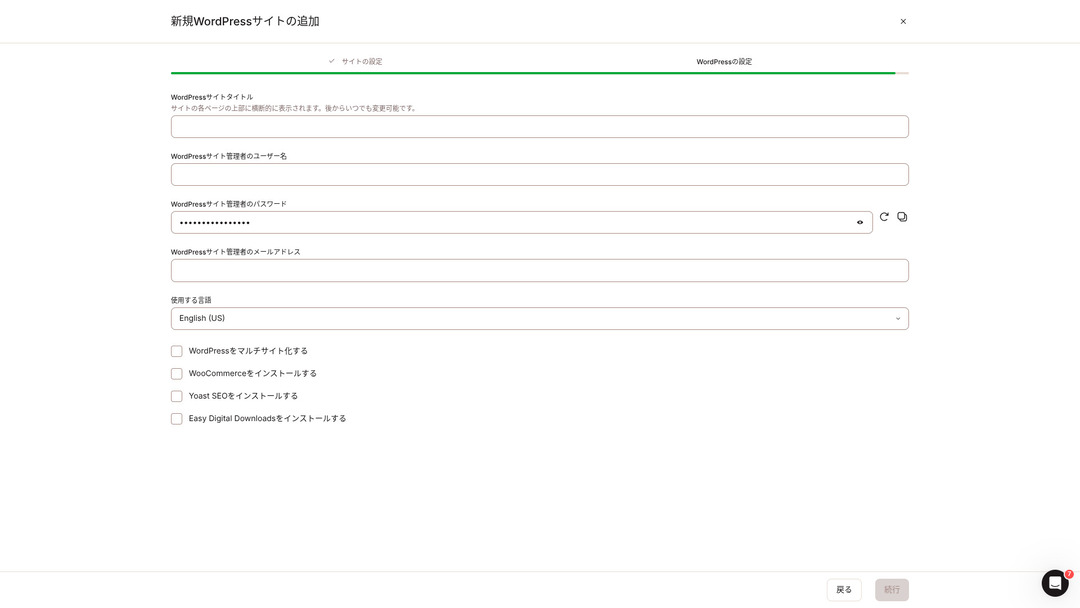
- WordPress site title
- WordPress admin username
- WordPress admin password
- WordPress admin email address
- Language to use
Decide those settings. Once you click “Continue,” your WordPress site setup is complete.
Ценови планове на Kinsta: най-добрият избор е годишният план за един сайт
Kinstaима три ценови плана, като всеки може да се плаща месечно или годишно. За индивидуални потребители и компании практичните варианти са
- План за един сайт
- План за няколко сайта
one of those two.
| Comparison item | Single-site plan | Multi-site plan |
|---|---|---|
| Monthly fee | 4,459 yen (annual billing) 5,202 yen (monthly billing) | 8,769 yen (annual billing) 10,404 yen (monthly billing) |
| WordPress sites | 1 | 2 |
| Visits | 35,000 | 70,000 |
| Storage | 10GB | 20GB |
| CDN | 125GB | 250GB |
If you are saying, “I’m about to start a blog,” I recommend the single-site plan.
Ревюта за Kinsta и пет ключови характеристики

WordPress е бърз: първо място по скорост на показване
Kinstaсе класира на първо място по скорост на показване в нашите измервания. Това наистина е бърз сървър.
If you are struggling with server speed, I would tell you to choose Kinsta without hesitation.
Наличен е CDN
Kinstauses 37 data centers as server bases around the world while also operating 260 CDN locations. By using a CDN, people viewing your website receive data from the nearest CDN server, which helps pages load faster.
★ What Is a CDN? Improve Speed and Performance with Distributed Servers
Kinsta ’s cheapest WordPress hosting option, the Starter plan, still includes 100GB of CDN.That provides more than enough transfer capacity.
★ What Are Traffic and Data Transfer? Managing and Optimizing Web Traffic
Включва 14 дни автоматични архиви
Kinstacomes with 14 days of automatic backup functionality.
Backups are essential.There is always a possibility that data may be deleted by mistake or altered by a cyberattack.In situations like that, backup data lets you restore the site.
KinstaWith you can restore everything from up to 14 days of backup data even if something goes wrong, which gives real peace of mind.
Поддръжка от инженери 24/7
Kinstahas a 24/7 support system staffed by engineers.
You never know when a situation requiring support will arise.If it is not resolved quickly, it may even become a matter of business credibility.
Kinstagives peace of mind because engineers are always there to support you.Especially if you do not have engineers inside your company, Kinstathe reassurance of being able to contact engineers at any time, as you can with Kinsta, is extremely valuable.
Безплатна гаранция за поправка при хакване
No matter how much effort you put into security, nothing is ever 100 percent guaranteed. Still, Kinsta comes with a free hack-fix guarantee.
If you are hacked,Kinsta will work together with you to repair the damage.
- Free site inspection
- Detailed file scans to identify malware
- Repair of core files using a fresh WordPress installation
- Identification and removal of infected plugins and themes
Because the response is so thorough, you do not have to worry that the same hacking damage will happen again.
Недостатъкът на Kinsta е високата цена

Even though it is a top-tier server, Kinsta is expensive.
In terms of price, it belongs in the category of servers used by businesses.I compared it with other business-oriented servers.
- Initial setup fee
- 12-month server contract
- One year of domain cost
- Plan that supports WordPress
KinstaThere are servers that cost more than Kinsta, but all of the others are servers based in Japan.They offer Japanese-language support and a large number of business-oriented features as well.
So although it is truly top-tier in server speed, there is no denying that it still feels expensive.
Сравнение на Kinsta с конкурентни сървъри
I compared it with major Japanese hosting services that, like Kinsta, place a strong emphasis on speed.
ConoHa WING
ConoHa WING is a server built with a strong focus on WordPress display speed. Its key feature is how easy it is to get started with WordPress. Tasks such as acquiring and configuring a domain, creating a database, and installing WordPress are already completed when you sign up for the server, so the settings needed to launch a WordPress website are finished at the time of the server contract.
As a result, even if you have no server knowledge or WordPress skills, you can start your website right away.

ConoHa WING Review: Why 750,000 Users Choose It, Plus a Test of Its Speed, Pros, and Cons
ConoHa WING Review: Why 750,000 Users Choose It, Plus a Test of Its Speed, Pros, and Cons
serverfield.org
XServer
XServer has long been a popular high-speed server in Japan.It boasts the No. 1 user share in the domestic market.Its popularity comes not only from server speed, but also from its stability with 99.99% uptime and its attentive support.
However, when it comes to speed, Kinsta still comes out ahead of XServer.

XServer Review [2025 Latest]: A Thorough Guide to Speed, Pricing, Pros, and Cons
XServer Review [2025 Latest]: A Thorough Guide to Speed, Pricing, Pros, and Cons
serverfield.org
Стартирайте WordPress сайт с Kinsta в 7 стъпки
Here, we will start a WordPress website using Kinsta and MuuMuu Domain.
Let’s Start a Website with Kinsta!
- STEP.1Get a custom domain with MuuMuu Domain
Sign up for or log in to MuuMuu Domain.
If you do not yet have an account, create a new one on the MuuMuu Domain website. If you already have an account, just log in.
Search for and purchase your custom domain.
Enter your desired domain name into the MuuMuu Domain search bar and check whether it is available. If it is available, purchase that domain.
- STEP.2Set up a new site on Kinsta
First, sign up for Kinsta. Then add a new site.
Access the Kinsta dashboard and click “Add Site.”
Select the site name and the data center location. Choose “Install WordPress,” then enter the required information such as the site title, admin username, password, and email address.
If necessary, install plugins such as WooCommerce or Yoast SEO.
- STEP.3Update the DNS settings in MuuMuu Domain
Access the MuuMuu Domain dashboard, select the domain you acquired from the “Domain Management” section, and click “DNS Settings.”
From the Kinsta dashboard, check the DNS information for your site, including the name servers. Enter that information on the “DNS Settings” page in MuuMuu Domain and save it.
- STEP.4Set your custom domain in the Kinsta dashboard
Move to the settings page for the WordPress site you were just using.
Go to the “Domains” section and click “Add Domain.” Enter the custom domain name you acquired through MuuMuu Domain and add it.
Next, move to the “Tools” section and click “Install a free Let’s Encrypt SSL certificate” to install the SSL certificate.
- STEP.5Customize your WordPress site
Log in to the WordPress admin area from the Kinsta dashboard. Then install themes and plugins as needed and customize your site.
Често задавани въпроси за Kinsta
Мога ли да регистрирам домейн с Kinsta?
Не, не можете да регистрирате домейн чрез Kinsta. Регистрирайте домейна чрез услуга за регистрация на домейни, например MuuMuu Domain, а след това го добавете в MyKinsta.
Достатъчни ли са 10GB пространство в Kinsta?
Ако управлявате WordPress сайт, 10GB изобщо не са проблем. Към март 2025 г. този сайт с над 90 статии използва само 1,5GB пространство.
Как се произнася „Kinsta“?
„Kinsta“ се произнася „Kin-sta“.
Обобщение
“Kinsta” is the fastest top-tier rental server with data centers in 37 locations worldwide. It ranked No. 1 in our own measurements. There is no denying the high price, but if you want a server that fully pursues comfort and performance, it is an excellent choice without question. Japanese chat support is also available.
30-day money-back guarantee
Kinsta е сървър от най-висок клас. Ако искате уверено да подобрите скоростта на показване на сайта си, опитайте услугата.
Тя предлага не само скорост, но и отлична система за поддръжка, така че можете да я използвате спокойно.
Comparison of 10 Overseas Hosting Services

With overseas hosting services, many people struggle to decide which server to choose because of language barriers and cultural differences.
In this article, we thoroughly compare 10 carefully selected overseas hosting services from around the world and explain each service’s features, pricing plans, and actual user experience in detail.
You will find information that covers a wide range of needs, from selection criteria beginners can rely on to advanced features that engineers look for.