
10 günlük pulsuz sınaq
PR
Serverlər
Value Server icmalı [2025 ən son]: sərfəli qiymətə WordPress başladın
Yayımlandı: 2025.04.18
Yeniləndi: 2025.04.18
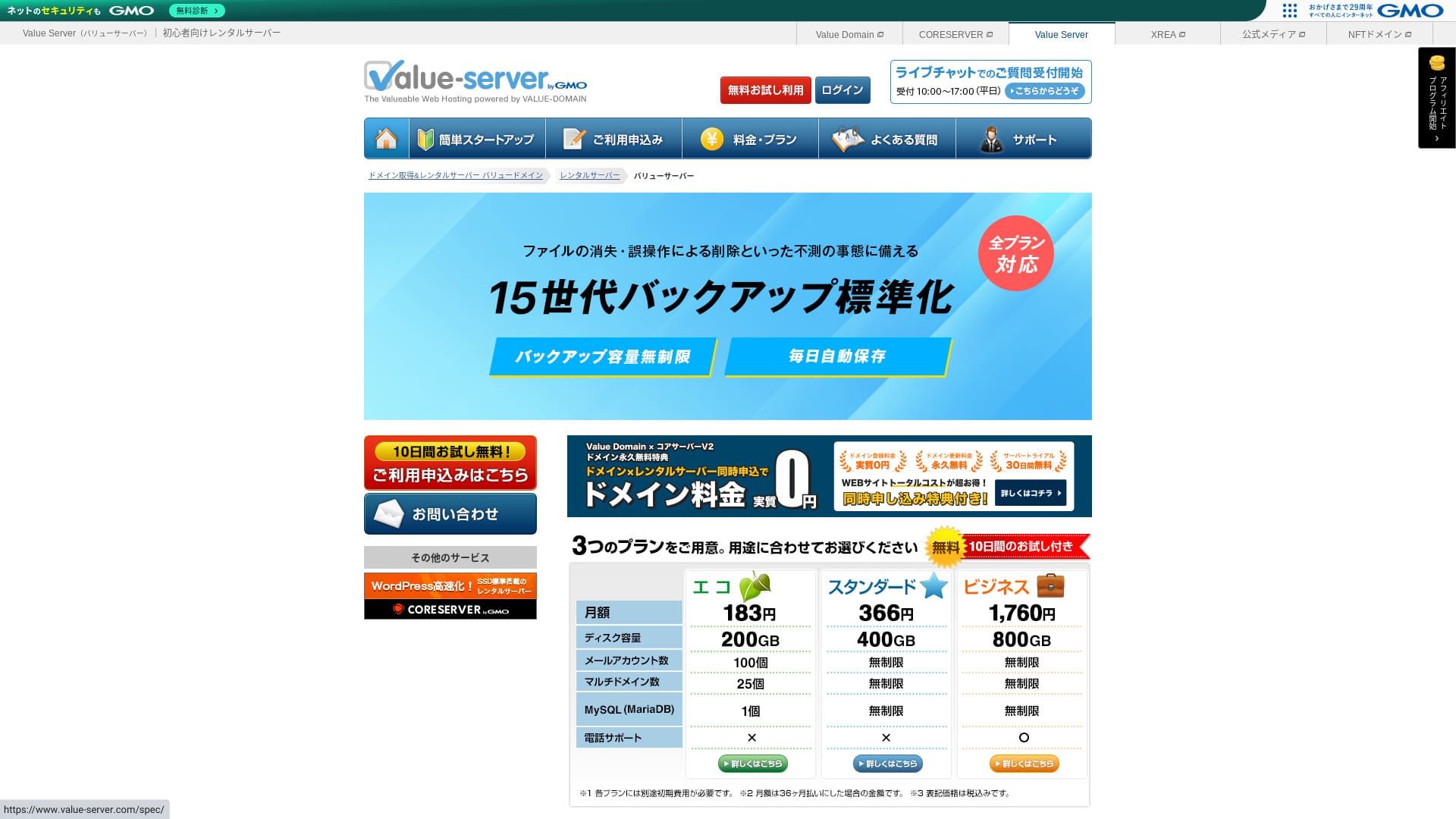
Value Server GMO Digirock, Inc. tərəfindən idarə olunan hostinq xidmətidir və xüsusilə Marutto planı ilə aşağı qiymətləri ilə tanınır.

Value Server bu istifadəçilər üçün tövsiyə olunur: mümkün olan ən ucuz serverdən istifadə etmək istəyənlər because:
- Sənayedə ən ucuzlardan biridir
- Serverdə SSD yaddaşdan istifadə olunur
- 15 nəsil ehtiyat nüsxə rahatlıq verir
Məhz buna görə. Çox güman ki, razı qalacaqsınız. Onu 10 gün ərzində pulsuz sınaqdan keçirə bilərsiniz.
Rəqib server kimi Star Rental Server. Bu, Value Server baxımından daha da güclüdür, çünki pulsuz plan da təklif edir. Onu da nəzərdən keçirin.
| Server növü | Paylaşılan server |
| Göstərilmə sürəti (TTFB) | Ölçülməyib |
| Tövsiyə olunan plan və müqavilə müddəti | Eco 12 ay |
| Sınaq / pulun geri qaytarılması zəmanəti | None |
| Aylıq ödəniş (12 aylıq müqavilə) | 220 yen |
| İlkin quraşdırma haqqı | Free |
| Pulsuz domen | None |
| Support | E-poçt və chat (iş günləri 10:00-17:00) |
| Uptime | Açıqlanmır |
| Storage | 200GB |
| Verilənlər bazalarının sayı | 1 |
| Təhlükəsizlik tədbirləri | None |
| SSL | Pulsuz paylaşılan SSL, fərdi SSL |
| Ehtiyat nüsxə / bərpa | 15 nəsil ehtiyat nüsxə pulsuz, bərpa pulsuz |
| E-poçt hesablarının sayı | 3 |
| E-poçt təhlükəsizliyi tədbirləri | POP/POP3S, SMTP/SMTPS, IMAP/IMAPS, spam filtri, virus filtri, fərdi filtrlər |
| Server / saytına daxil olun migration service | None |
| WordPress-in əvvəlcədən quraşdırılması | None |
| CDN | None |

Hikaru Ono
Value Server sənayedə böyük ad olan GMO Digirock, Inc. tərəfindən idarə olunur, buna görə ən ucuz seçimlərdən biri olsa da, keyfiyyətə görə narahat olmağa ehtiyac yoxdur. Mən şəxsən istifadə edərkən heç bir problem yaşamadım.
Bununla belə, ucuz olduğu üçün funksiyalar və tutum baxımından məhdudiyyətlər var; ona görə onları diqqətlə nəzərdən keçirin.
Value Server digər serverlərlə müqayisədə
- ÜmumiReytinq★★★☆☆
- Server sürəti ★★★☆☆
- Qiymət ★★★★★
- Sabitlik ★★★☆☆
- WordPress-i başlatma rahatlığı* ★★★☆☆
- Domen idarəetməsi və SSL qurulması kimi əməliyyatlar* ★★★☆☆
* Bu, mənim real istifadə təcrübəmə əsaslanır.

Fərdi istifadəçilər üçün tövsiyə olunan 21 WordPress hostinq xidmətini necə seçməli
Fərdi istifadəçilər üçün tövsiyə olunan 21 WordPress hostinq xidmətini necə seçməli
serverfield.org
- November 4, 2025 bazar araşdırması məlumatlarına görə, sürətə görə sorted
- Aylıq ödənişlər WordPress işlədə bilən ən ucuz planın birinci il xərcləridir
- Sürət eyni şərtlər altında demo saytlarda ölçülən Time to First Byte göstəricisidir
“Value Server” GMO Digirock, Inc. tərəfindən idarə olunan aşağı qiymətli rental serverdir. Fərdi istifadəçilər üçün sərfəli qiymətə malik olsa da, pulsuz paylaşılan SSL və pulsuz 15 nəsil ehtiyat nüsxə kimi güclü funksiyalar təklif edir.
Value Server istifadəçi rəyləri və beş əsas xüsusiyyət

Marutto planı ilə ildə 3,060 yen-ə WordPress saytı qura bilərsiniz
Value Server's Marutto plan lets you have a WordPress saytına daxil olun for 3,060 yen per year. It is extremely inexpensive.
Gəlin onu aşağıdakı şərtlərlə əsas yerli serverlərlə müqayisə edək.
- İlkin quraşdırma haqqı
- 12 aylıq server müqaviləsi
- Bir illik domen haqqının dəyəri
- WordPress istifadə edə bilən ən ucuz plan
| Hostinq şirkəti | Bir illik xərc |
|---|---|
| Value Server | 2,310 yen |
| ConoHa WING | 11,292 yen |
| Xserver | 10,560 yen |
| Lolipop! | 5,940 yen |
| Sakura Rental Server | 6,600 yen |
Of course, compared with the servers above, its features and specifications are less impressive. Even so, it should still be a strong option for people who want to build a saytına daxil olun as cheaply as possible.
SSD hər planda daxildir
Value Server includes hər planda SSD yaddaş even though it is inexpensive. With ultra-low-cost servers, it is common to see slow saytına daxil olun loading because they rely on cheap hard drives.
Vebsaytın göstərilmə sürəti SEO-ya da təsir edir, ona görə server seçiminə yüngül yanaşmaq olmaz. SSD-lər istifadə olunduqda isə daha rahat ola bilərsiniz.
Qeyd: SEO nədir? Axtarış motoru optimallaşdırması üçün düzgün addımlar və üsullar
Hər planda 15 nəsil avtomatik ehtiyat nüsxə daxildir
Value Server ucuzdur, amma yenə də hər planda 15 nəsil avtomatik ehtiyat nüsxə təqdim edir.
Ehtiyat nüsxə funksiyası yoxdursa, hücum və ya səhv səbəbindən məlumatlar itdikdə saytınızı bərpa edə bilməzsiniz. Value Server məlumatlarınızı hər gün avtomatik ehtiyatlayır və bu, rahatlıq verir.
Bu 15 nəsil ehtiyat nüsxə təsirlidir. Lolipop! kimi böyük serverlər belə bunu aşağı qiymətli planlarında təklif etmir. GMO Digirock, Inc. tərəfindən idarə olunan Core Server də aşağı qiymətli planında ehtiyat nüsxə funksiyalarını daxil etmir.
Bu baxımdan, Value Server aşağı qiymətli provayder üçün çox xidmət yönümlüdür, çünki belə güclü 15 nəsil ehtiyat nüsxə təqdim edir.
Value Server-in çatışmazlıqları və onların həlli, açıq şəkildə

Üstünlükləri olsa da, Value Server-in çatışmazlıqları da var. İstifadə etməzdən əvvəl onları tam başa düşdüyünüzə əmin olun.
WAF kimi qabaqcıl təhlükəsizlik tədbirləri yoxdur
Value Server WAF kimi qabaqcıl təhlükəsizlik tədbirləri təqdim etmir. Fərdi SSL dəstəyi daxil olmaqla müəyyən səviyyədə qoruma təklif edir, amma ən yeni hücum üsullarına qarşı xüsusilə güclü olmaması yenə də bir qədər narahatlıq doğurur.
WAF istifadə etmək istəyirsinizsə, təhlükəsizlik yönümlü WordPress pluginləri quraşdırın.
Qeyd: Təhlükəsizliyi gücləndirən beş WordPress pluginini necə seçməli
İşləmə vaxtı açıqlanmır
Unfortunately, Value Server does not disclose its uptime. That means it is impossible to know the server's stability in numerical terms. If reliability is a priority, such as for a corporate saytına daxil olun, that uncertainty may make you hesitate.
Qeyd: A Beginner's Bələdçi to Understanding Hosting Uptime and SLAs
If a server becomes unstable because of trouble, your saytına daxil olun may fail to appear or become extremely slow to load. In some cases, a 503 error may occur. That is stressful for people visiting your site.
Qeyd: 503 xətası nədir? How to Avoid Web Congestion and Respond in an Emergency
İşləmə vaxtını bilmək mümkün olmadığı üçün Value Server-dən yalnız onun qeyri-sabit ola biləcəyi riskini başa düşdükdən sonra istifadə edin.
Marutto və Eco planları ilə yalnız bir WordPress saytı yarada bilərsiniz
Value Server-in Marutto və Eco planları yalnız bir WordPress saytı yaratmağa imkan verir.
- I want to create an event site in addition to my main saytına daxil olun
- İkinci bloq yaratmaq istəyirəm
Bu səbəblərə görə ikinci WordPress saytına ehtiyacınız varsa, ayrıca başqa bir server hazırlamalı olacaqsınız.
Value Server-i oxşar iki serverlə müqayisə edin
Gəlin Value Server-i aşağı qiymət baxımından ona bənzəyən iki rəqib serverlə müqayisə edək. Oxşar görünsələr də, fərqlər var; buna görə onları diqqətlə müqayisə etməyə vaxt ayırın.
Core Server
Core Server eyni şirkət tərəfindən idarə olunur. Aşağı qiymətli qalmaqla yanaşı yüksək texniki göstəricilər təklif edir. Yeddi incə bölünmüş plandan ən uyğununu seçə bilərsiniz. Qiymətə yönəlmiş V1 xətti və performansa yönəlmiş V2 xətti var.
Ümumi, Core Server beats Value Server in features and specifications, so if price is not your top priority, Core Server is the better choice.

Core Server Review [2025 Latest]: Thorough Bələdçi to Qiymət, Speed, Pros, and Cons
Core Server Review [2025 Latest]: Thorough Bələdçi to Qiymət, Speed, Pros, and Cons
serverfield.org
Star Server
Star Rental Server is also inexpensive. At the same time, it resembles Value Server in its commitment to speed, including the use of SSD storage. It is somewhat more expensive than Value Server, but its greater transfer capacity is a strong point because it can keep up even if your saytına daxil olun traffic grows.
Star Server avtomatik ehtiyat nüsxələri daxil etmir. Bu, Value Server-in üstün olduğu sahələrdən biridir.

Star Server icmalı [2024 ən son]: təəccüblü dərəcədə aşağı qiymətli və ətraflı sınaqdan keçirilmiş
Star Server icmalı [2024 ən son]: təəccüblü dərəcədə aşağı qiymətli və ətraflı sınaqdan keçirilmiş
serverfield.org
Value Server-də WordPress saytını 6 addımda başladın
Gəlin Value Server ilə sayt quraq!
- STEP.1Rəsmi Value Server saytına daxil olun
On the top page, click “Pulsuz sınaqdan keçirin.”
- STEP.2Serverə müraciət edin və domen əldə edin
Plan seçin. Server hesabınızın adı (ilkin domen) istənilən şey ola bilər. Bu ilkin domeni saytınızın domeni kimi istifadə etməyəcəksiniz. İstifadə edə bilərsiniz, amma bunu tövsiyə etmirəm.
Bu mərhələdə eyni zamanda WordPress quraşdırmasını seçmək hələ mümkün deyil, amma domeni seçdikdən sonra onu işarələyə biləcəksiniz. Mütləq istifadə edin; WordPress saytına başlamağı xeyli asanlaşdırır.
Bu serverdə istifadə edəcəyiniz domen üçün müraciət seçimi altında “Domeni pulsuz əldə et”i seçin. Sonra istədiyiniz mətni daxil edin. .com və .net kimi mövcud üst səviyyəli domenlər arasından istədiyinizi seçin.
“.com” və “.co.jp.” kimi kök domenləri seçə bilərsiniz. Qəbul və yeniləmə haqları kök domenə görə dəyişir. Hansını seçəcəyinizi bilmirsinizsə, şirkətlər üçün mümkün olduqda “.co.jp” tövsiyə edirəm. Fərdi istifadə üçün “.com” və “.net” yaxşı seçimdir. Bu domenlər çox tanış olduğu üçün daha etibarlı görünür və istifadəçilər üçün əlçatandır.
Qeyd: Domen nədir? İnternetdə ünvan kimi rolu və onu necə əldə etmək olar
Domeni seçdikdən sonra “WordPress-i eyni zamanda quraşdır” seçimini işarələyin.
“Davam et” düyməsini klikləyin.
- STEP.3İstifadəçi məlumatlarını daxil edin
İstifadəçi məlumatları ekranı açılacaq. “İstifadəçi qeydiyyatı”na klikləyin, istifadə növünüz və adınız kimi məlumatları daxil edin, detalları təsdiqləyin və “Qeydiyyatdan keç və davam et” düyməsini klikləyin.
Tələb olunan SMS yoxlamasını tamamlayın, sonra “Müraciəti təsdiqlə” düyməsini klikləyin.
Anketi doldurun və ya keçin, sonra “İdarəetmə panelinə keç” düyməsini klikləyin.
- STEP.4WordPress-i quraşdırın
İdarəetmə panelinin məlumat bölməsində əvvəl müraciət etdiyiniz “Value Server (1)” görünür. Onu klikləyin və “Yeni idarəetmə paneli”nə keçin.
Sonra “Alətlər” bölməsindən “Tətbiq quraşdırma”nı seçin və “WordPress Blog”a klikləyin.
“+ Bu tətbiqi quraşdır” düyməsini klikləyin və domen seçin. Əvvəllər müraciət etdiyiniz domen açılan siyahıda görünəcək, onu seçin.
Versiya ayarlarını olduğu kimi saxlaya bilərsiniz.
WordPress üçün aşağıdakı ayarlardan istifadə edin.
- İnzibatçı istifadəçi adı: İstənilən şey ola bilər.
- İnzibatçı şifrəsi: Mümkün qədər mürəkkəb edin. Sonra asanlıqla dəyişə bilərsiniz.
- İnzibatçı e-poçtu: An email address you use regularly. For companies, I recommend the business email of the person who manages the saytına daxil olun.
- Saytın başlığı: İstənilən şey ola bilər. Sonra asanlıqla dəyişə bilərsiniz.
- Sayt şüarı: Bu alt başlıqdır. İstənilən şey ola bilər. Sonra asanlıqla dəyişə bilərsiniz.
WordPress-ə giriş zamanı inzibatçı istifadəçi adı və şifrəsindən istifadə olunur. Onları mütləq qeyd edin.
“Qabaqcıl” ayarları olduğu kimi saxlaya bilərsiniz.
Hər şeyi daxil etdikdən sonra “+ Quraşdır” düyməsini klikləyin. Quraşdırma bitdikdən sonra ekranda “wp-admin/” ilə bitən URL-i klikləyin. Bu, WordPress inzibatçı ekranınızın ünvanıdır.
- STEP.5İlkin WordPress quraşdırması
Açılan WordPress giriş ekranında quraşdırma zamanı təyin etdiyiniz istifadəçi adı və şifrəni daxil edib “Daxil ol” düyməsini klikləyin.
“Bu sayta qoşulmaq mümkün deyil” xəbərdarlığını görsəniz, DNS ayarları hələ yayılmayıb. Gözləməkdən başqa bir şey yoxdur; bir neçə saatdan bir yenidən giriş etməyə çalışın.
Qeyd: What Are DNS and Name Serverlər?
WordPress-ə daxil olduqdan sonra permaləkləri quraşdırın. WordPress inzibatçı ekranında “Ayarlar” və sonra “Permalinks” bölməsinə keçin. “Post name” seçin və “Dəyişiklikləri saxla” düyməsini klikləyin.
“Post name” ilə məqalə dərc edərkən URL-də istədiyiniz sətri daxil edə bilərsiniz. Oxucuların məqalənin məzmununu təsəvvür etməsinə kömək edən qısa sətirdən istifadə etməyi tövsiyə edirəm. Çox uzun olsa, bəzi insanlar saytın şübhəli göründüyünü düşünə bilər.
- STEP.6Pluginləri quraşdırın
WordPress inzibatçı ekranına qayıdın, “Pluginlər” bölməsinə, sonra “Yeni əlavə et”ə keçin və lazım olan pluginləri quraşdırın.
Axtarışla istədiyiniz plugini tapdıqdan sonra “İndi quraşdır” və ardınca “Aktivləşdir” düymələrini klikləyin. Bundan sonra hər plugin üçün təlimatlara əməl edin.
Təhlükəsizlik və ehtiyat nüsxə pluginlərini mütləq quraşdırın.
- Təhlükəsizliyi gücləndirən beş WordPress pluginini necə seçməli
- Məlumatlarınızı bərpa etməyə kömək edən 5 güclü WordPress ehtiyat nüsxə plugin-i
Pluginləri də quraşdırdıqdan sonra WordPress saytınız tam hazır olur!
Xülasə
“Value Server” GMO Digirock, Inc. tərəfindən idarə olunan aşağı qiymətli rental serverdir. Qiymətləri fərdi istifadəçilər üçün də əlçatan qalsa da, pulsuz paylaşılan SSL və pulsuz 15 nəsil ehtiyat nüsxə kimi güclü funksiyalar təklif edir.
10 günlük pulsuz sınaq
Value Server aşağı qiymətli serverdir. İşləmə vaxtı açıqlanmasa və təhlükəsizlik funksiyaları bir qədər zəif olsa da, 15 nəsil avtomatik ehtiyat nüsxə sayəsində adətən bərpa etmək mümkündür. Əgər sizin üçün ən vacib amil qiymətdirsə, mütləq sınayın.
32 WordPress hostinq xidmətinin tam müqayisəsi: fərdi istifadəçilər, şirkətlər və xaricdən istifadə üçün tövsiyələr

“WordPress başlatmaq istəyirəm” deyə düşünüb “tövsiyə olunan WordPress hostinqi” axtardığınızda fərdi istifadəçilər, şirkətlər və kiçik bizneslər üçün seçimlərdən tutmuş xarici serverlərə və ucuz serverlərə qədər hər cür məqalə tapırsınız. Açığı,
- Hansı sayta baxmalıyam?
- Serveri sadə və asan başa düşülən şəkildə seçmək istəyirəm!
- Zəhmət olmasa, WordPress-i dərhal necə başlatmağı göstərin.
Heç belə hiss etmisinizmi? Buna görə bu məqalə fərdi istifadəçilər, şirkətlər, daxili istifadə və xarici istifadə üçün 32 hostinq xidməti arasından ən yaxşı seçimləri diqqətlə seçir və onları təqdim edir. İzah hostinq xidmətlərindən hər gün istifadə edən tətbiq inkişaf etdirmə şirkətinin SEO rəhbəri tərəfindən verilir.